153
21. Macro Operations
The Macro function allows users to perform a sequence of recorded operations with the single push of a
button. The keypad is used to record and execute macros. Macro memory data can be backed up and
restored from SD cards. See Sec. 22 "File Operations" for more details. Macros cannot be edited in the
menu screen, but in web browser control screens. (See Appendix 4-6 “Macro.”)
21-1. Recording Macros
Max of 100 macros (10 pages with 10 macros per page) can
be stored in memory.
No. 0-89 macros can hold up to 30 actions for each and
No. 90-99 up to 300. Use No. 90-99 when using the fader
or joystick, because these operations involve many actions.
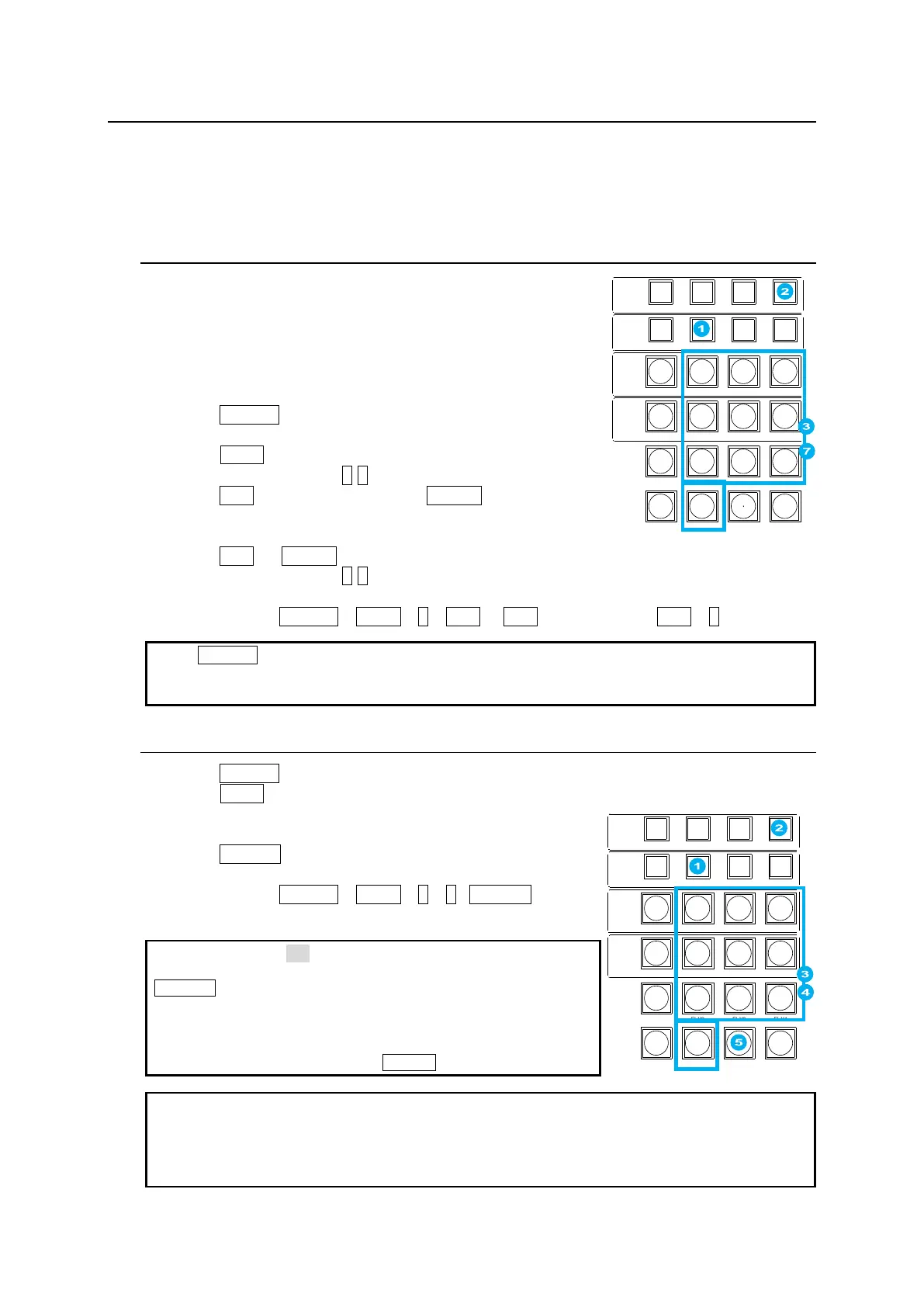
Recording Macros
(1) Press MACRO in the MEMORY block to display the
MACRO menu and change the Keypad to MACRO mode.
(2) Press PAGE in the MEMORY block.
(3) Press a number button (0-9) to select a page.
(4) Press REC in the MACRO block (or STORE in the MEMORY
block) to start recording.
(5) Perform operations you need to record as a macro.
(6) Press REC (or STORE) to stop recording.
(7) Press a number button (0-9) to store the macro.
Ex) To Save a “Select IN01 on M/E1 PST” action to MACRO 12
Successively press MACRO > PAGE > 1 > REC > (IN01 on M/E1 PST) > REC > 2
When MACRO is pressed, the number buttons light up if they have data. To overwrite the data to
a lit button, press the button so that it changes from lit to flashing, then press the button again.
Before recording, the duration can be set under REC DURATION in MACRO menu PAGE.
21-2. Executing Macros
(1) Press MACRO in the MEMORY block.
(2) Press PAGE.
(3) Press a number button to select a page.
(4) Press a number (macro) button.
(5) Press RECALL to execute the macro.
Ex) To Execute MACRO 12
Successively press MACRO > PAGE > 1 > 2 >RECALL.
If DIRECT is set to ON in MACRO menu PAGE 3, macros are
executed by simply pressing number buttons without pressing
RECALL.
A macro number button turns on red during execution. Pressing
the lit red button pauses the macro execution. Re-pressing the
button resumes the execution.
To stop macro executions, press CLEAR.
Note that macros hold only values that are changed during recording. For fader movements,
which are successively changed, macros memorize the last stopped position. Therefore, to
perform the same actions as those recorded with a fader, return the fader to its previous position
before a macro is executed. Also note that macros cannot record the position of two faders at the
same time.
CONTROL
MEMORY
M/E1
M/E2
MENU LOCK KEY PRI PAGE
DIRECT PATT MACRO EVENT SEQUENCE
INC
DEC
7 8 9
4 5 6
1 2 3
0
RECALL STORE
ENTER
CLEAR
+ / -
CK WIPE SUB EFF
FLX4FLX3FLX2FLX1
KEY1 KEY2 KEY3 KEY4
KEY1 KEY2 KEY3 KEY4
CONTROL
MEMORY
M/E1
M/E2
MENU LOCK KEY PRI PAGE
DIRECT PATT MACRO EVENT SEQUENCE
INC
DEC
7 8 9
4 5 6
1 2 3
0
RECALL STORE
ENTER
CLEAR
+ / -
CK WIPE SUB EFF
FLX4FLX3FLX2FLX1
KEY1 KEY2 KEY3 KEY4
KEY1 KEY2 KEY3 KEY4



 To Next Page