150
6.4 Functions of the exposure screen
z
Canceling full-screen display
1
Press [ ].
• The display returns to the normal image.
HINT
•••••••••••••••••••••••••••••••••••••
• You can operate the Full-Screen Display using [ ]
depending on settings. The display of [ ] is dis-
abled by default. If you want to use this function, con-
tact Konica Minolta technical representatives.
• While the Show Full Screen View is displayed, an ob-
long image can be rotated to display it. However, the
image will not be able to be rotated if its height and
width are the same.
• You can enable Full-Screen Display or return to the
original display by double-clicking the image display
area using the mouse.
• You can double-click only by using a mouse in the im-
age display area.
• Double click can be substituted with double touch in
the Exam. Tags display area.
•••••••••••••••••••••••••••••••••••••••••••••••••••••
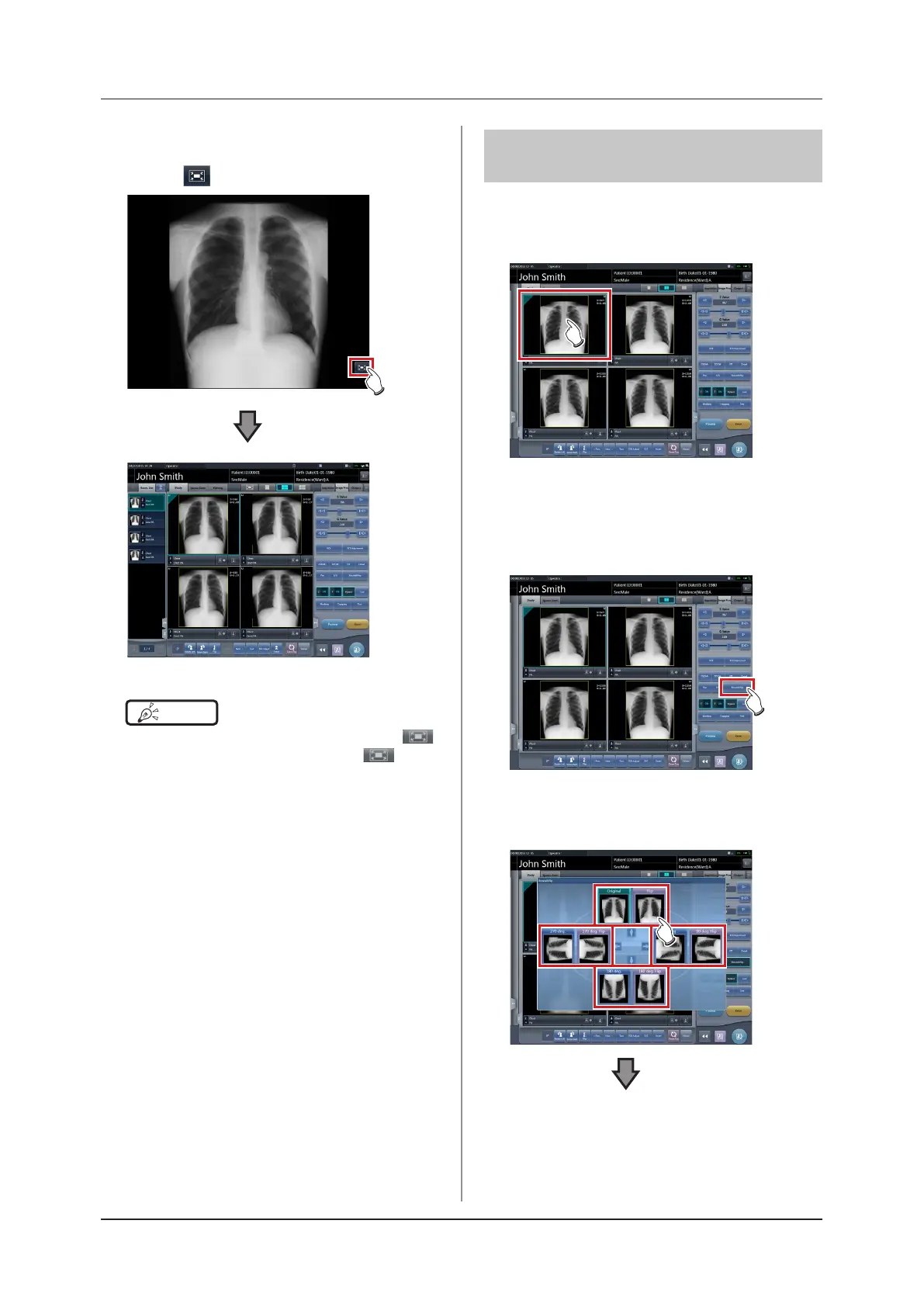
6.4.18 Rotation and ip of
display
Exposed images can be rotated and ipped.
1
Select an image to rotate and ip.
• The control panel automatically switches to the
[Image Proc] tab. If it does not switch, select the
[Image Proc] tab manually.
2
Press [Rotate&Flip].
• The selection screen is displayed.
3
Select the item to apply.













 To Next Page