211
7.2 Exposure with AeroDR Portable RF Unit2
Chapter 7
5
Press [Perform].
• Registration is performed in the patient data-
base of this device, and the exposure screen or
the body part selection screen is displayed.
HINT
•••••••••••••••••••••••••••••••••••••
• Because input of "Sex", "Pregnancy" are displayed
with selection buttons instead of the input panel, press
the selection buttons.
• When entering "Institution Residence", "Hospital
Department" and "Requesting Physician", select the
names from the pull-down menu or selection button,
or input them directly with the keyboard.
• With the input item as a search key, search the patient
database for this device, or a higher system.
• When there is a patient ID that matches, name, sex
and age are displayed.
When there is no patient ID that matches, the cursor
moves to the following input eld.
•••••••••••••••••••••••••••••••••••••••••••••••••••••
7.2.4 Manual body part selec-
tion
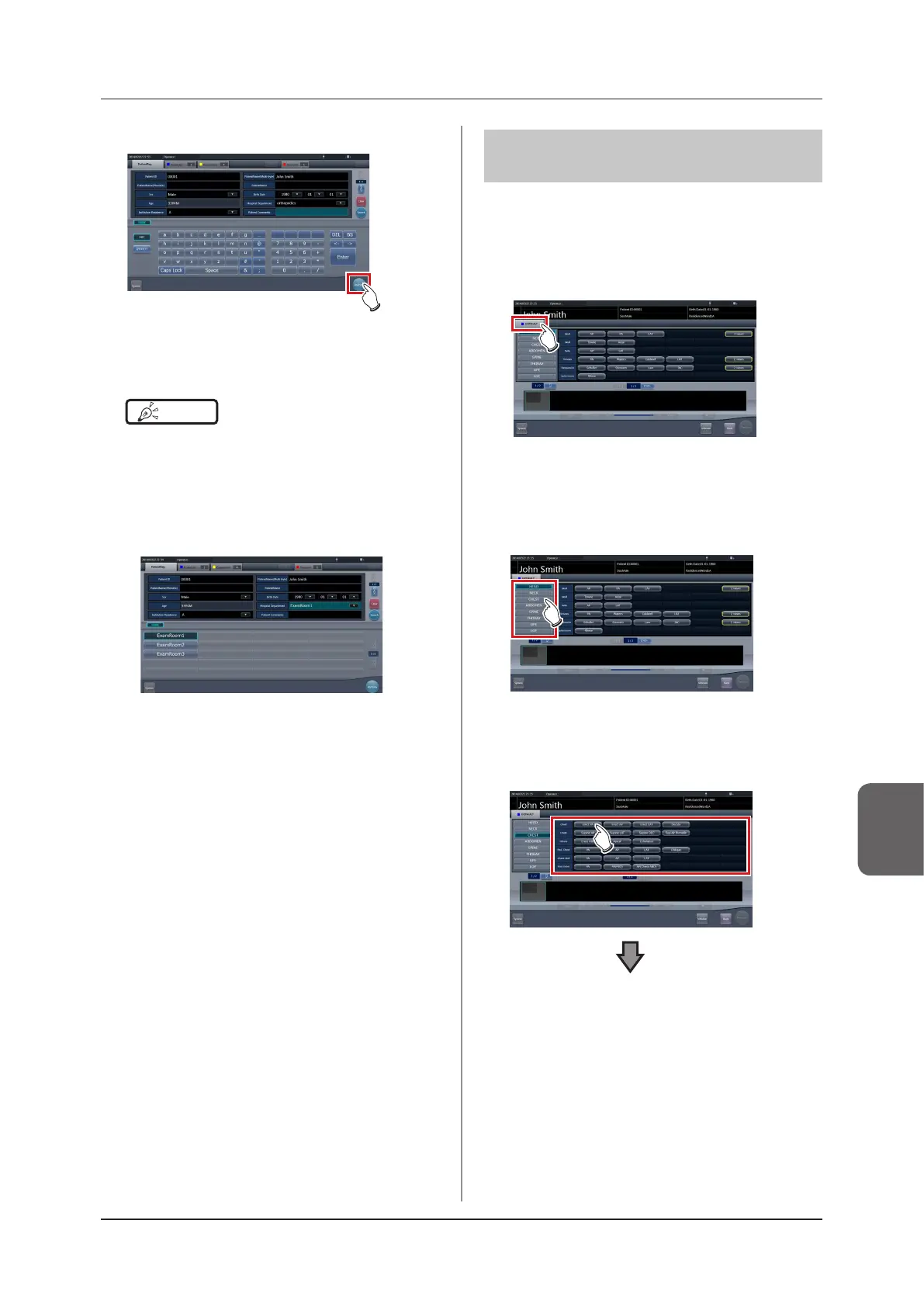
When making advanced settings of exposure body
part and exposure method for each exposure, select
body part manually with the following procedure.
1
Select the tab.
• Linking to the selected tab, the exposure body
part available with the tab are displayed auto-
matically.
2
Select the exposure body part.
• The Exam. Tags corresponding to the selected
exposure body part will be displayed.
3
Select an Exam. Tag.













 To Next Page