241
7.4 Exposure with Unitless
Chapter 7
7.4.6 Change of the AP
information
When the AP information needs to be changed be-
cause the exposure location has been moved, perform
the following procedure.
The following procedure shows an example of a chan-
nel change from institution (1) to institution (2).
* The numbers ((1) and (2)) on the screen indicate AP
information and AP information icons for institution
(1) and (2). These are shown for ease of explana-
tion, and not displayed on the actual screen.
IMPORTANT
•••••••••••••••••••••••••••••••••••••
• Make sure to check the following before changing the
channel of the AP information.
– The AeroDR Access Point 2 is turned on.
– The AeroDR Access Point 2 Unit has been turned
on for 1 minute or more.
•••••••••••••••••••••••••••••••••••••••••••••••••••••
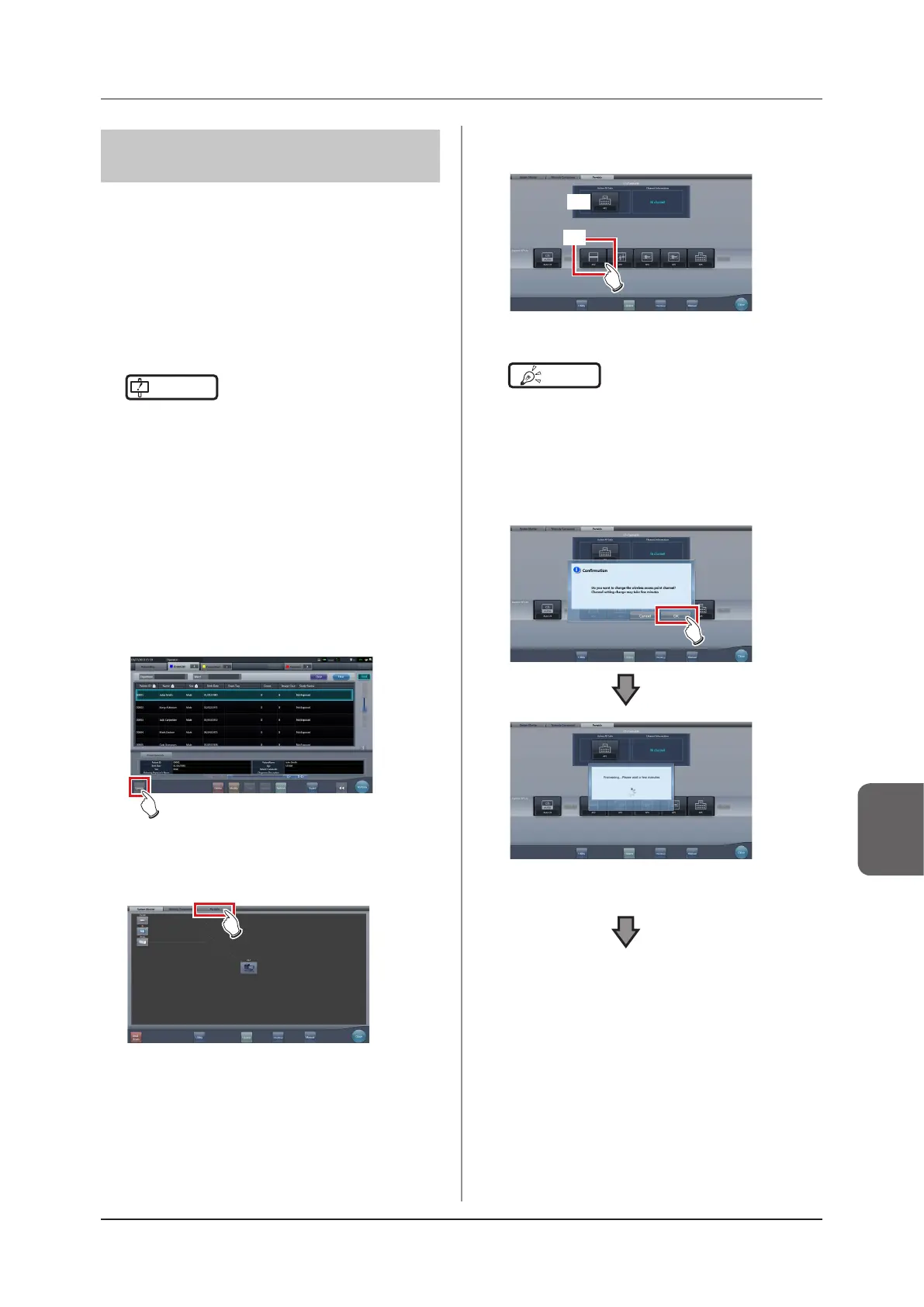
1
Press [System] to display the system
monitor screen.
• [System] is displayed in the toolbar display area
of the patient registration screen, list screen,
body part selection screen, and exposure
screen.
• The system monitor screen is displayed.
2
Press the [Portable] tab.
• The portable screen is displayed.
3
Select the icon of the AP information to be
changed from the [Inactive AP List] icons.
(1)
(2)
• A conrmation screen is displayed.
HINT
•••••••••••••••••••••••••••••••••••••
• When automatic channel selection is set, pressing
[Auto CH] sets the optimum channel automatically.
•••••••••••••••••••••••••••••••••••••••••••••••••••••
4
Press [OK].
• Press [Cancel] to return to the previous screen.
• The AP information change process begins.
• The change process takes several minutes.













 To Next Page