206
7.1 Exposure with AeroDR Portable RF Unit
7.1.6 Change of the IP ad-
dress of the connected
institution network
The procedure to change the IP address of the institu-
tion network to which you are connecting is as follows.
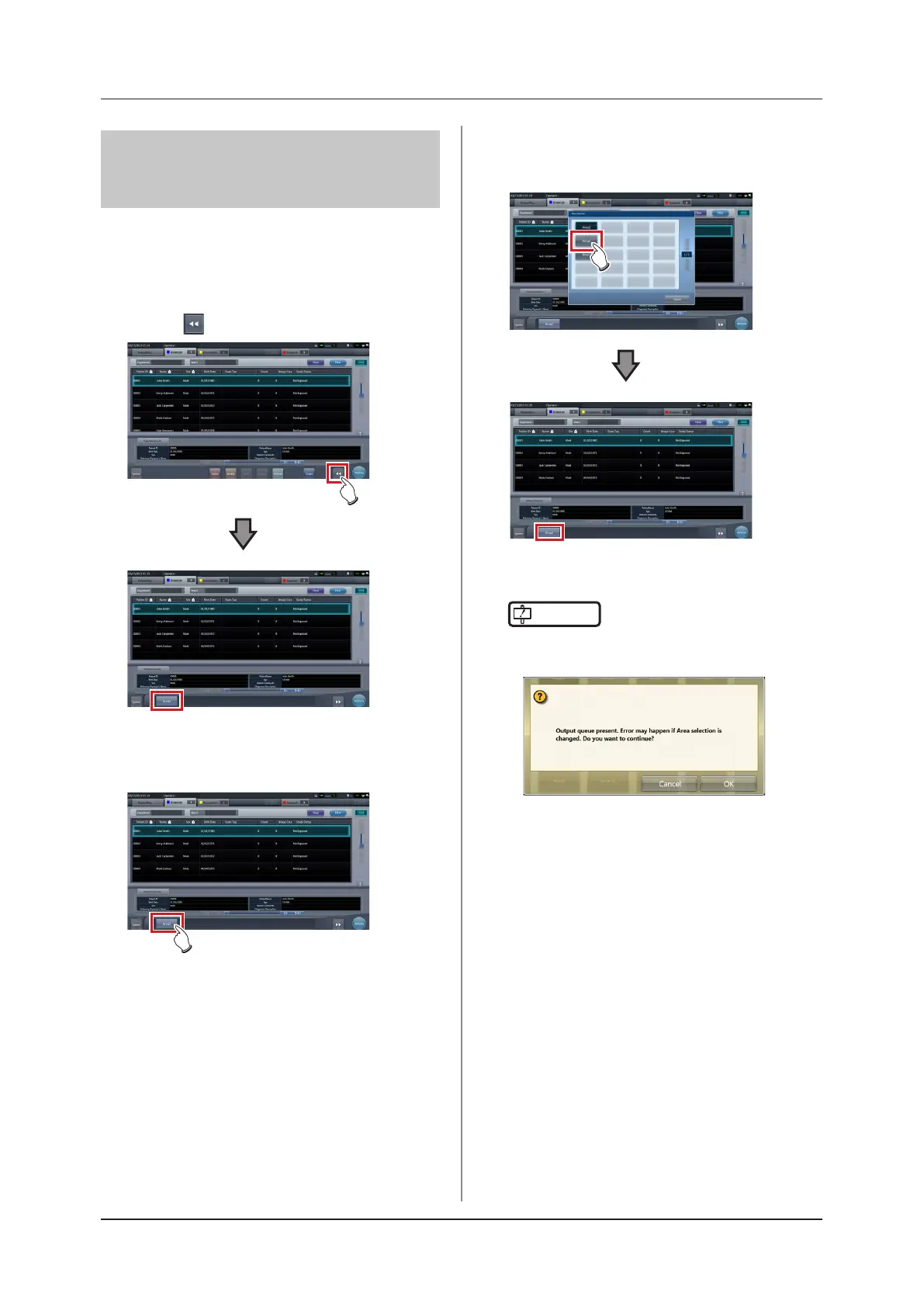
The procedure for switching from [Area1] to [Area2] is
described below as an example.
1
Press [ ] on the list screen.
• The area selection button is displayed.
2
Press the area selection button.
• The area selection screen is displayed.
3
Press the button corresponding to the de-
sired area name.
• Press [Cancel] to return to the previous screen.
• The area is switched, and the display returns to
the list screen.
IMPORTANT
•••••••••••••••••••••••••••••••••••••
• When there is data which has not yet been transmit-
ted, a conrmation screen appears.
→ Press [OK] to execute the change in IP address.
→Press [Cancel] to close the area selection screen
and return to the list screen. After transmitting the
data, please change the IP address.
• When selecting areas using an external wired LAN
adapter, make sure the external wired LAN adapter is
attached before pressing the area selection button.
•••••••••••••••••••••••••••••••••••••••••••••••••••••













 To Next Page