345
Chapter 7
7.22 Other functions
7.22.1
Switching of the wireless
communication function
of the DR Detector
The wireless communication functions of the DR
Detector (permitted/prohibited) can be switched.
IMPORTANT
•••••••••••••••••••••••••••••••••••••
• Switch the wireless communications function from o
to on while the DR Detector is in the wired connection
condition.
• If there are more DR Detectors than I/F Cables, estab-
lish a wired connection once for DR Detectors that did
not have one when the wireless communications func-
tion was switched from o to on before use.
•••••••••••••••••••••••••••••••••••••••••••••••••••••
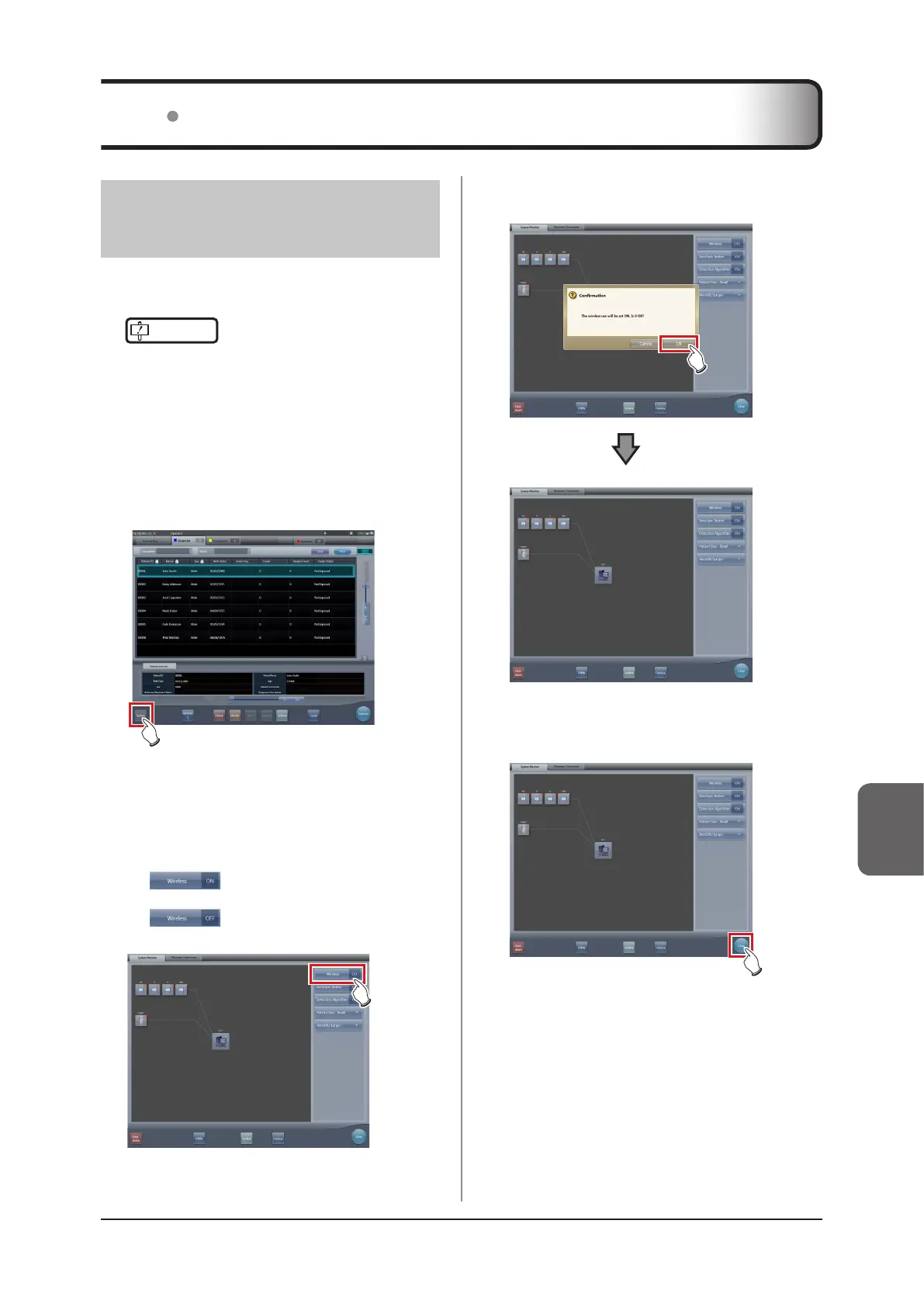
1
Press [System] on the initial screen.
• The system monitor screen is displayed.
•
If the network status is not displayed, select the
[System Monitor] tab on the function switching tabs.
2
Press [Wireless] to switch the wireless
communication function.
• [ ] shows that wireless communica-
tion function is on.
• [ ] shows that wireless communica-
tion function is o.
• A conrmation screen is displayed.
3
Press [OK].
• Press [Cancel] to return to the previous screen.
• The wireless communication function switches.
4
Press [Close].
• The display returns to the initial screen.













 To Next Page