9.1 Various problems and countermeasures
379
Chapter 9
IMPORTANT
•••••••••••••••••••••••••••••••••••••
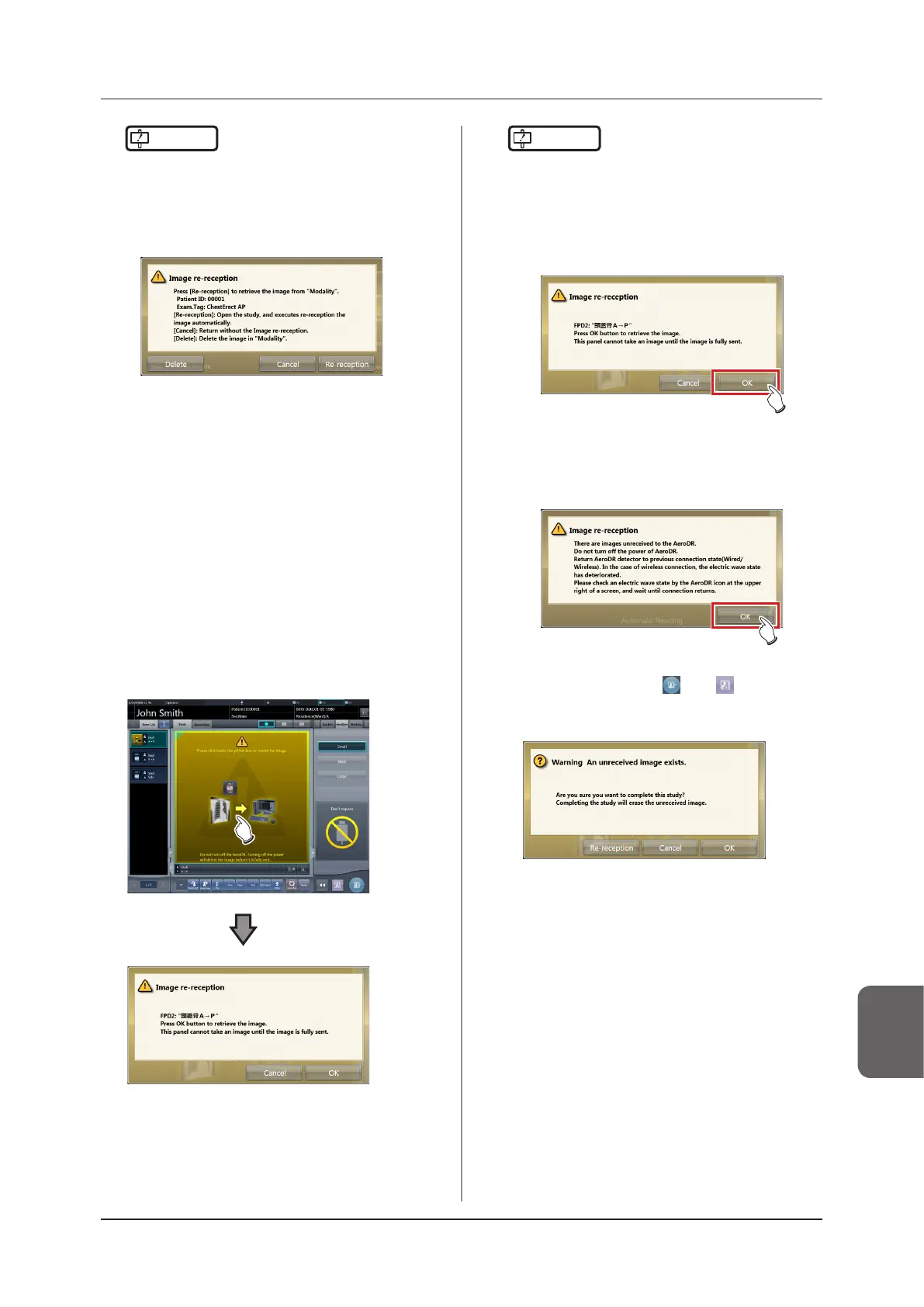
• If you suspend the examination and display the list
screen without acquiring images that have not been
transferred, or if you restart this device after deactivat-
ing it once, a confirmation dialog for reacquiring the
images appears.
– When [Delete] is pressed, the image deletion
confirmation screen is displayed. When [OK] is
pressed on the image deletion conrmation screen,
the images not transferred yet are deleted.
– When [Cancel] is pressed, the display returns to
the list screen.
– When [Re-reception] is pressed, the study is start-
ed, and the image is acquired from the DR Detec-
tor.
•••••••••••••••••••••••••••••••••••••••••••••••••••••
z
Resuming reacquisition of images
1
Press the image display area to resume
reacquisition of images from the DR De-
tector.
• The conrmation dialog is displayed.
IMPORTANT
•••••••••••••••••••••••••••••••••••••
• The confirmation dialog displayed varies depending
on the connection with the DR Detector.
– When the connection with the DR Detector is re-
stored:
Press [OK] and reacquisition of images from the
DR Detector is resumed.
– When the connection with the DR Detector is not
restored:
After pressing [OK], check the connection with the
DR Detector.
• If there is an image on the DR Detector that has not
been transferred when [
] or [
] is pressed on
the exposure screen, a conrmation screen for reac-
quiring the images is displayed.
– When the [Re-reception] is pressed, the image ac-
quisition from the DR Detector is started.
– When [Cancel] is pressed, the display returns to
the exposure screen.
– When [OK] is pressed, the examination is ended or
suspended.
•••••••••••••••••••••••••••••••••••••••••••••••••••••














 To Next Page