261
7.7 One Shot stitching exposure
Chapter 7
z
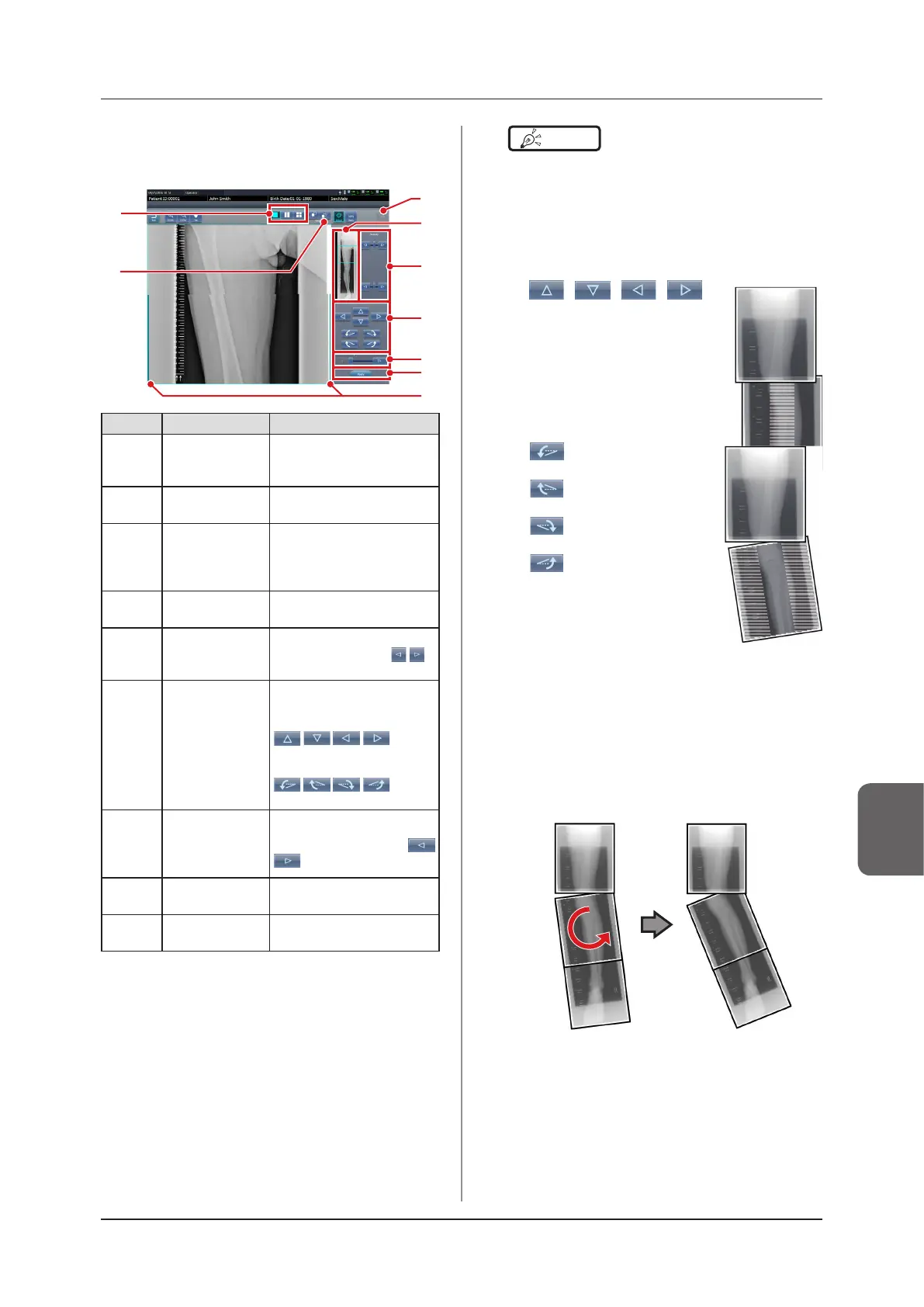
Viewer screen
This is the screen for adjusting images taken with One
shot stitching exposure with the DR Detector.
(5)
(6)
(7)
(3)
(8)
(2)
(4)
(1)
(9)
Number Name Functions
(1)
Display layout
toggle button
Selects the screen display
format from 1×1, 2×1, and
2×2 display options.
(2) Adjust button
Displays and hides the
stitching adjustment detector.
(3) Reset button
Resets the position of the
moved image and the
changed density to return
them to their initial states.
(4) Full preview
The entire image will be
displayed.
(5)
Part correction
button
Adjust the density of the
images by pressing [
]
or dragging the bar.
(6)
Move/rotate
button
Moves the position of
selected images and adjusts
their angles.
:
image position is moved
toward each direction.
:
image angles are adjusted.
(7)
Magnication
Ratio button/
Magnication
Ratio bar
Display images are magnied/
shrunk by pressing [
] or dragging the bar.
(8) Apply button
Applies the adjusted image
combination position.
(9)
Adjust image
guide
The adjusted target image is
displayed.
HINT
•••••••••••••••••••••••••••••••••••••
z
Moving/rotating an image during image
combination
• For image movement/rotation, the lower image
becomes the work image. The movement/rotation
action is as follows.
Moving
[ ][ ][ ][ ]:
Moves the image to direction
pressed
The image can also be moved by
dragging the center of the image
(horizontal stripe portion).
Rotating
[ ]: Lowers the upper left
edge of the image
[
]: Raises the upper left
edge of the image
[
]: Lowers the upper right
edge of the image
[
]: Raises the upper right
edge of the image
If you drag the left or right area of the image (horizontal
stripe portion) vertically, you can move the upper
edge up or down in the direction you are dragging it.
If you drag it horizontally, you can move the image
horizontally.
z
Linking 3 images
• When combining 3 images, the lower image will also
move/rotate if the central image is moved/rotated.













 To Next Page