OPERATION
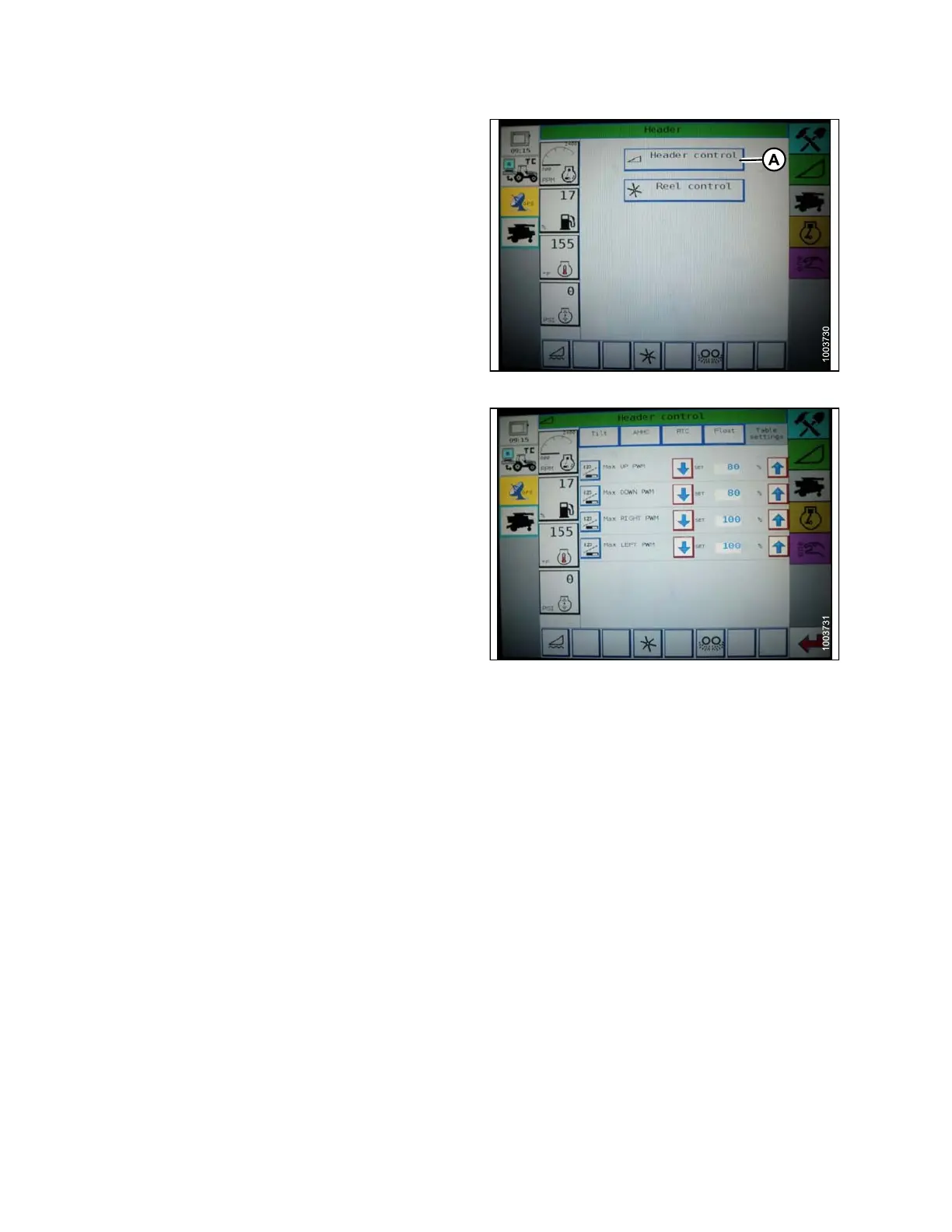
2. Press HEAD ER CONTROL (A). The HEADER
CONTROL page displays.
Figure 3.114: Challenger Combine Display
3. Go to t he TABLE SETTINGS ta b.
4. Press up arrow on MAX UP PWM to increase
percentage number and increase raise speed; Press
down arrow o n MAX UP PWM to decrease percent ag e
number and decrease raise speed.
5. Press up arrow on MAX D OWN PW M to increase
percentage number and increase lower speed; Press
down arrow on MAX DOWN PWM to decrease
percentage number and decrease lower speed.
Figure 3.115: Challenger Combine Display
Setting the Sensitivity of the Auto Header Height Control (Challenger 6 Series)
The sen
sitivity adjustment controls the distance the cutterbar must travel up or down before the Auto Header
Height
Control (AHHC) reacts and raises or lowers the feeder house. When the sensitivity is set to maximum, only
small
changes in ground height are needed to cause the feeder house to raise or lower. W hen the sensitivity is set
to min
imum, large changes in the g round height are needed to cause the feeder house to raise or lower.
NOTE:
Changes may have been made to the combine controls or display since this document was published. Refer to
the combine operator’s manual for updates.
1. Press the HEADER icon on the FIELD page. The
HEADER page appears.
147695 100 Revision A









 To Next Page