MAINTENANCE AN D SERVICING
1. Open endshield. Refer to Opening Endshields, page
33.
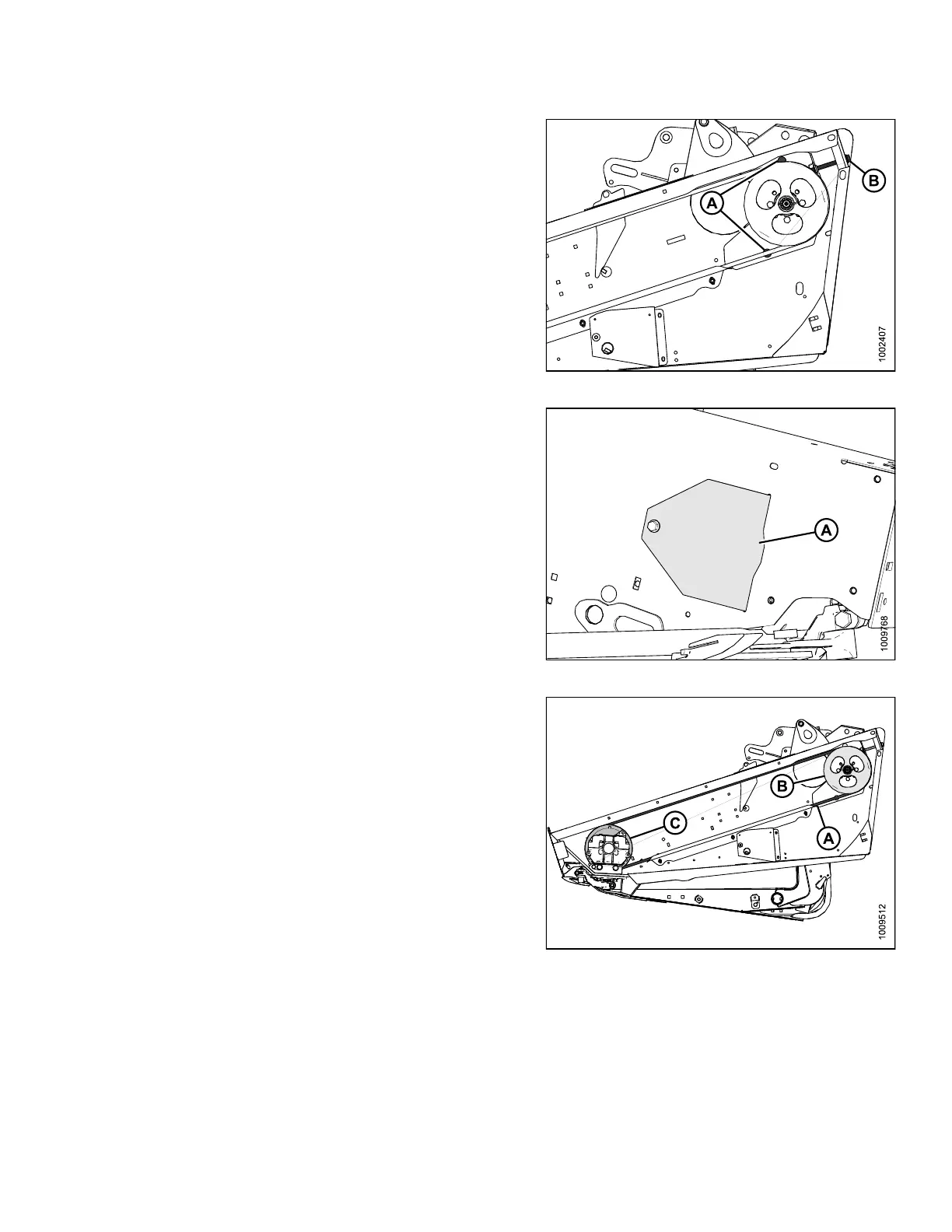
2. Loosen the two bolts (A) that secure the motor
assembly to header endsheet.
3. Loosen the belt by turning the tensioning bolt (B)
counterclockwise.
Figure 5.120: Knife Drive
4. Open the access cover (A) on the endsheet behind
cutterbar to provide clearance between the knife drive
box pulley and the endsheet.
Figure 5.121: Access Cover
5. Remove belt (A) from drive pulley (B).
6. Slip belt (A) over and behind the knife drive
box pulley (C). Use notch in pulley to assist in
removing belt.
Figure 5.122: Knife Drive
Installing Knife Drive Belts
NOT
E:
Pro
cedure is the same for both ends of the double-knife header.
147695 319 Revision A









 To Next Page