MAINTENANCE AND SERVICING
Installing Adapter Feed Draper Drive Roller Bearing
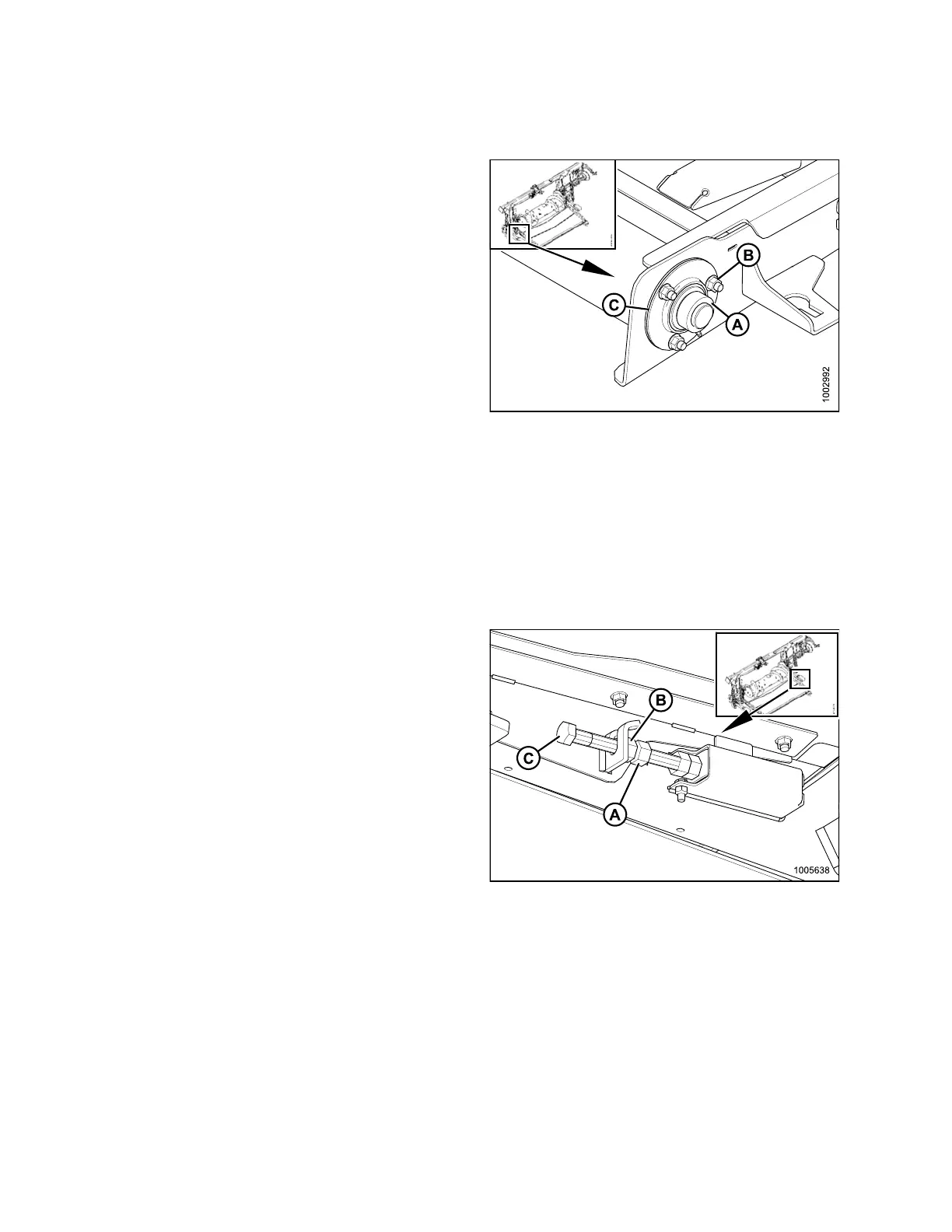
1. Install bearing flangettes (C) and new bearing.
2. Install three bolts (B) to secure bearing and flangettes
to the feed deck.
3. Lock bearing collar (A) and tighten setscrew.
4. Tension the feed draper. Refer to 5.10.2 Adjusting
Feed Draper Tension, page 323.
5. Attach the header to the adapter. Refer to 4.7.2
Attaching H eader to Adapter and Combine, page 245
for procedure.
Figure 5.1
41: Drive Roller
5.10.4 Ada
pter Idler Roller
Removing
Adapter Feed Draper Idle r Roller
Left-hand side shown:
1. Remove the header from the adapter. Refer to 4.7.1 Detaching Header from Adapter and Combine, page 240.
2. Leave adapter attached to combine. Engage the feeder house safety props.
3. Loosen jam nut (A).
4. Hold nut (B) with a wrench and turn bolt (C)
counterclockwise to decrease tension. Repeat at
opposite side.
Figure 5.142: Tensioner
147695 328 Revision A









 To Next Page