MAINTENANCE AND SERVICING
Installing A dapter Feed Draper Drive Roller
1. Apply grease to spline.
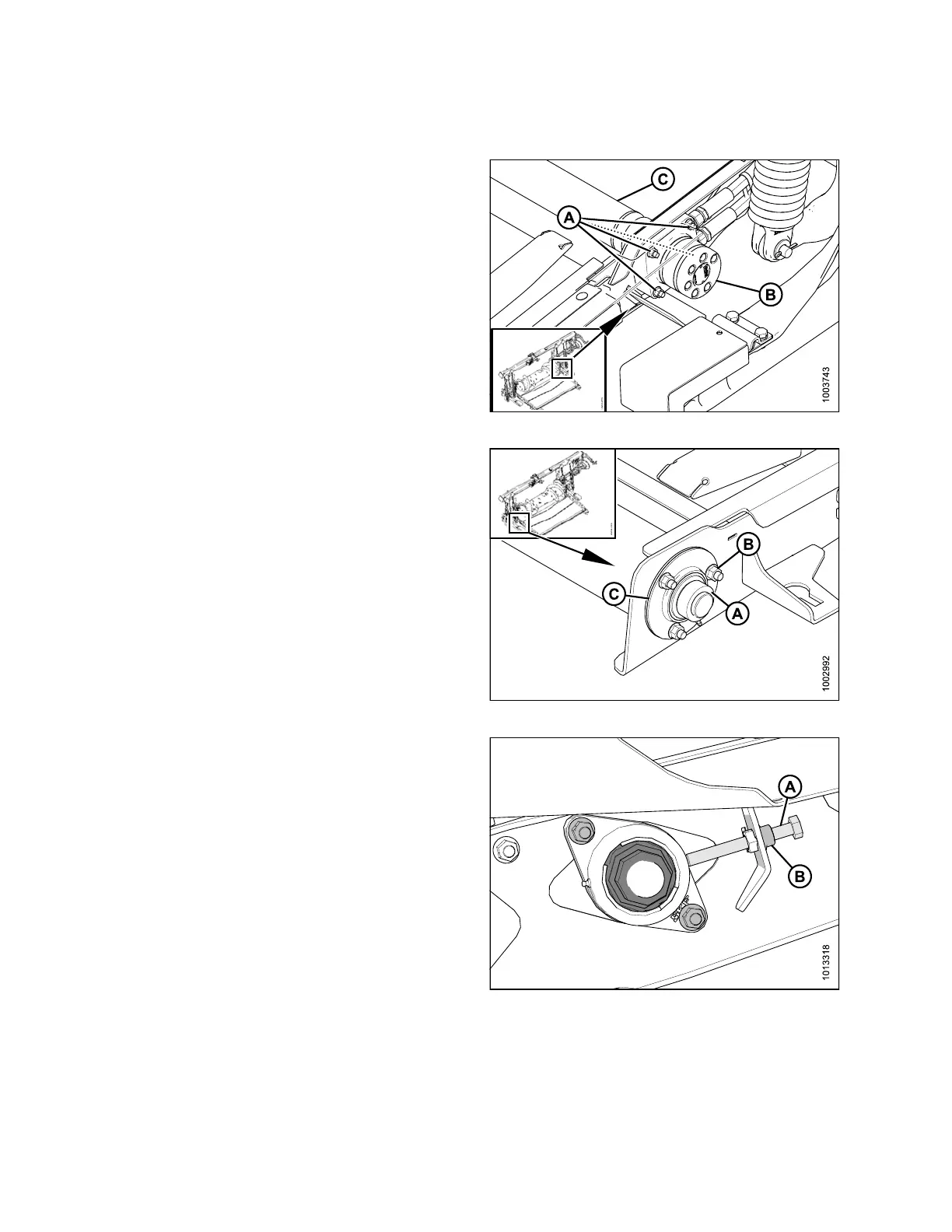
2. Position roller (C) in adapter frame.
3. Slide motor (B) into the drive roller. Secure the motor
to the feed deck with four bolts (A).
Figure 5.136: Motor
4. Install bearing flangettes (C) and bearing.
5. Install three bolts (B) to secure bearing and flangettes
to the feed deck.
6. Lock bearing collar (A) and tighten setscrew.
7. Install the feed deck draper. Refer to 5.10.1 Replacing
Adapter Feed Draper, page 322.
8. Tension the feed draper. Refer to 5.10.2 Adjusting
Feed Draper Tension, page 323.
9. Attach the header to the adapter. For instructions, refer
to 4.7.2 Attaching Header to Adapter and Combine,
page 245.
Figure 5.137: Bearing
10. Turn adjust er bolt (A) clock w ise until it touc hes the
bearing housing (B). Secure using the jam nut (C).
11. Install the feed deck draper. Refer to 5.10.1 Replacing
Adapter Feed Draper, page 322.
12. Tension the feed drap er. Refer to 5.10.2 Adjusting
Feed Draper Tension, page 323.
Figure 5.138: Bearing
147695 326 Revision A









 To Next Page