MAINTENANCE AND SERVICING
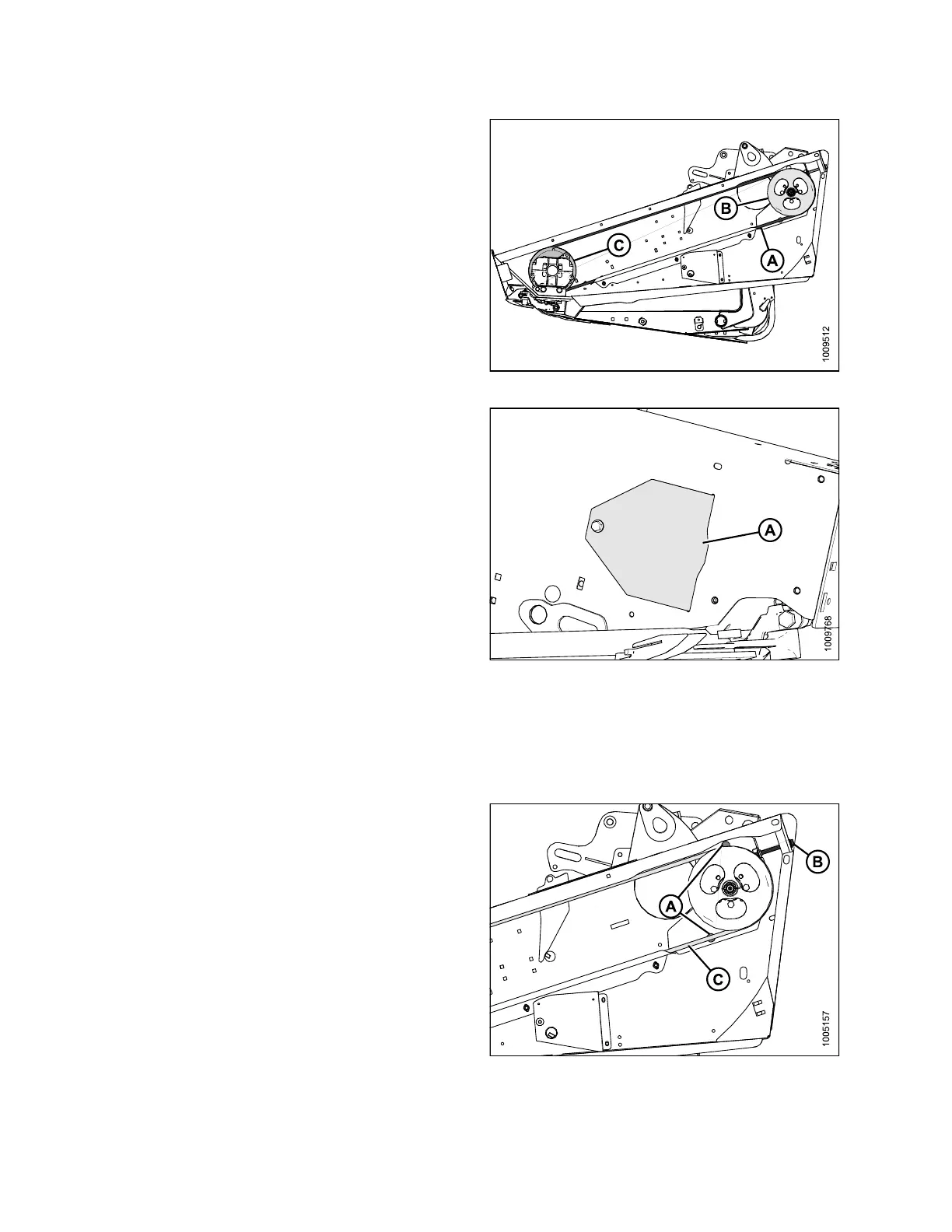
1. Route knife drive belt (A) around knife drive box
pulley (C) and k nife drive pulley (B). Use notch in
pulley (C) to assis t in installing belt.
NOTE:
When installi
ng new belt, never pry belt over pulley.
Be sure drive m
otor is fully forward.
2. Tension knife drive belt. Refer to Tensioning Knife
DriveBelts,page320.
Figure 5.123: Knife D rive
3. Reinstall the access cover (A) and secure it with bolt.
4. Close endshield. Refer to Closing Endshie lds, page
34.
Figure 5.124: Access Cover
Tensio ning Knife Drive Belts
IMPORT
ANT:
To prol
ong belt and drive life, do NOT overtighten belt.
1. Open left endshield.
2. Loosen the two bolts (A) that secure the motor
assembly to header endsheet.
3. Turn adjuster bolt (B) clockwise to move the drive
motor until a force of 20 lbf (80 N) deflects belt (C)
3/4 in. (18 mm) at mid-span.
Figure 5.125: Left-Hand Shown – Right-Hand
Opposite for Double-Knife Headers
147695 320 Revision A









 To Next Page