MAINTENANCE AND SERVICING
Installing Drive Sprocket
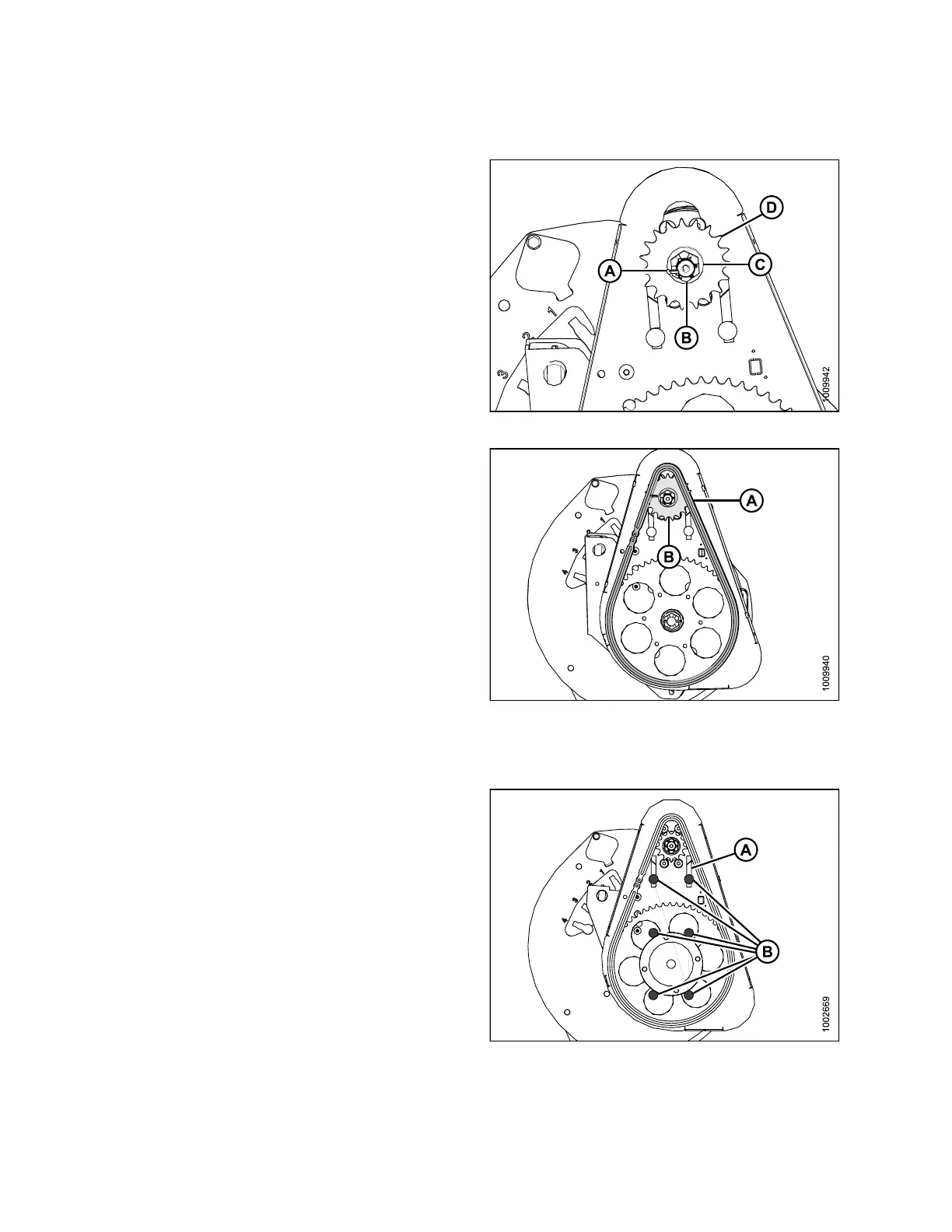
1. Install the new drive sprocket (D), flat washer (C), and
slotted nut (B), onto the motor shaft.
2. Torque nut to 40 ft·lbf (54 N·m). Tighten to next slot if
necessary to install cotter pin (A).
Figure 5.2
66: Reel Drive Sprocket
3. Install the chain (A) onto drive sprocket (B).
Figure 5
.267: Reel Drive
Tighte
ning Drive Chain
1. Ensure the six bolts (B) securing motor mount to chain
case are loose.
2. Slide motor and motor mount upwards until chain (A)
is tight, and tighten bolts (nuts on backside).
3. There should be 1/8 in. (3 mm) of slack in the chain.
Adjust if necessary.
4. Torque bolts (B) to 54 ft·lbf (73 N·m).
Figure 5.268: Reel Drive
147695 382 Revision A









 To Next Page