MAINTENANCE AND SERVICING
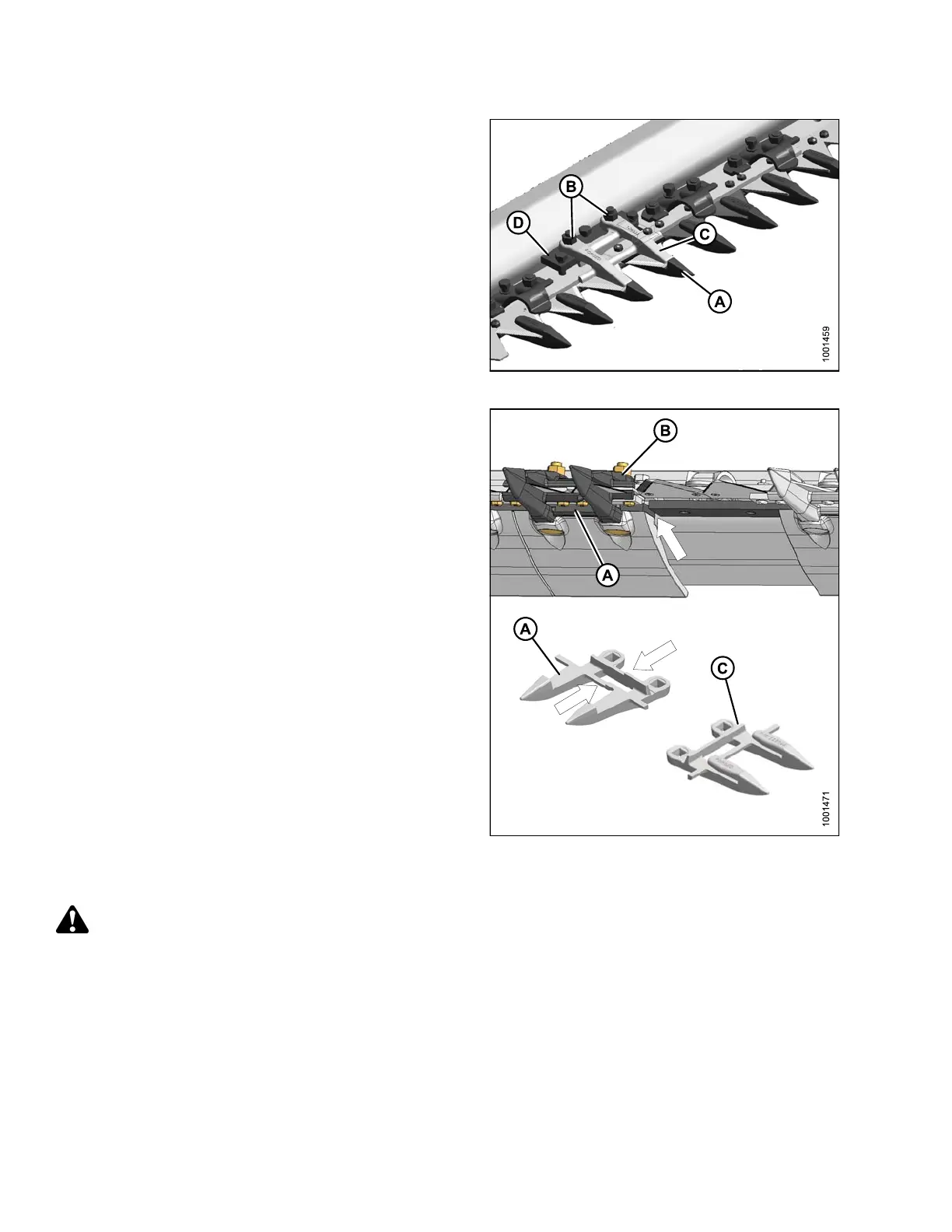
1. Remove two bolts and nuts (B) that attach knife
guard (A) and top guide (C) to c utterbar.
2. Remove kn ife g ua rd, plastic we ar pla te (if installed ),
top guide (C), and adjuster bar (D).
Figure 5.95: Double-Knife Guard
3. Position plastic wear plate (if applicable), replacement
guard (A), adjuster bar, and top guide (B). Install bolts,
but do NOT tighten.
IMPORTANT:
Ensure center guard (A) (right of cutterbar split)
has offset cutting surfaces.
NOTE:
Top guide (B) must accommodate the two
overlapping knives at center guard location on
double-knife header. Ensure replacement is the
correct part.
4. Check an
d adjust clearance be tween hold-down an d
knife. R
efer to Checking Knife Hold-Downs, page 308.
Figur
e 5.96: Double-Knife Guard
Repl
acing Stub Guards on a Single-Knife Header
WARNI
NG
To avoid bodily injury from fall o f raised reel, always engage reel safety props before going under raised
reel for any reason.
Stub guards are designed for cutting tough crops and are factory installed at the outer ends of specific headers.
147695 306 Revision A









 To Next Page