MAINTENANCE AN D SERVICING
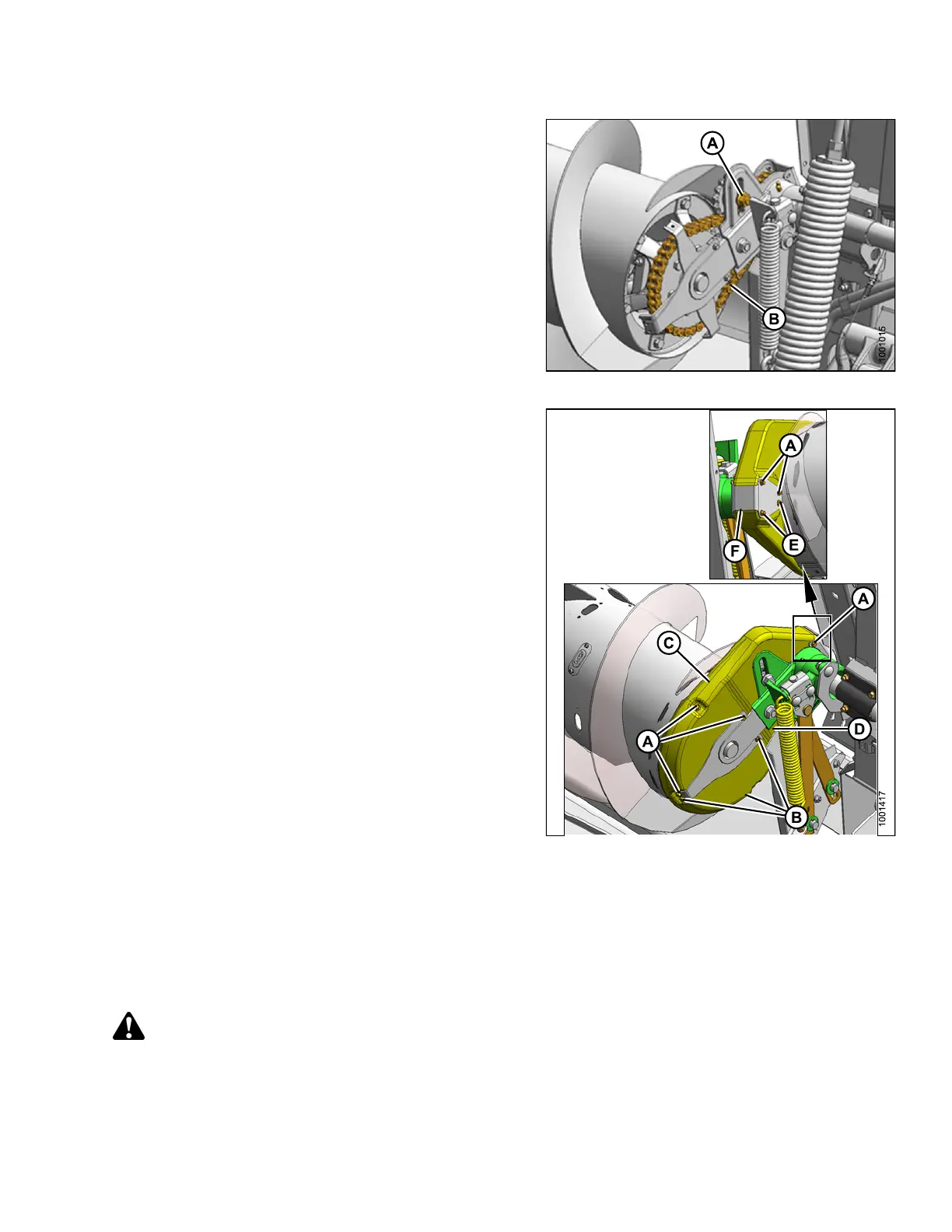
6. Loosen the bolt (A) that secures the idler sprocket.
7. Rotate auger in reverse to take up slack in lower strand
of chain (B).
8. Push idler sprocket down to eliminate remaining slack
in upper strands.
9. Rotate auger back and forth to check slack, and repeat
above step if necessary. A slight amount of slack
is acceptable.
NOTE:
Do NOT useexcessiveforceonidlertotightenchain.
10. Tighten idl
er bo lt (A), a nd torque to 215 ft·lbf (290 N·m).
Figure 5.52: Auger Drive
11. Reinstall covers (C) and (D). Engage inboard lip of
cover into auger tube and rotate cover back to engage
rear support.
12. Install cover retainer (F).
13. Replace and tighten bolts (A), (B), and (E).
Figur
e 5.53: Auger Drive
5.7.3
Removing Auger Drive Chain
The chain tensioner can only take up slack for a single pitch. When the chain has worn or stretched beyond the
limits of the tensioner, the chain should be replaced.
To replace the auger drive chain, follow these steps:
DANG
ER
To avoid bodily injury or death from unexpected start-up of m achine, always stop engine and remove key
from ignition before leaving operator’s seat for any reason.
147695 287 Revision A









 To Next Page