MAINTENANCE AN D SERVICING
Removing Drive Sprocket
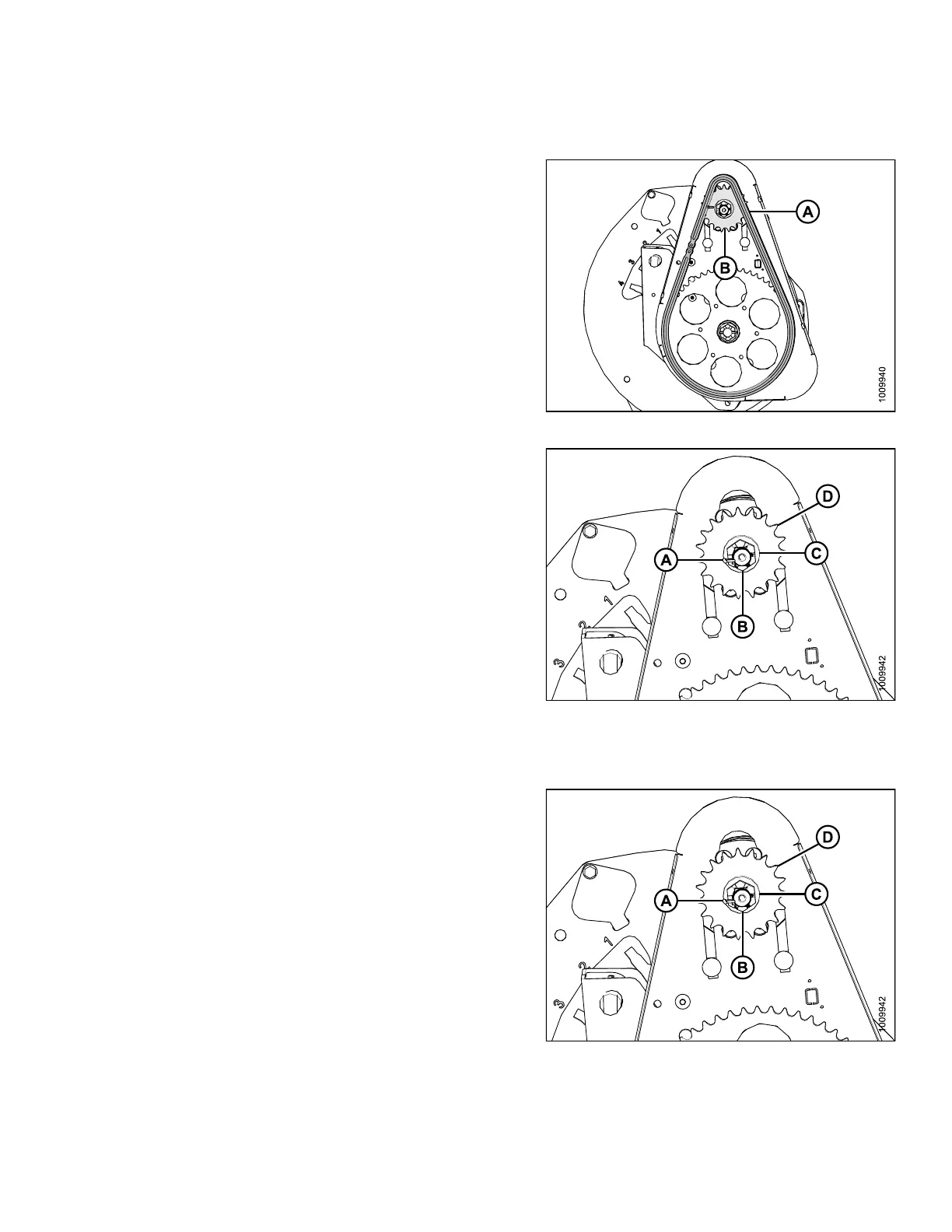
1. Remove the drive chain (A) from the d rive sprocket (B).
Figure 5.2
44: Reel Drive
2. Rem ove the cot ter pin (A), sl otted nut (B ), and flat
washer (C) from the motor shaft.
3. Remove the drive sprocket (D). Ensure key remain s in
the shaft.
IMPORTAN
T:
Do NOT use
pry bar and/or hammer to remove drive
sprocket
(D). Th is will dama ge the motor. Use a puller
if drive
sprocket does not come off by hand.
Figure
5.245: Reel Drive
Instal
ling Drive Sprocket
1. Install the new drive sprocket (D), flat washer (C), and
slotted nut (B), onto the motor shaft.
2. Torque nut to 40 ft·lbf ( 54 N·m). Tighten to next slot if
necessary to install cotter pin (A).
Figure 5.246: R eel Drive Sprocket
147695 373 Revision A









 To Next Page