OPERATION
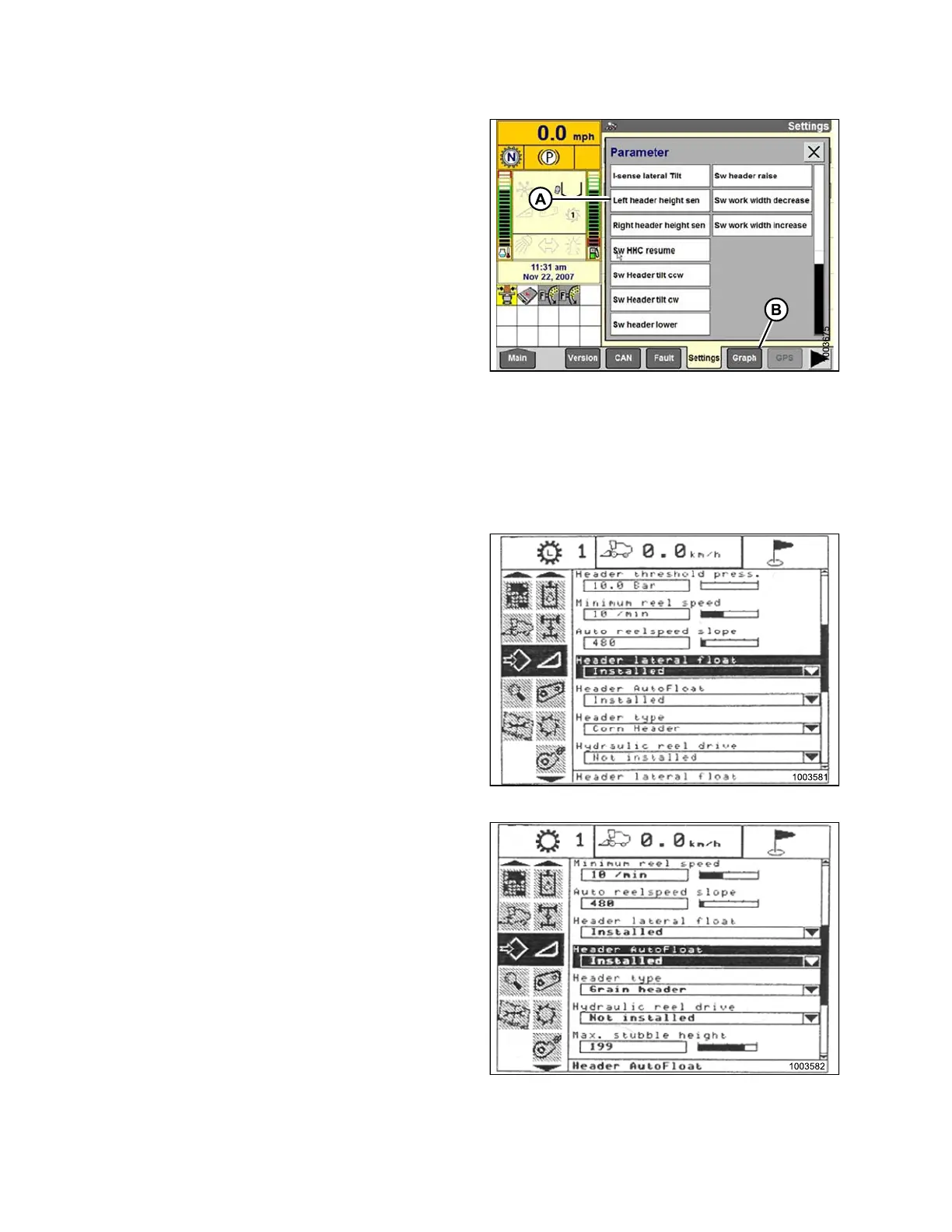
9. Select LEFT HEADER HEIGHT SEN (A), and then
select GRAPH button (B). The exact voltage is
displayed at top of screen.
10. Raise and lower the header to see the full range of
voltage readings.
11. Adjust the voltage limits (refer to Ad jus tin g Voltage
Limits, page 93) if the sensor voltage is not within the
low and high limits or if the range between the low and
high limits is insufficient (refer to Table 3.10 Combine
Voltage Limits, page 91).
Figure 3.251: Combine Display
Engaging the Auto He ader Height Control (New Holland CR/CX Series)
NOTE:
Changes ma
y have been made to the combine controls or display since this document was published. Refer to
the combi
ne operator ’s manual for updates.
1. Select HEADER LATERAL FLOAT on the combine
display screen, and press ENTER.
2. Use the up and down navigation keys to move between
options, and select INSTALLED from the open window.
Figure 3.252: Combine Display
3. Select HEADER AUTOFLOAT on the combine display
screen, and press ENTER.
4. Use the up and down navigation keys to move between
options, and select INSTALLED from the open window.
Figure 3.253: Combine Display
147695 166 Revision A









 To Next Page