OPERATION
2. Select TOOLBOX on the MAIN screen, and then select
HEADER SETUP.
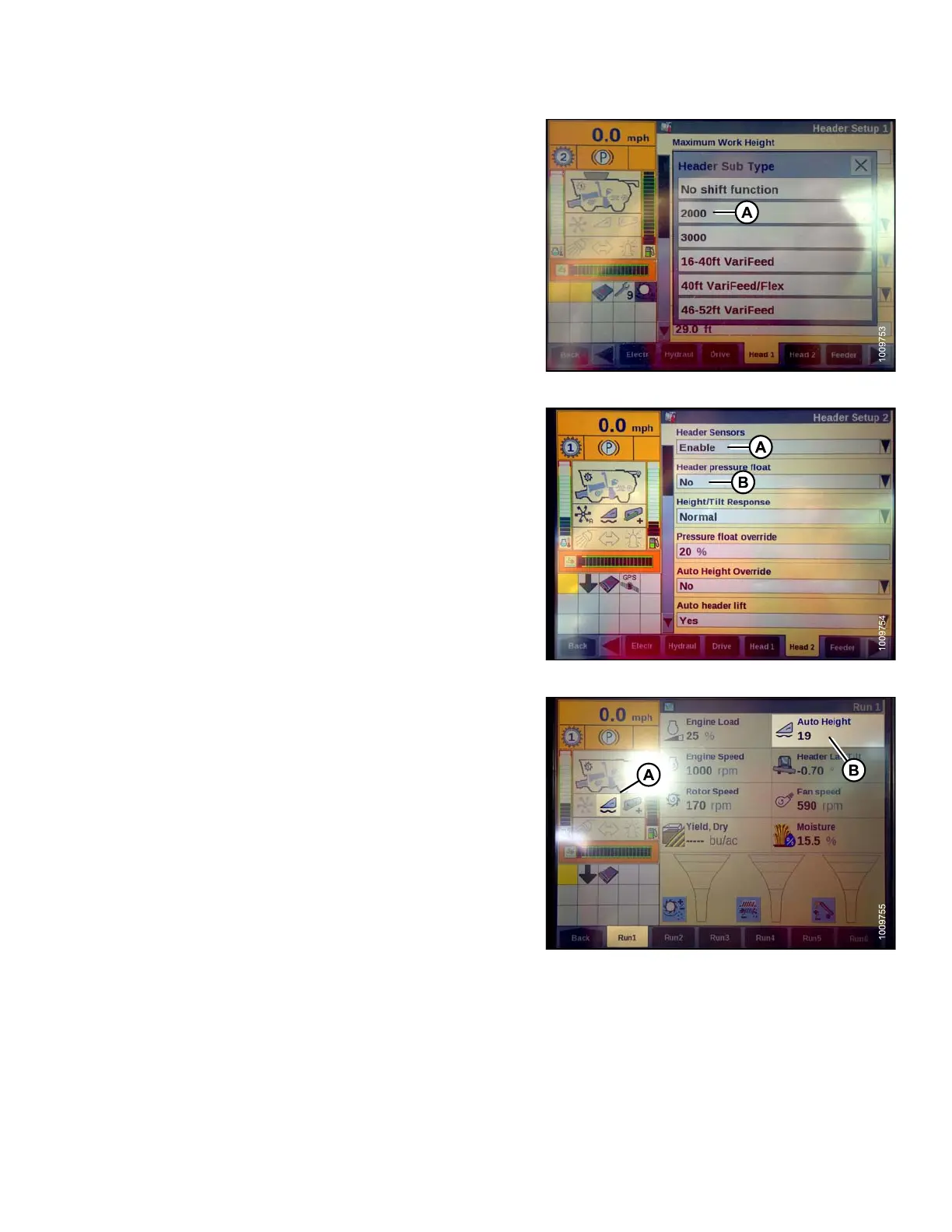
3. Locate the HEADER SUB TYPE field. It will be located
on either the HEAD 1 or the HEAD 2 tab.
4. Select 2000 (A).
Figure 3.145: Combine Display
5. Locate the HEADER SENSOR S and HEADER
PRESSURE FLAT fields. They will be located on
either the HEAD 1 or the HEAD 2 tab.
6. Select ENABLE (A) in the HEADER SENSORS field.
7. Select NO (B) in the HEADER PRESSURE FLAT field.
Figure 3.146: Combine Display
8. Ensure AUTO HEIGHT icon (A) appears on the monitor
and is displayed as shown at (B). When the header
is set for cutting on the ground, this verifies that the
combine is correctly using the potentiometer on the
header to sense ground pressure.
NOTE:
AUTO HEIGHT field (B) may appear on any
of the RUN tabs and not necessarily on the
RUN 1 tab.
Figure 3.147: Combine Display
147695 113 Revision A









 To Next Page