Point User Guide 83
Swapping and deleting prospects, borrowers, and co-borrowers
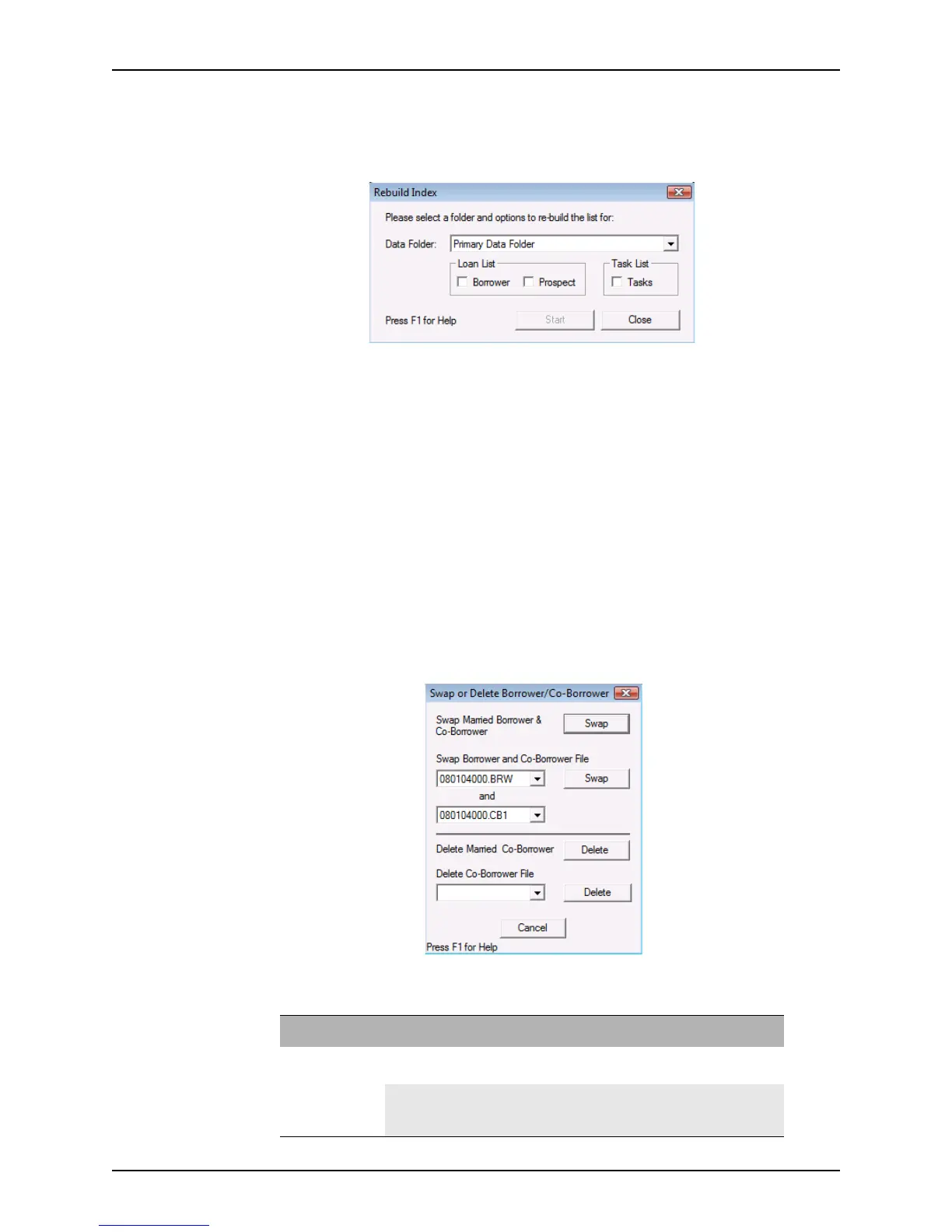
To rebuild your lists:
1 Select File > Rebuild List.
The
Rebuild Index dialog box is displayed.
2 Select the data folder from the Data Folder dropdown list.
3 Select the list or lists you want to rebuild, and click Start.
4 Click OK in the
Rebuild List dialog box.
5 Click Close in the
Rebuild Index dialog box to return to the list of loans.
Swapping and deleting prospects, borrowers, and co-borrowers
Point contains a tool that is used to swap borrower, prospect, and co-borrower
information, or delete all the information regarding a specific applicant.
To access this tool from a borrower or prospect file:
1 Open a borrower or prospect file.
2 Select Bor/Co-Bor > Swap or Delete.
The
Swap or Delete Borrower/Co-Borrower dialog box is displayed.
Refer to the following table to ensure that you are using the correct format to swap or
delete applicants.
To... for Action
Swap Information Married Borrowers
and Co-Borrowers
Click the top Swap option (that is located next to
Swap Married Borrower and Co-Borrower).
Unmarried Co-
Borrowers
Select the files to be swapped from the dropdown
lists under Swap Borrower and Co-Borrower File and
click the bottom Swap option.



 To Next Page