Point User Guide 351
Interfaces
5 Restart Point for the changes to take effect.
Updating loan status
To update the loan status for a borrower:
1 Open a borrower file.
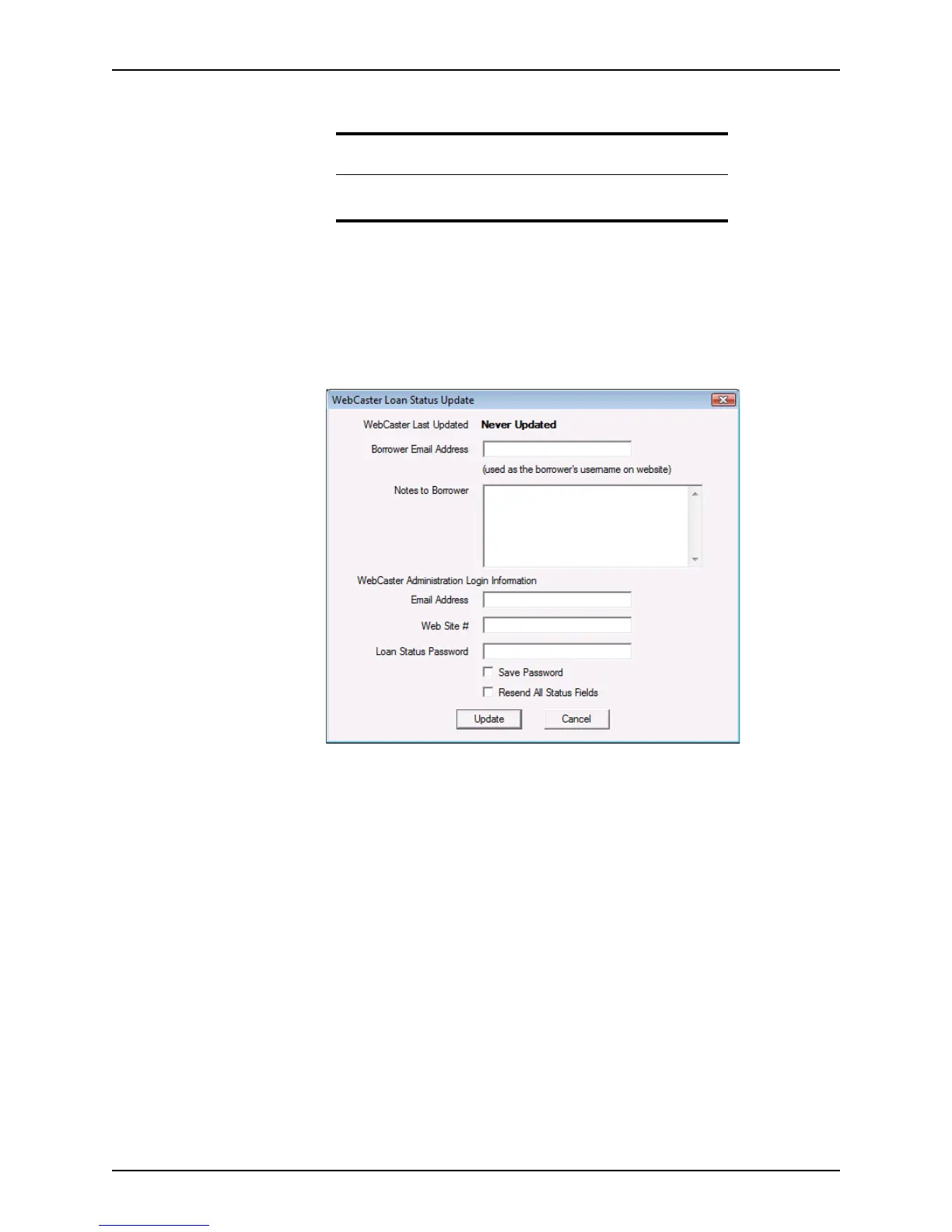
2 Select Interfaces > WebCaster > Update Loan Status.
The
WebCaster Loan Status Update dialog box is displayed.
3 Enter the borrower’s e-mail address in the
BorrowerEmailAddress field.
The e-mail address is used as the borrower’s user ID to log into the web site.
4 Enter any text to convey to the borrower upon their login in the
NotestoBorrower
field.
5 Complete the Administration Login information.
6 To save your log in information for future access, select the
Save Password check box.
7 Select the
Resend All Status Fields check box to send an updated status of all fields.
8 Click Update.
When the loan status is updated, information is retrieved from the loan tracking
screen.
If specified, WebCaster can send e-mails to borrowers stating that their loan status
has been updated and is now available. Borrowers can log into your site and view the
status of their loan application.
Related information
For more information about using WebCaster, visit our WebCaster page
at www.calyxsoftware.com.



 To Next Page