40 Calyx Software
Utilities configuration
• Hazard insurance
• Mortgage insurance
• Flood insurance
• School taxes
To configure the escrow account option:
1 Open a borrower or prospect file.
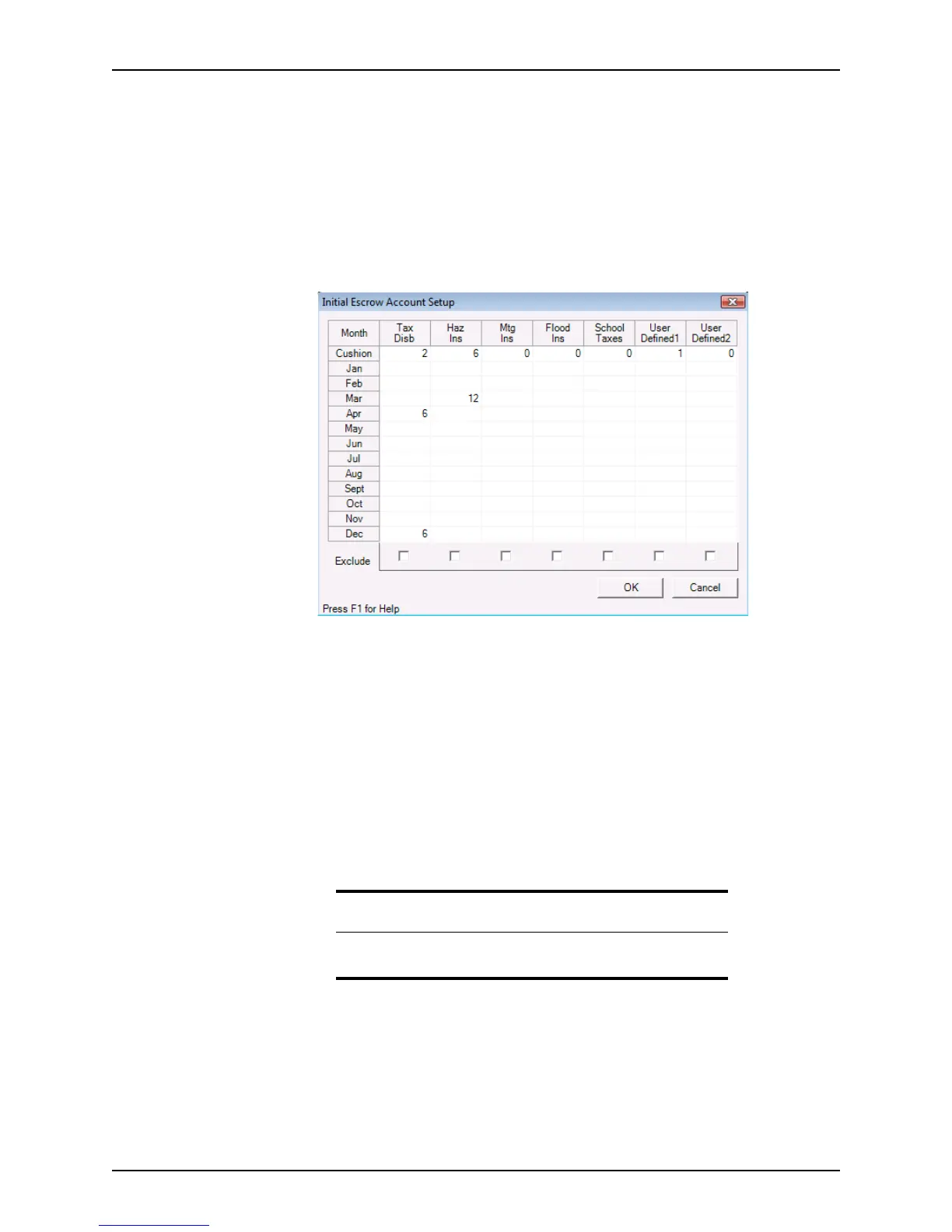
2 Select Utilities > Company Defaults > Escrow Account.
The
Initial Escrow Account Setup dialog box is displayed.
3 For each type of tax or payment, select the cell that corresponds to the month when
the payment is due and enter the number of months to be paid at that time.
For example, if property taxes are paid in April and December for a six-month period,
enter
6 in the Apr and Dec fields for that column. For annual payments, enter 12 in the
field for the month when the payment is due.
4 To specify that the borrower must pay some fees in advance to provide a reserve in
the event a fee increases or a payment is missed, enter the number of months the
borrower must pay in the
Cushion row.
5 To exclude a fee from the aggregate accounting, select the
Exclude check box at the
foot of the disbursement column where the fee is entered.
6 Click OK.
Specifying the ECOA Address
Use the ECOA Address option to enter the address of the federal agency that
administers compliance for the Equal Credit Opportunity Act. Point automatically
populates the address on the ECOA submission form.
To configure the ECOA address:
1 Select Utilities > Company Defaults > ECOA Address.
Related information
For information about setting up the escrow account for a specific loan,
refer to Calculating ongoing escrow payments, on page168.



 To Next Page