316 Calyx Software
Integrated products and services
5 In the Credit Card Information section, select the credit card to use for the transaction
from the Type dropdown list.
The credit cards that are accepted by different credit agencies will vary.
6 Complete the
AcctNo., and Exp.Date fields. Enter the expiration year in 4-digit format,
for example,
2008.
7 Enter the
CardSecurityCode and click OK.
Populating liabilities and viewing credit reports
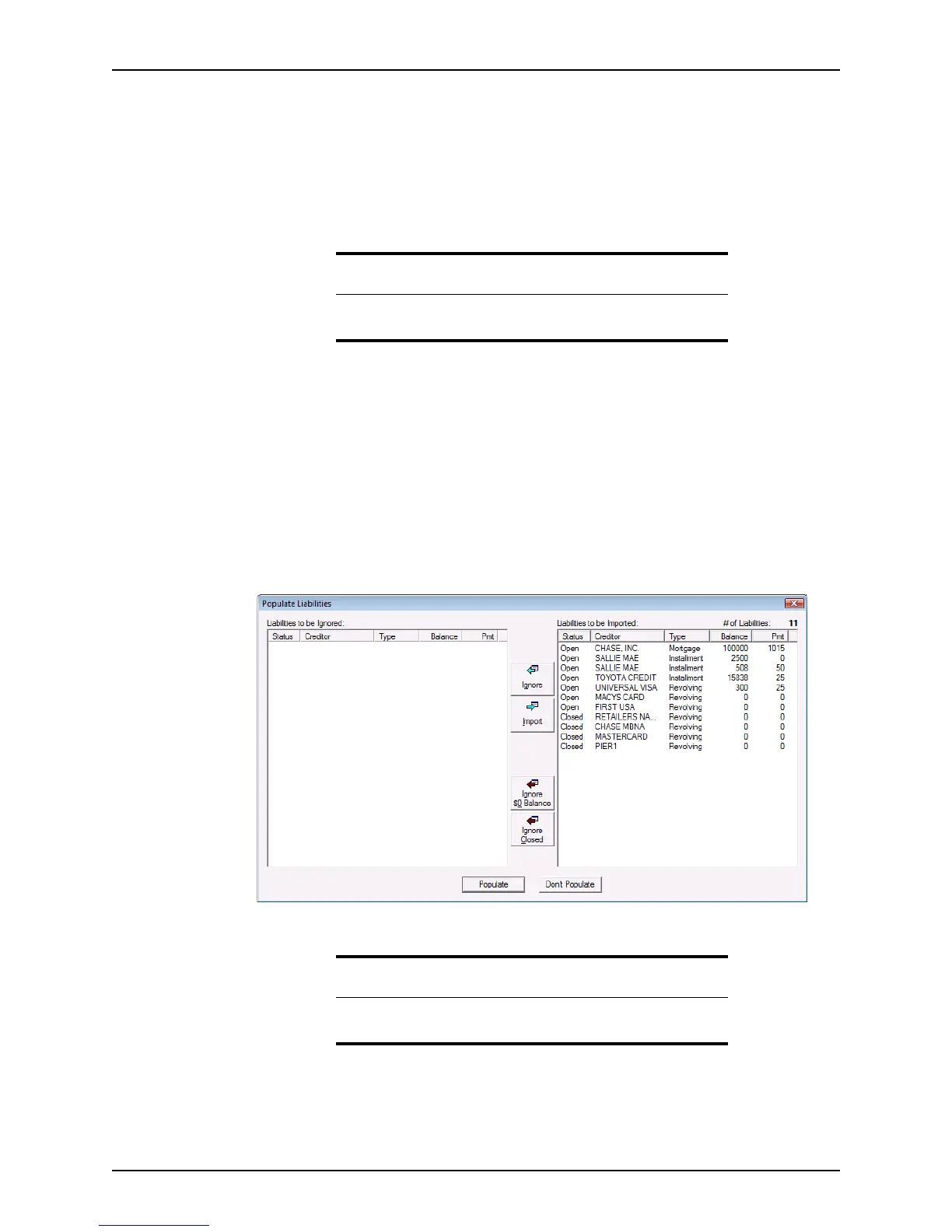
Use the Populate Liabilities feature to import information from the borrower’s credit report
into the loan file. By default, all debts and accounts in the credit report are designated to
be imported into the loan file when the credit report is generated. With the
Populate
Liabilities
dialog box, you can specify which accounts to add to the Loan Application
and which accounts to ignore.
To populate the
Loan Application with the borrower’s liabilities:
1 The
Populate Liabilities dialog box is opened at the time the credit report is initially
received after the order is placed. To open the dialog box at a later time, select
Services > Credit Reports > Populate Liabilities.
The accounts on the borrower’s credit report are listed in the
Liabilities to be
Imported
section of the dialog box.
Attention
The Card Security Code field refers to the three-digit code on the back of
your credit card. This code provides extra identity verification.
Tip
The Populate Liabilities dialog box is also accessible from the Loan
Application
.



 To Next Page