Point User Guide 307
Services
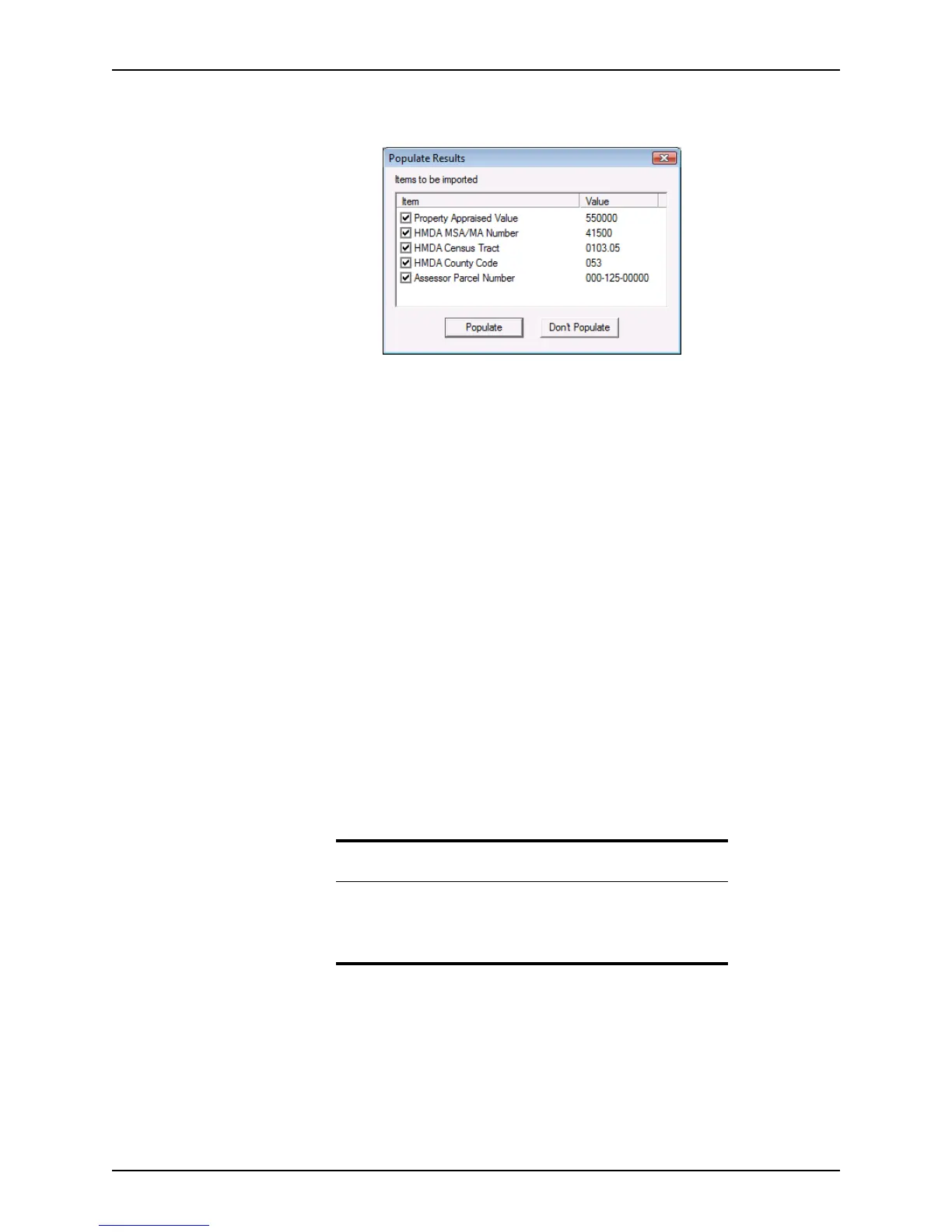
Select Services > AVM Reports > Populate Results or select Services > AVM
Reports > View AVM and click
Populate Results.
By default, all options are selected.
2 Select or deselect the check box next to the AVM result to add or remove the item
from the loan file.
3 Click
Populate to populate the file with the AVM data.
Click Don’t Populate to return to the loan file without populating the AVM data.
Initial disclosures and closing documents
The interface for ordering initial disclosures and closing documents is the same as for
other services. However, there are some significant differences between the interface for
these and other services.
With the initial disclosures and closing documents interface:
• You must specify the investor and product before you request the documents. If a
product and investor are not specified, an error will occur when the request is
submitted.
• The request dialog box does not require any loan information. The loan
information that is required for the request is retrieved from the screens in Point.
• Information that is not part of the loan file in Point might be required by some
providers. An interface is available to submit vendor-specific data.
• If the analyze feature is configured on your system, you can view an analysis of
your loan data to determine if it is in compliance.
Related information
• For more information about specifying investors and products, refer
to Specifying investors and products, on page308.
• For more information about the analyze feature, refer to Viewing
loan data analysis, on page314.



 To Next Page