Point User Guide 445
Entering data into the database
3 After you are finished adding and editing options, click OK.
Entering data into the database
To create a new record in the database:
1 Select Utilities > Cardex Database to open the
Cardex Database (Browsing for
all records
) dialog box.
2 Click New.
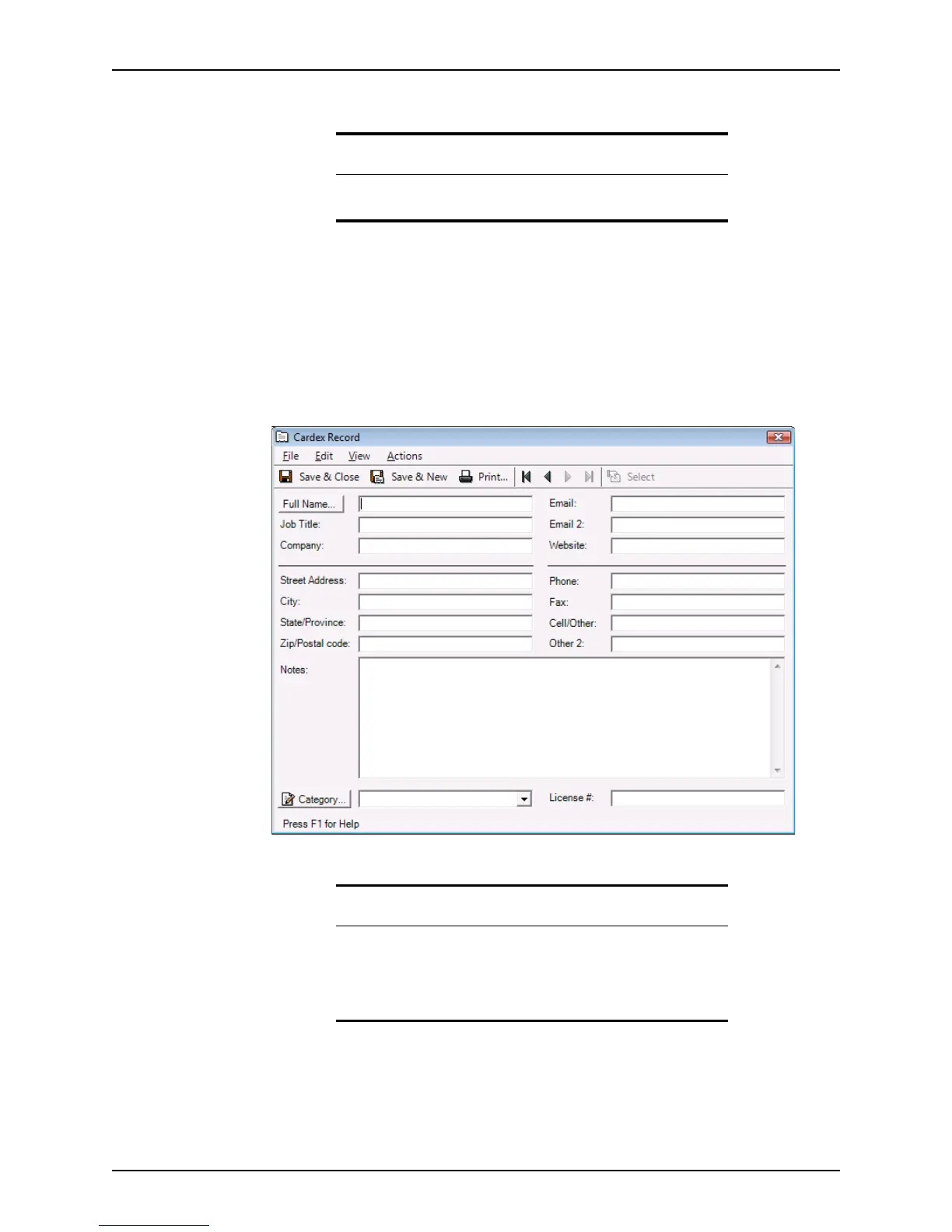
The
Cardex Record dialog box is displayed.
3 Complete the
FullName, JobTitle, Company, Email, and Website fields.
The e-mail and web site addresses become links that you can use to launch an e-mail
or the web site from this dialog box.
4 Complete the address and telephone number fields.
5 Enter any comments about the contact or company in the
Notes field.
Related information
For more information about creating Cardex categories, see Knowledge
Base article #0106 Creating Cardex categories and entering records.
Important
In some cases where names fields are used in Point, separate fields are
provided for each part of the name (first, last, middle, suffix). Therefore,
if you enter the name as one unit in the
FullName field, click the Full
Name button to open the
Check Full Name dialog box. Use this dialog
box to check that each part of the name was entered as a separate entity.



 To Next Page