Point User Guide 273
Supplementary screens
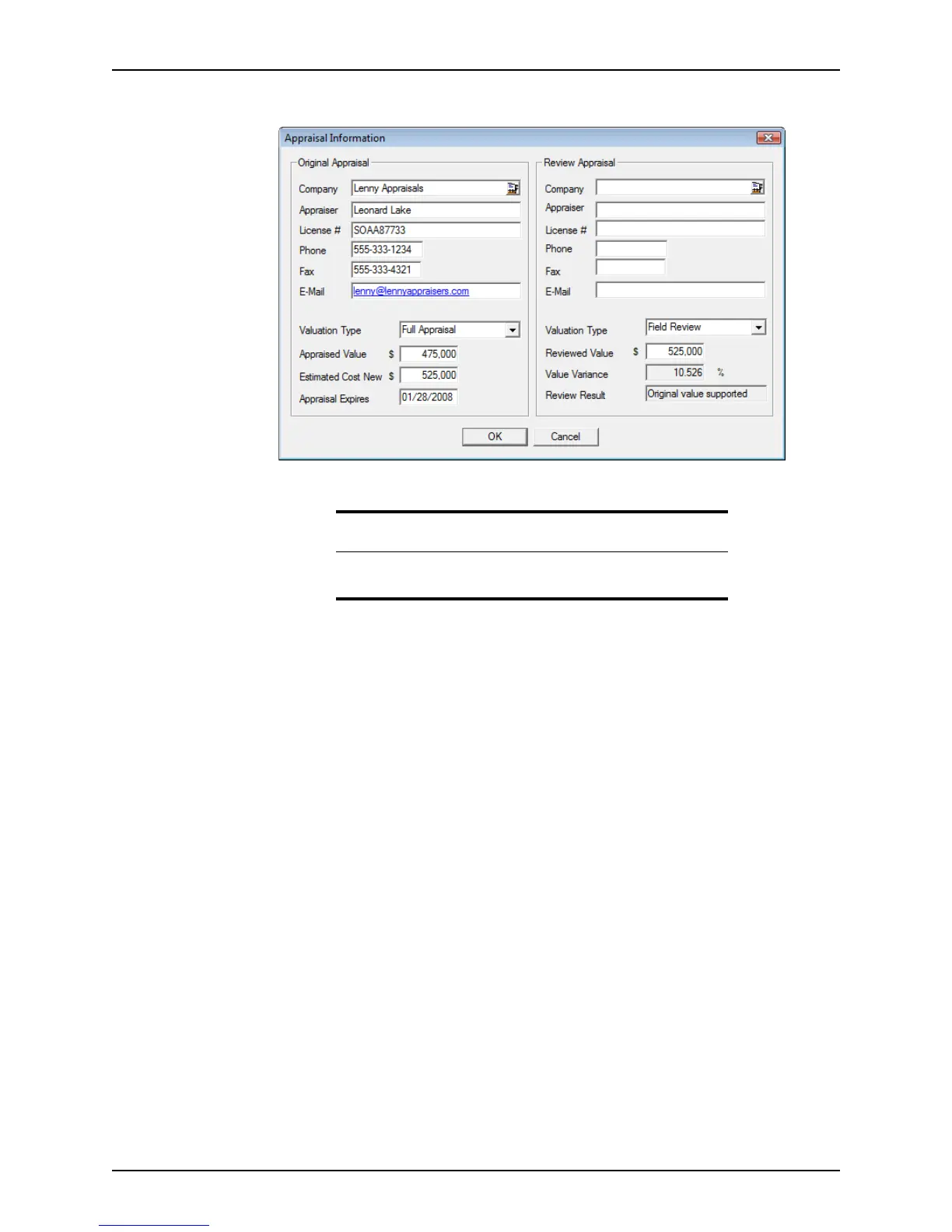
The Appraisal Information dialog box is displayed.
2 Enter the company information for the original appraiser.
3 Select the Valuation Type from the dropdown list and complete the
AppraisedValue,
EstimatedCostNew, and the AppraisalExpires fields.
4 Enter the company information for the Reviewal Appraisal.
5 Select the Valuation Type from the dropdown list and enter the
ReviewedValue.
The
ValueVariance is calculated and the ReviewResult field is automatically
populated with the result.
6 Click OK to exit the dialog box.
Insurance information
The Insurance dialog box provides easy access to mortgage, hazard, and flood
insurance information. It is accessible by clicking the Insurance button which is located at
the bottom of the workspace in the
Conditions and Closing screens.
The fields on this tab correspond to fields in the
Insurance section on the Underwriting
screen and the
Mortgage Insurance section on the Registration & Rate Lock screen.
Insurance information is automatically populated in the corresponding fields throughout
the loan file.
To complete the
Insurance dialog box:
1 Click the Insurance button.
Tip
You can enter the company information manually or use the Cardex
database to populate these fields.



 To Next Page