104 Calyx Software
Loan Application
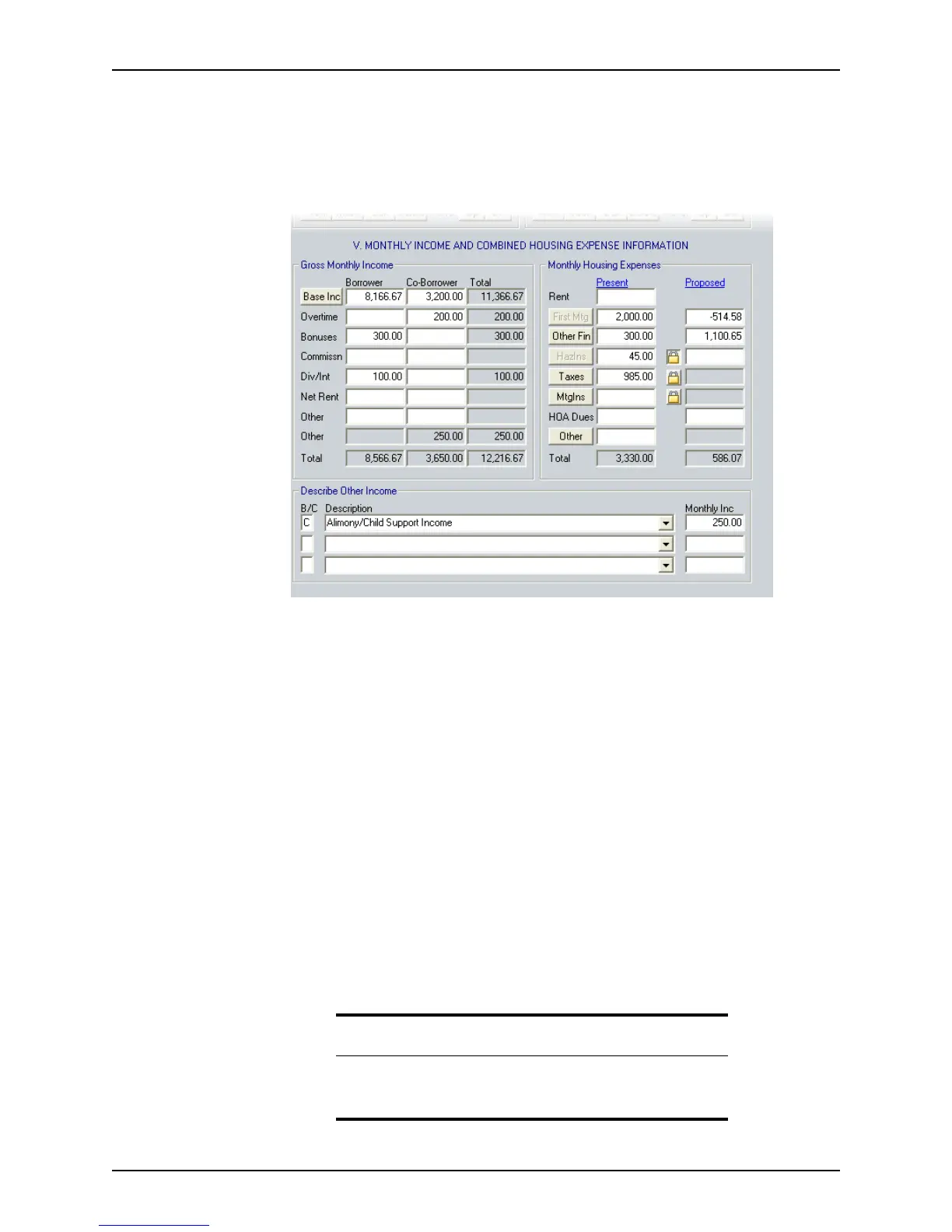
Entering income and housing expenses
To enter income and housing expenses:
1 Open page 2 of the
Loan Application and go to Section V. Monthly Income and
Combined Housing Expense Information
.
2 Enter the primary borrower’s monthly gross income in the
BaseInc field.
If the borrower’s income is based on an annual, semi-monthly, bi-weekly, weekly, or
hourly rate, convert it to a monthly rate by using the monthly income calculator. Click
the Base Inc button to open the
Monthly Income Calculator.
a Select the period that the income in
Amount field represents from the Period
dropdown list.
b Enter the gross amount that is earned for that period.
The
MonthlyIncome field is populated with the calculated monthly amount.
c Click OK to populate the
BaseInc field.
3 Enter the monthly income from
Overtime, Bonuses, Commissn, and Div/Int. Enter
these values as averages (usually over two or three years).
NetRent, if applicable, is calculated from property information that is entered in the
Schedule of Real Estate Owned.
4 Repeat the process for the co-borrower.
5 Enter additional income in the
Other field and in the Describe Other Income section.
a Enter
B or C to indicate whether the income is for the borrower or co-borrower.
Important
If you do not specify whether the other income is earned by the borrower
or co-borrower, the
Other fields are not populated with the total other
income.



 To Next Page