Point User Guide 103
Entering employment information
3 If the borrower or co-borrower has been employed by their current employer for less
than two years and the information was not populated from the
Verification of
Employment/Income
screen, complete the Additional Current and Former
Employers
section.
To add a current or former employer to the list:
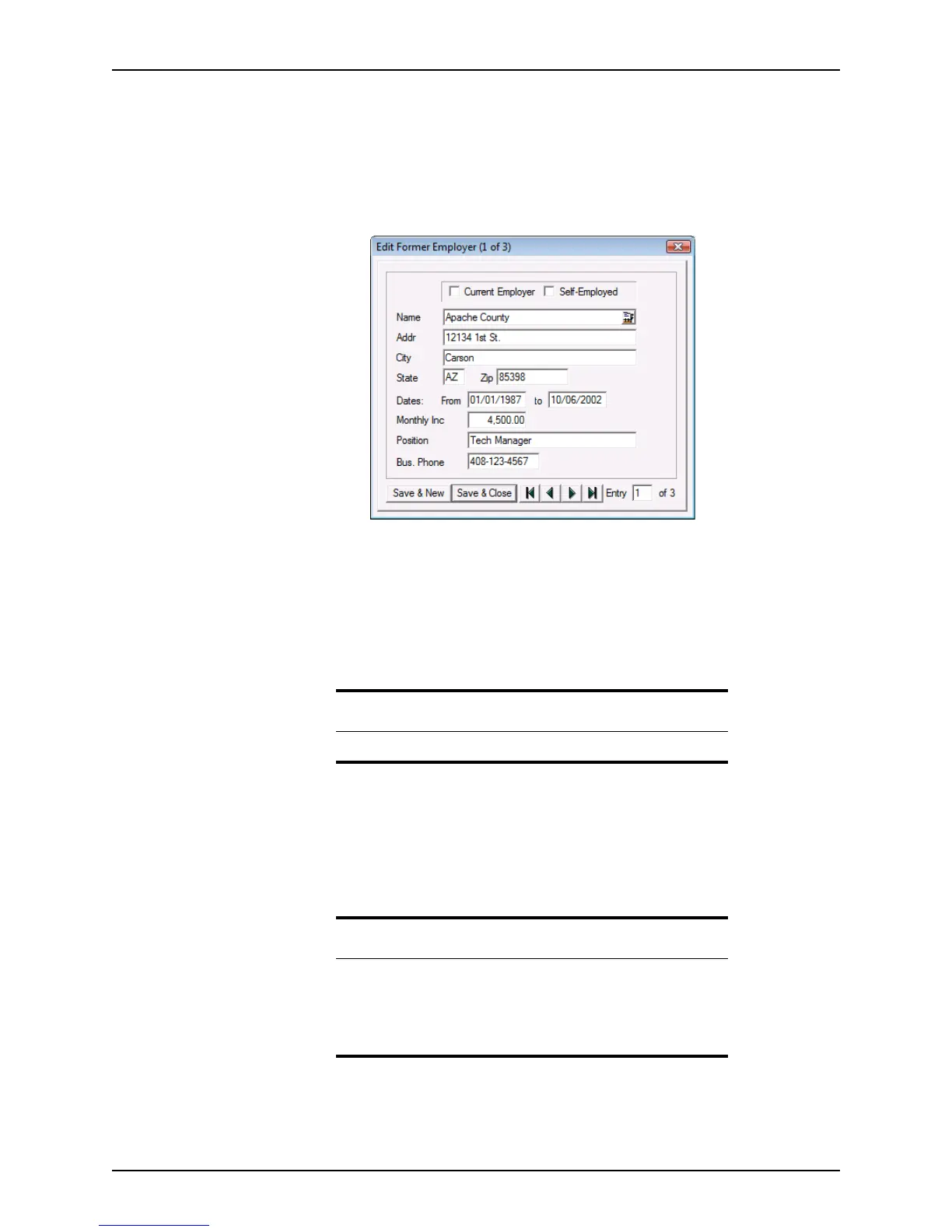
a Click New to open the
Edit Former Employer dialog box.
b Enter the borrower’s previous employment information.
If a borrower or co-borrower has more than one current employer, select the
Current Employer check box to indicate that the borrower is still employed with
the company.
If the borrower was self-employed, select the
Self-Employed check box.
To enter multiple employers, click Save & New after each entry.
Use the arrow buttons to navigate between entries in the
Edit Former Employer
dialog box.
c When you are finished entering employers, click Save & Close.
Use the Insert, Edit, and Delete buttons to add, change, or remove entries. Use
the Up and Dn buttons to move entries up or down in the list.
Note
The employer list can contain a maximum of eight employers.
Related information
• Refer to Chapter 8, Verifications, for more information about the
Verification of Employment screen.
• Refer to VOE/VOI reports, on page329, for more information about
submitting a verification of employment request in Point and
populating the employment fields.



 To Next Page