Point User Guide 63
Naming files automatically
Naming files automatically
Use the Auto File Naming option to enable Auto File Naming and to specify the
parameters that Point will use when Auto File Naming is enabled. Assigning automatic
names to files prevents the accidental overwriting of filenames. You can specify different
parameters for borrower and prospect files.
The interface to set auto file naming for prospects and borrowers is the same. Borrower is
used to illustrate the process in the following example:
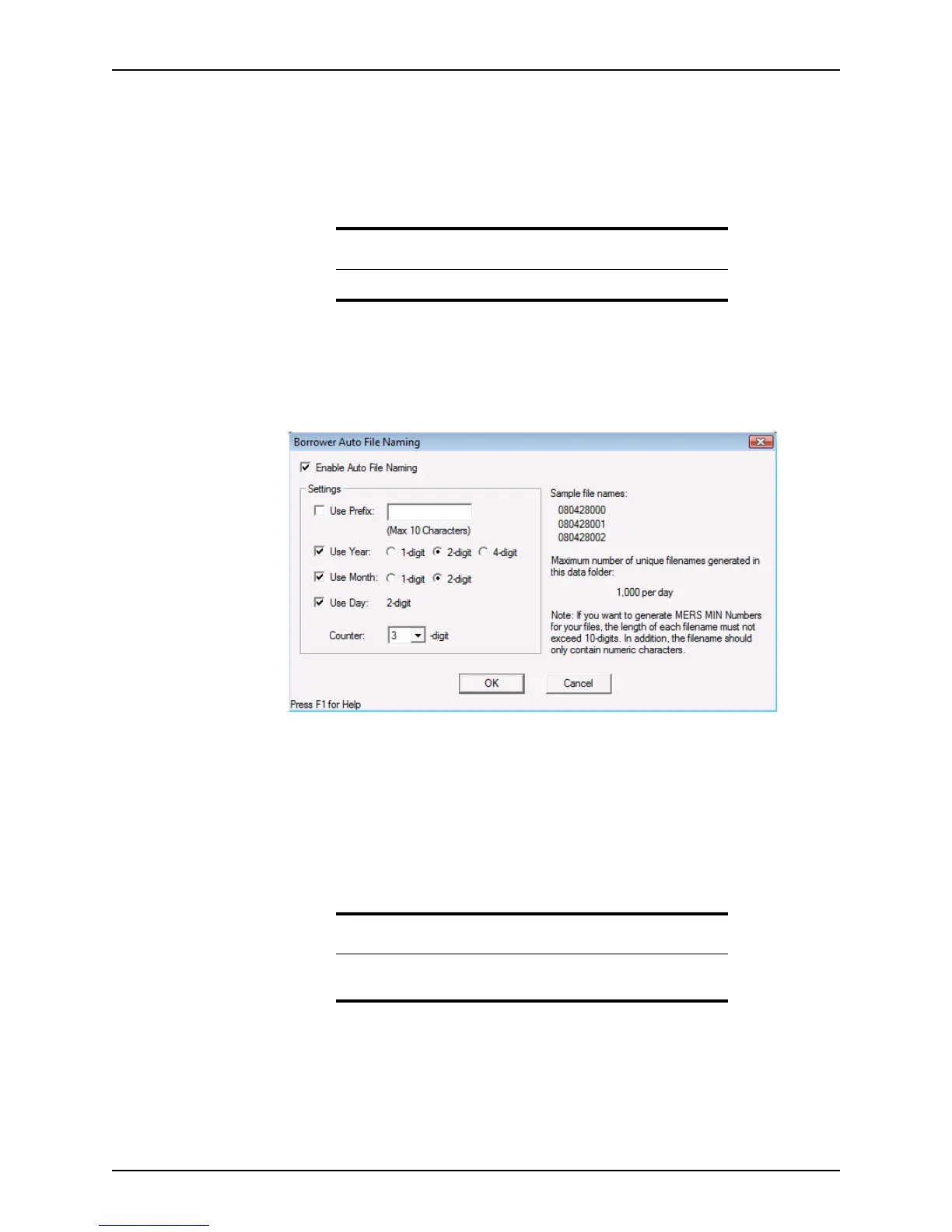
1 Select Utilities > Auto File Naming > Borrower.
The
Borrower Auto File Naming dialog box is displayed.
2 Select the Enable Auto File Naming check box.
3 To include a custom prefix in your file names, select the
Use Prefix check box and
enter a numeric prefix of up to 10 characters.
4 Specify the date settings.
a To use the date or partial date in your file name, select the corresponding check
box for
Year, Month, and Day.
b Select
1-digit, 2-digit, or 4-digit to specify the format for the year and month.
Requirement
You must enable Auto File Naming to import a batch of files into Point.
Requirement
For Auto File Naming to function properly, the prefix must be numeric
and the 2-digit option must be selected for the month parameter.



 To Next Page