Point User Guide 141
Disclosures
c Click Calculate.
The monthly payment, interest rate, index rate, and other fields associated with
each loan type are automatically populated.
d If the loan has a balloon payment, select the
Balloon check box.
The
FinalBalloonPmt field is automatically populated. If the 1stPmtDate field is
completed on the
Good Faith Estimate, the EstimatedDueDate field is also
automatically populated.
e If the loan is based on limited or no documentation of the borrower’s income,
select the corresponding check box.
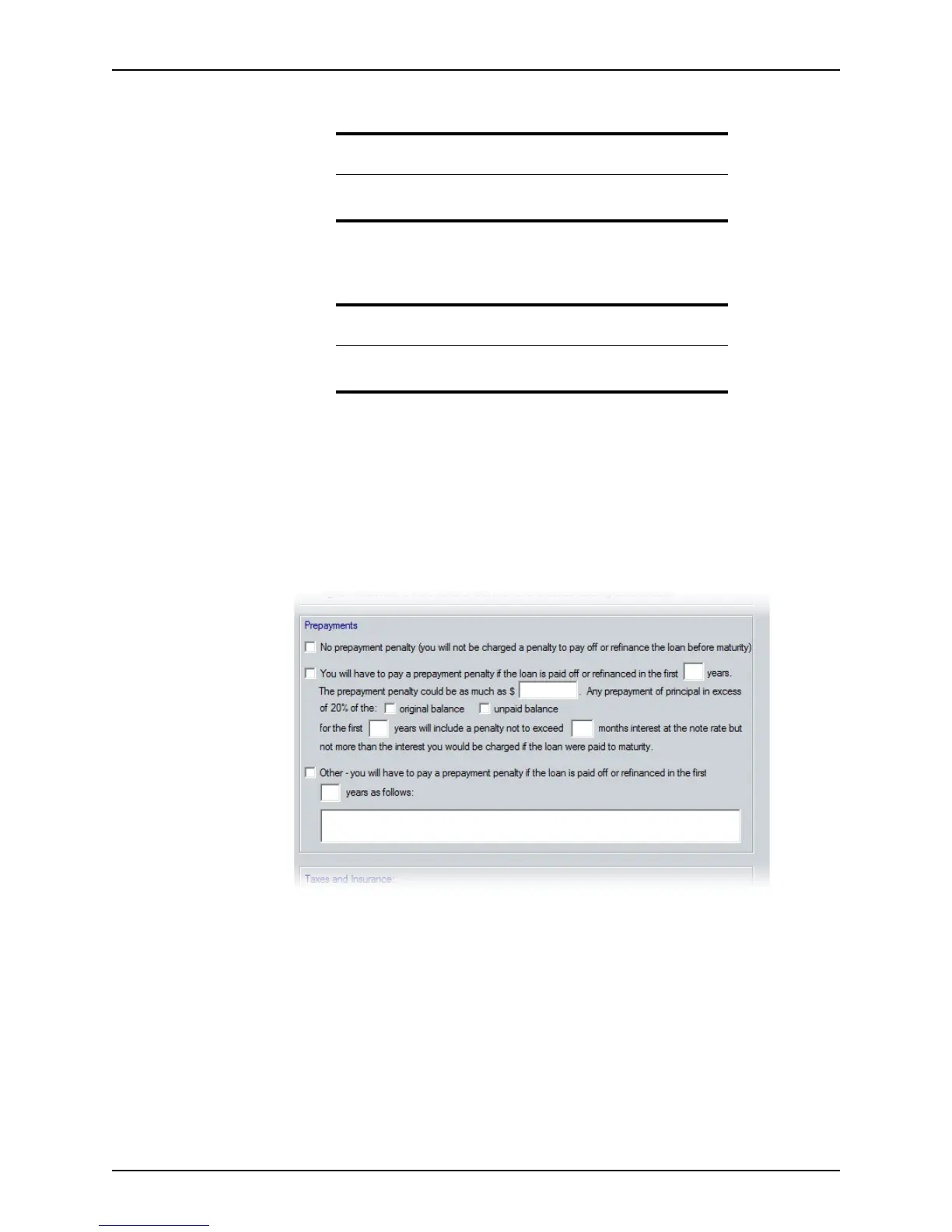
7 Select one of the following options in the
Prepayments section:
• If no prepayment penalty is associated with the loan, select the No prepayment
penalty option.
• If the loan is paid off or refinanced earlier than a specified number of years, select
the Prepayment penalty option and enter the following information:
– the number of years that must pass before the loan can be paid without
incurring a penalty
– the amount of the penalty if the loan is paid off early
– whether the penalty is assessed on the unpaid loan balance or the original
loan balance
– the maximum number of months of interest the penalty cannot exceed
Tip
The Calculate button is located on the command bar at the bottom of
the workspace.
Attention
Even though the fields for all options are calculated on the screen, only
the calculations for the selected option are included on the printed form.



 To Next Page