164 Calyx Software
Disclosures and other forms
b Select the applicable check boxes in the Project Classification, Occupancy, and
Property Rights sections.
c Complete any other fields that were not prepopulated.
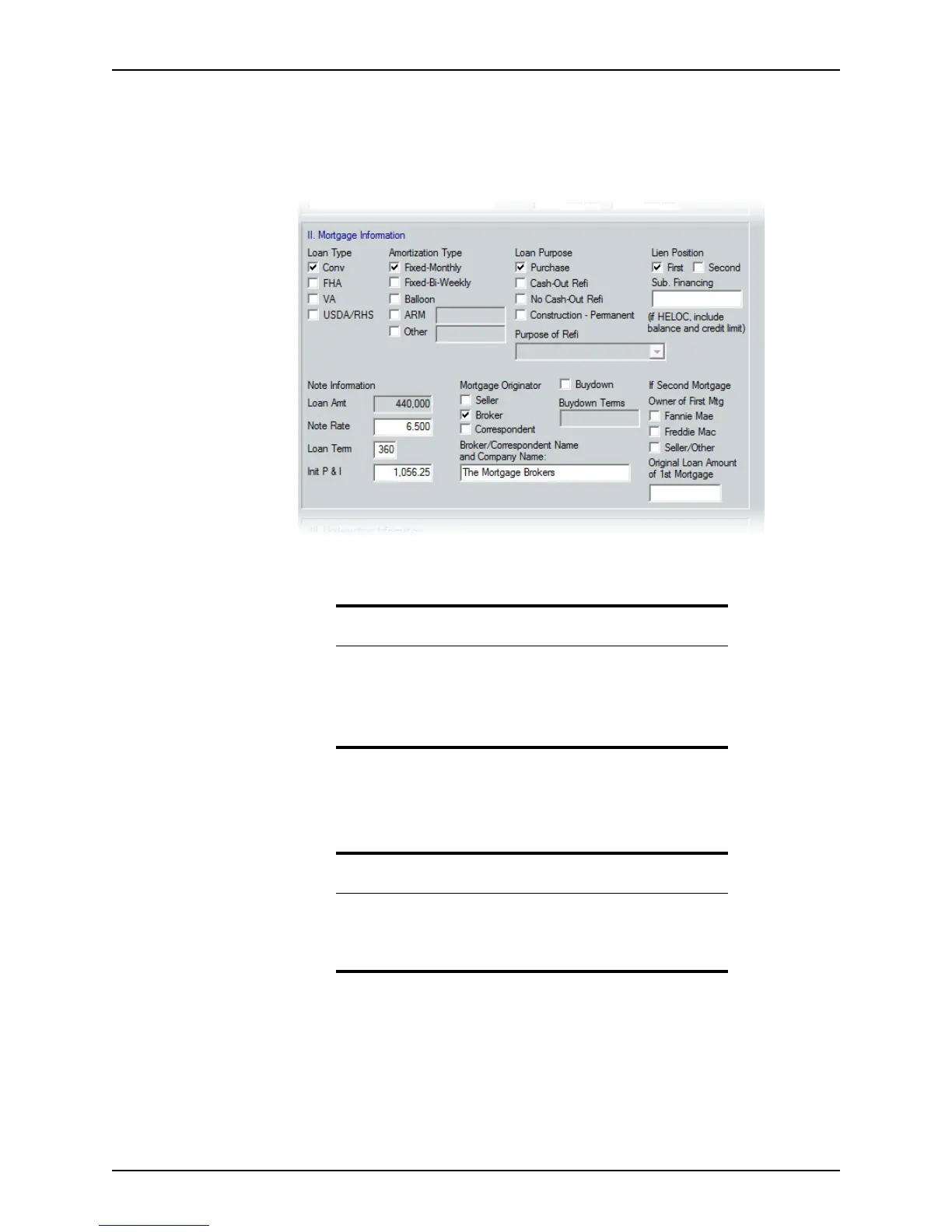
4 Complete the
Mortgage Information section.
The
Loan Type, Amortization Type, Loan Purpose, and Lien Position sections should
be populated from the
Loan Application.
a If the lien position is
First, enter the amount of subordinate financing in the Sub.
Financing
field. If the loan is a HELOC (Home Equity Line of Credit), enter the
actual balance and the credit limit.
Recommendation
The loan and amortization types are automatically populated from other
screens.
If there is a second mortgage on the subject property, enter the
information in the
If Second Mortgage section. This information is used
to determine the loan program eligibility.
Attention
If you are using the Combined Transmittal Summary, many fields are
grayed out because the values are populated from the primary
borrower’s and co-borrower’s combined Transmittal Summaries. To add
or change a figure, modify the individual Transmittal Summary.



 To Next Page