Point User Guide 331
Services
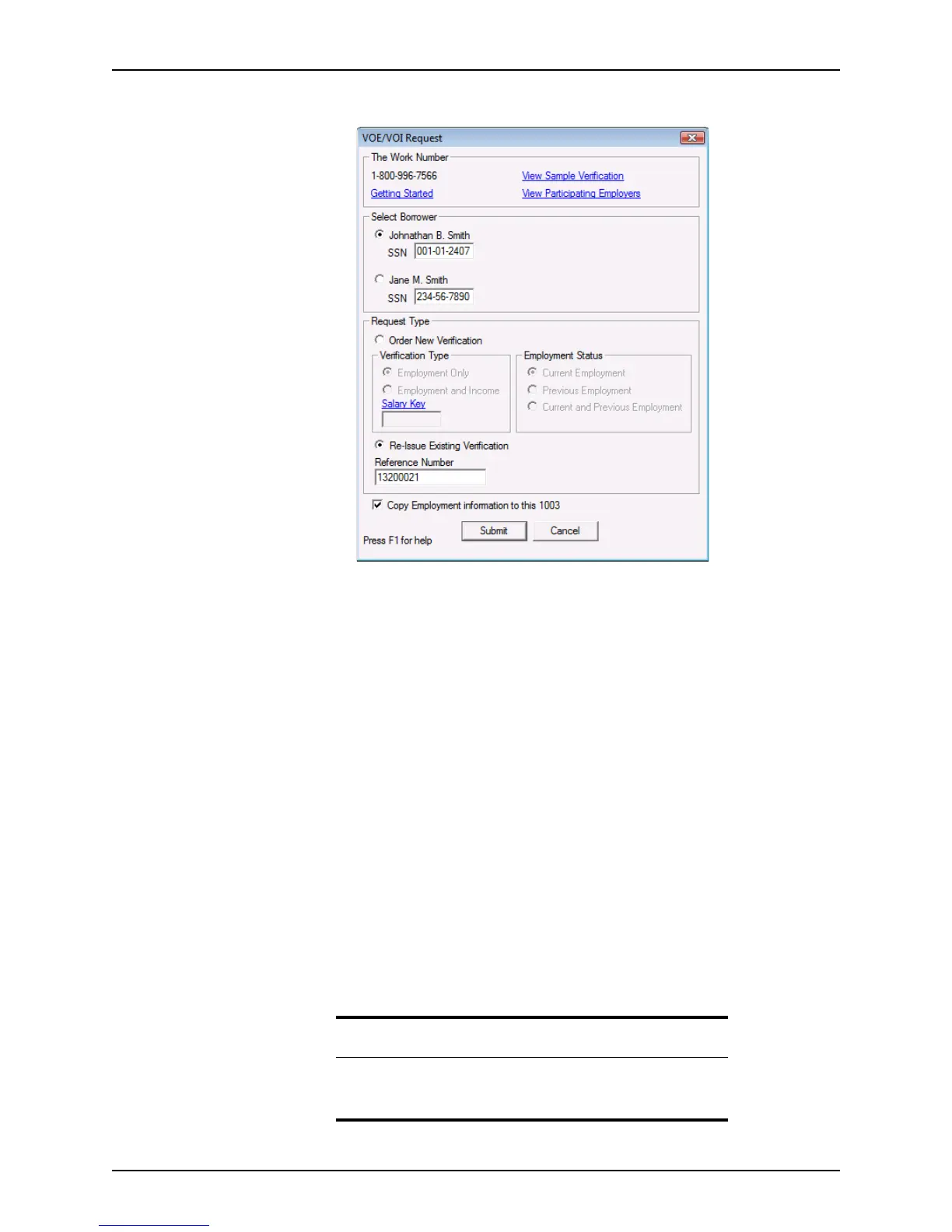
The VOE/VOI Request dialog box is displayed.
2 In the
Select Borrower section, select whether the VOE/VOI is for the borrower or co-
borrower.
3 To order a new verification, select
Order New Verification.
To re-issue an existing verification, select
Re-Issue Existing Verification. The
ReferenceNumber field is populated with the reference number from the previous
request. This option is the default selection when a previous request has been made
for the borrower.
4 Select the verification type:
•Employment
• Employment and Income
5 Select the employment status:
• Current Employment
• Previous Employment
• Current and Previous Employment
6 If you are requesting income verification, enter the borrower’s salary key.
You must enter this information for a verification of employment or income.
7 Select the
Copy Employment information to this 1003 check box to populate the
employment information in the loan file.
Tip
You can also populate the Loan Application by clicking the Populate
Emp. button on the Verification of Employment (VOE) screen and
page 2 of the
Loan Application.



 To Next Page