Point User Guide 71
Loan file creation
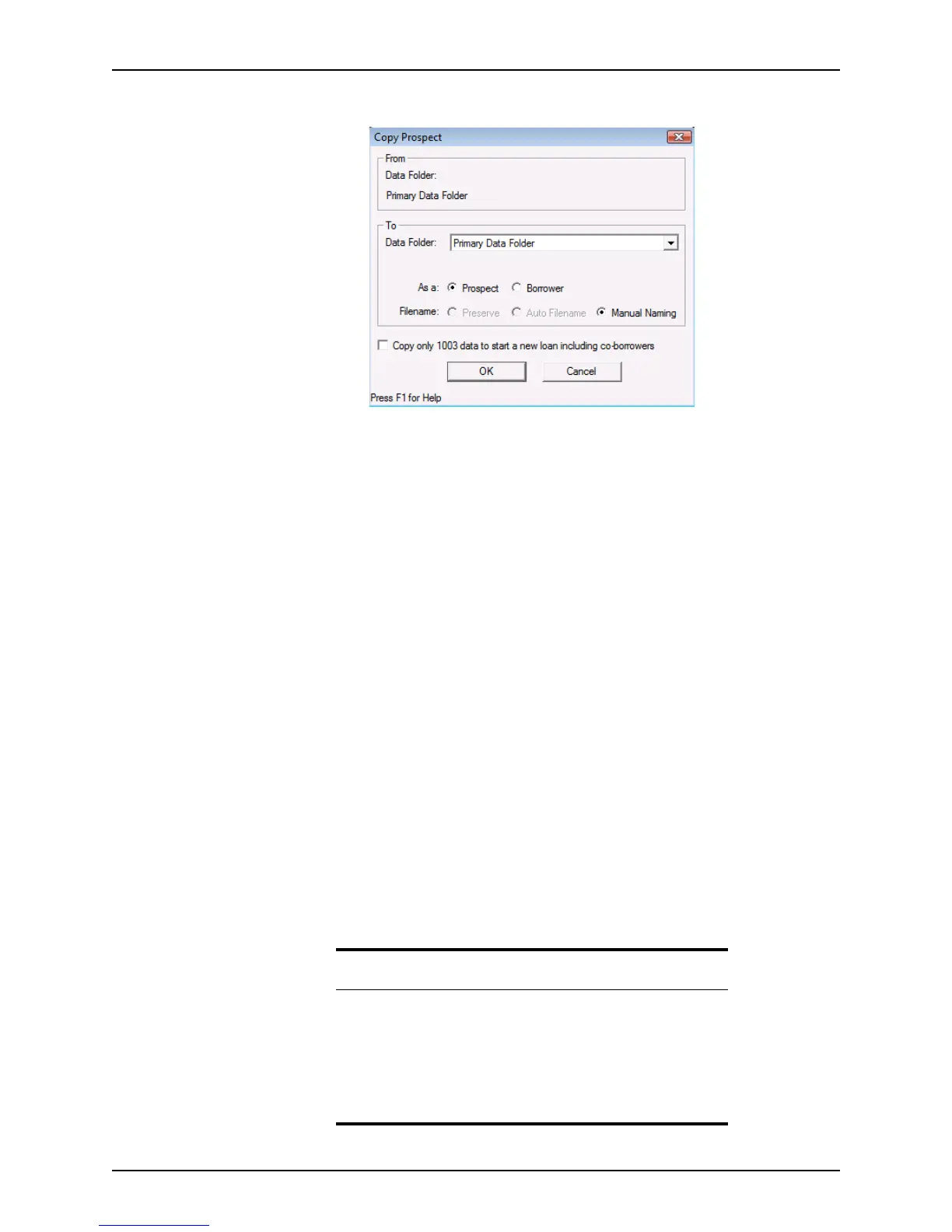
The Copy Prospect (or Copy Borrower) dialog box is displayed.
4 Select a data folder, the file type (
Prospect or Borrower), and specify one of the
following file naming conventions:
Preserve
Retains the original file name. This option is available only if you are copying a
borrower file from a prospect file, or a prospect file from a borrower file.
Auto Filename
Use the automatic file naming convention that is specified for the selected data
folder.
Manual Naming
Enter a name of your choice in the
Rename File dialog box, which is displayed
when you click OK.
5 To copy only the
Loan Application, check the Copy only 1003 data to start a new
loan including co-borrowers
check box.
In addition to the
Loan Application, the following items are duplicated in the new
loan when this option is selected:
• User-defined miscellaneous items
• Due date calculations that are defined in the Miscellaneous Items section of the
Status and Checklist screen
• The loan representative who is identified in the Borrower Information screen
• The processor who is identified in the Borrower Information screen
6 Click OK to complete the copy process and click Yes when prompted to confirm the
copy.
Related information
• For information about how to specify the auto file naming
parameters and enable auto file naming, refer to Naming files
automatically, on page63.
• Refer to Searching for prospect and borrower files, on page75, for
information about searching for loan files.
• Refer to Chapter 10, Loan tracking, for information about the loan
checklist, basic documents, and miscellaneous items.



 To Next Page