20.PROFINET COMMUNICATION
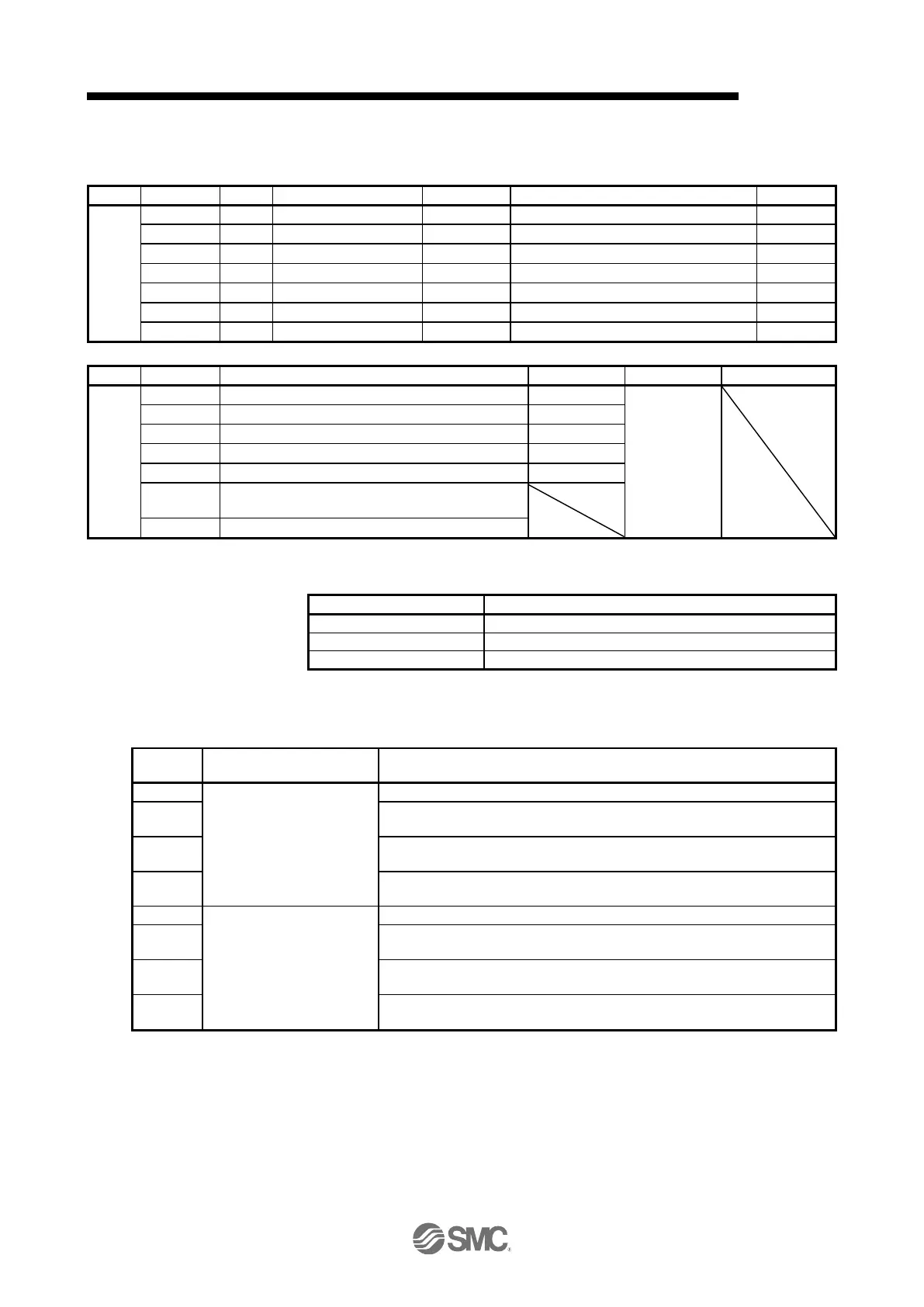
(4) Point table (P10241 to P10495)
Register the positioning data to the point table.
Acceleration time constant
Deceleration time constant
00000000h to instantaneous permissible speed
00000000h to 00004E20h (0 to 20000)
00000000h to 00004E20h (0 to 20000)
00000000h to 00004E20h (0 to 20000)
00000000h to 00000003h, 00000008h to 0000000Bh
(0 to 3, 8 to 11)
00000000h to 00000063h (0 to 99)
The settable values in Point data vary depending on the setting of [Pr. PT01].
FFF0BDC1h to 000F423Fh (-999999 to 999999)
FFF0BDC1h to 000F423Fh (-999999 to 999999)
FFF0BDC1h to 000F423Fh (-999999 to 999999)
When "1"or "3" is set in Auxiliary of the point table No. 255, bit 6 in the Point table error factor (P10819: 1)
turns on and an error occurs. The following shows the description of the values to be set in Auxiliary.
Point table command method
Absolute value command
method
Automatic operation for a selected point table is performed.
Automatic continuous operation is performed to the next point table without a
stop.
Automatic continuous operation is performed without a stop to the point table
selected at start-up.
Automatic continuous operation is performed without stopping a point table No.
1.
Incremental value command
method
Automatic operation for a selected point table is performed.
Automatic continuous operation is performed to the next point table without a
stop.
Automatic continuous operation is performed to the point table selected at the
start.
Automatic continuous operation is performed without stopping a point table No.
1.


 To Next Page
 Loading...