248 Calyx Software
Banker functions
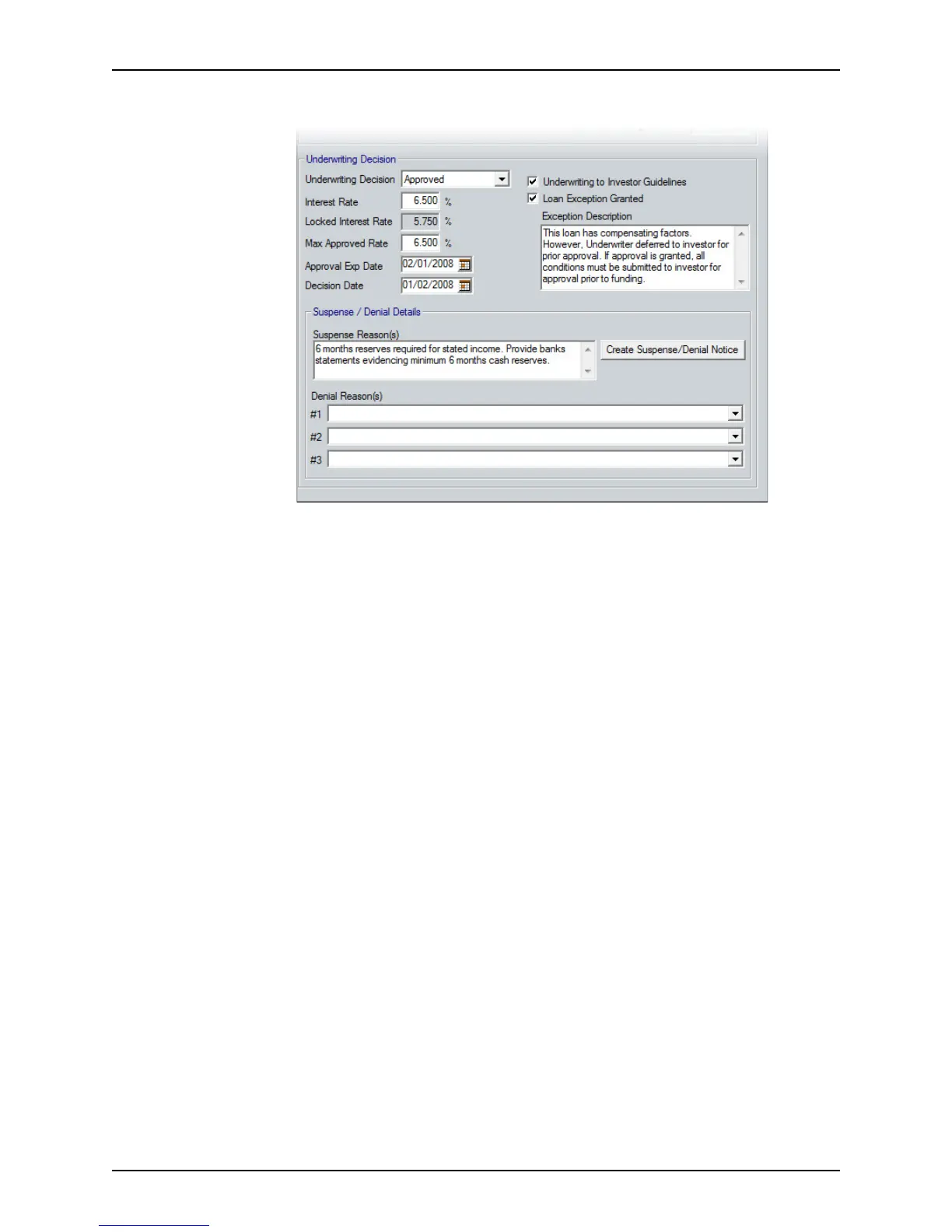
8 Complete the Underwriting Decision section.
a Select your decision from the dropdown list.
The
DecisionDate field is automatically populated.
• If you approved the loan, enter the maximum interest rate that is approved
and the date that the approval expires in the
MaxApprovedRate and
ApprovalExpDate fields.
• If for some reason you are unable to approve the loan immediately, select
suspended from the dropdown list and specify the reason in the
Suspense
Reason(s)
field.
• If you deny the loan, specify up to three HMDA-compliant reasons for the
denial from the Denial Reason dropdown lists.
When the
DecisionDate field and the Suspense/Reason(s) or the DecisionDate
field and at least one of the
DenialReason(s) fields are completed, the Create
Suspense/Denial Notice button becomes enabled.
b If the loan was suspended or denied, click the Create Suspense/Denial Notice
button.
The Suspense/Denial Notice is generated and is automatically added to the
document repository.
The
Email Document dialog box is displayed. The FileName field is
prepopulated with the document name.
c To e-mail the document, keep the default file name or enter a new name and click
OK.
To cancel the e-mail request, click Cancel.
d Select the
Underwriting to Investor Guidelines check box if the loan conforms to
the investor guidelines.
e Check the
Loan Exception Granted check box if an exception was made to the
program guidelines that might be subject to added conditions or pricing add-ons.



 To Next Page