424 Calyx Software
Tasks
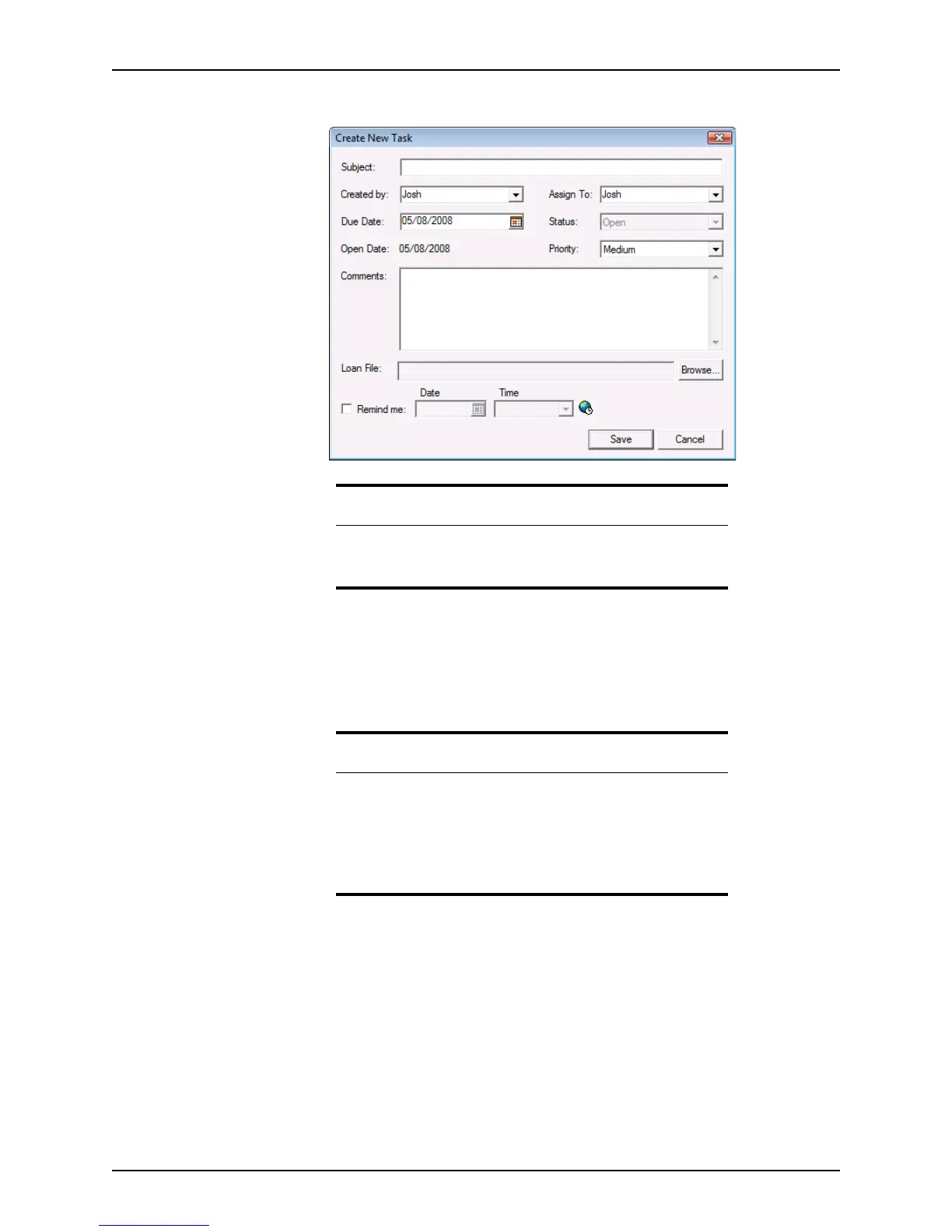
The Create New Task dialog box is displayed.
3 Enter a brief description (60 characters or less) of the task in the
Subject field.
4 Select your name from the Created by dropdown list.
5 Select the person who is responsible for completing the task from the Assign To
dropdown list.
6 Enter the date the task is due in the
DueDate field or select it from the calendar.
The default status is Open and the
OpenDate field is automatically filled with the
current date.
7 Select
High, Medium, or Low from the Priority dropdown list.
8 Enter any additional information about the task in the
Comments field.
Tip
You can also access the Create New Task dialog box from an open loan
file by clicking the New Task icon or selecting Utilities > Show Tasks
and clicking the New button.
Attention
In an unsecured environment, the Createdby and AssignTo fields
automatically populate from the representative and processor lists,
respectively, that were established in the dropdown list utility.
In a secured environment, the
Createdby field defaults to the logged in
user and the
AssignTo field populates based on the settings in Point
Administrator.



 To Next Page