System User Interface
GARD 8000 SYS RFL Electronics
August 1, 2012 5-24 973.334.3100
5.5.6 TSD PUSH BUTTON INTERFACE CONFIGURATION
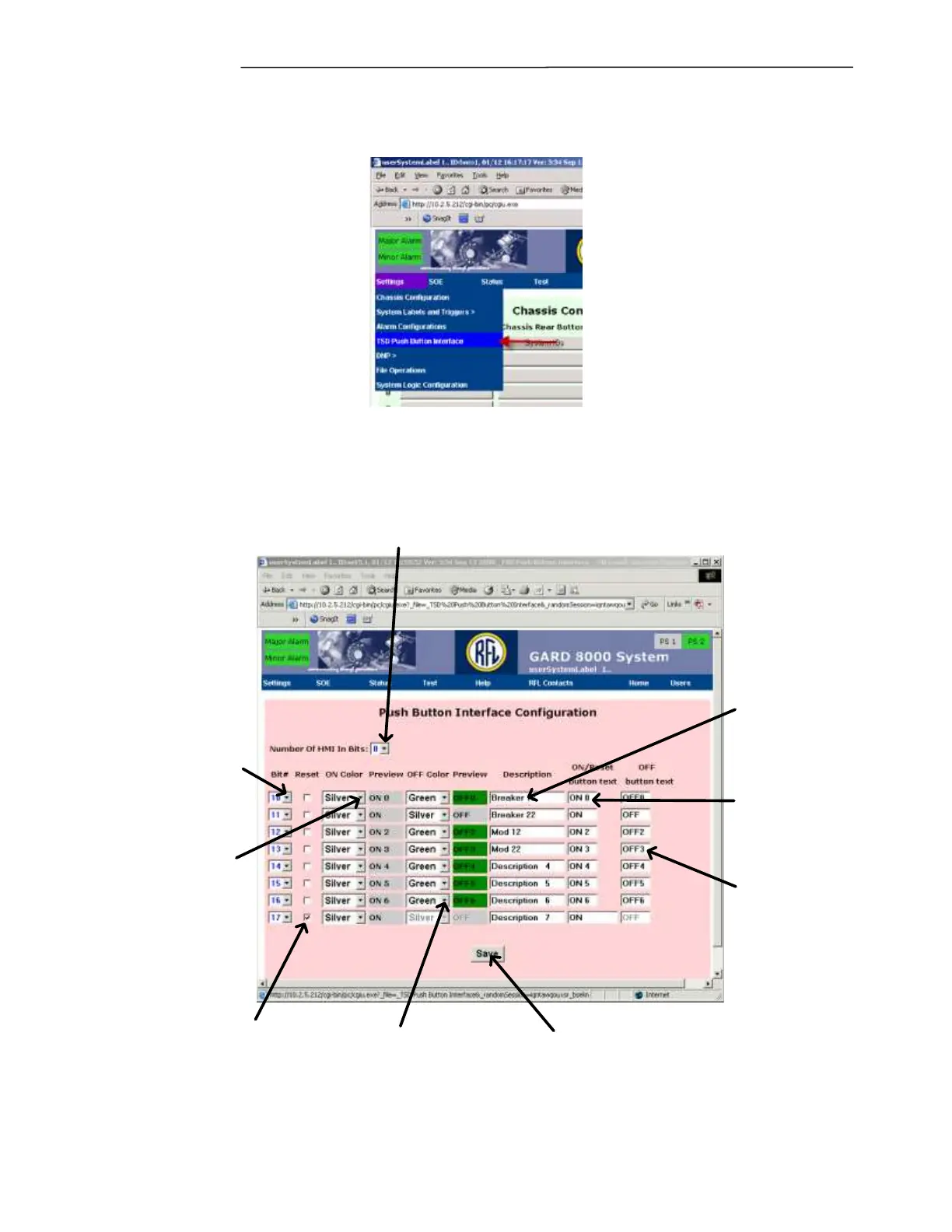
From the pull down menu on your PC select “Settings” > “TSD Push Button Interface.”
The following web page will appear. This web page will allow the user to configure which input bits
appear on the “Push Button Interface.” Up to 8 HMI input bits can be configured. Click “Save” after
configuring the web page.
Selects the HMI
input bit number
Sets the color to
display the ON buttons
as or reset if checked
ON = logic value 1
Sets the color to
display the OFF
buttons as
OFF = logic value 0
Sets the title of the
buttons that will be
seen on the TSD
Selects the number of HMI "In Bits" that are to
be manipulated on the "Push Button Interface",
selecting enables the remaining options
When checked this
will appear as a
single reset button
on the TSD
Sets the text that
appears inside the
'ON' button or
Reset, if reset is
checked
Sets the text that
appears inside the
'OFF' button.
Check after configuration
is complete
Figure 5-18. TSD Push Button Interface Configuration.



 To Next Page