System User Interface
GARD 8000 SYS RFL Electronics
August 1, 2012 5-29 973.334.3100
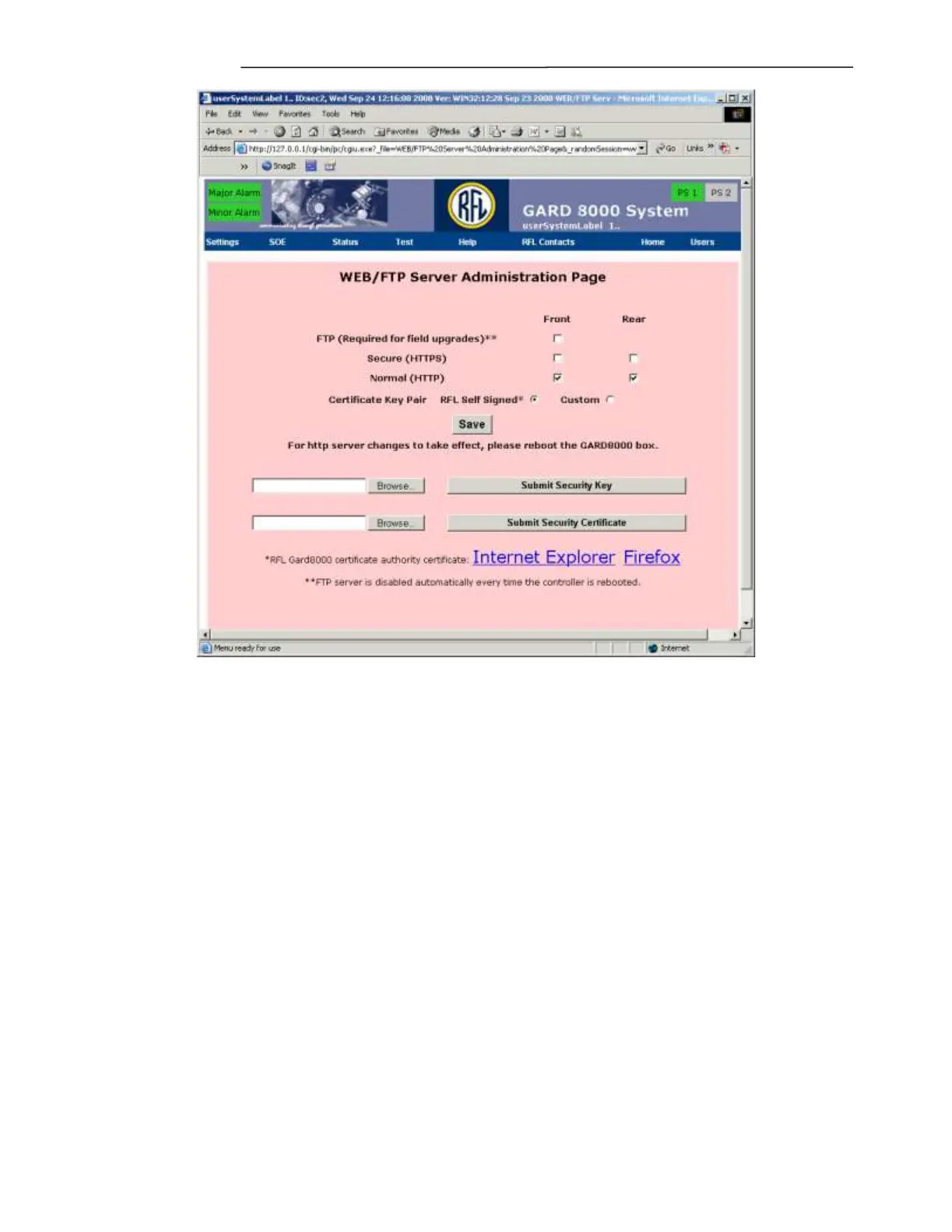
Figure 5-23. WEB/FTP Server Administration Page
FTP Server
This will enable or disable the File Transfer Protocol server on the GARD’s front Ethernet port. This
will be disabled by default, and is disabled on every power-cycle or reboot of the GARD 8000
controller module regardless of the setting. Enabling the FTP server will only last until the
controller reboots. Before a field upgrade is possible the FTP server must be enabled, it will be
disabled during the upgrade process since power cycling is required.
Overview –HTTP vs HTTPS
The GARD 8000 web server can be configured to use either hypertext transfer protocol (http) by itself
or https over a secure sockets layer (https), http is the default. When using http without a secure
sockets layer the entire web page and form content is sent in clear text. Passwords and usernames are
obscured to prevent the casual user from seeing them in packet captures, but this is by no means
secure. When using https all traffic between the browser and server is encrypted.
The server on the GARD 8000 may be configured to listen to http requests, https requests, both or none
for front and rear Ethernet ports independently. The option to listen to none or turn off the server is
available only for the rear port. The front port must be configured for at least one protocol.


 To Next Page