GARD DNP Configuration and SNMP Trap Agent
GARD 8000 SYS RFL Electronics
April 23, 2015 16-18 973.334.3100
2. Locate the GARD ID number as shown. Contact RFL or an RFL sales representative with
this number.
3. RFL will use this unique ID to generate a ‘Feature Key’ to unlock the SNMP Trap Agent.
The SNMP Key and Redundant Key (if a second controller board is present on the GARD)
will be given to the customer for insertion into the ‘System Configuration’ web page.
16.5.2 SNMP TRAP RECEIVER CONFIGURATION
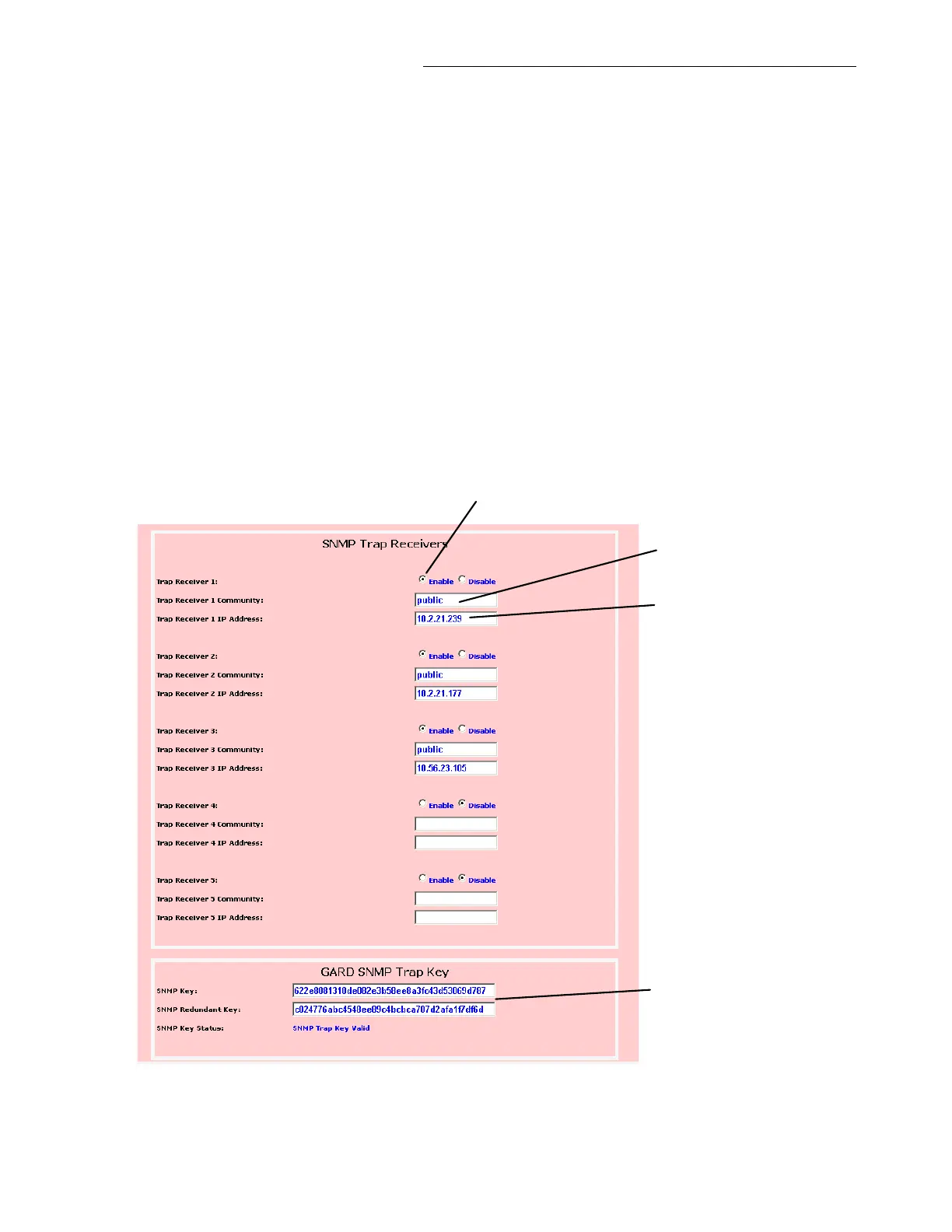
The SNMP Trap Receivers are configured on the ‘System Configuration’ web page. Go to Settings >
System Labels and Triggers > System Configuration; the SNMP Trap Receivers are located in the
bottom third of the web page as shown below.
If necessary, insert the ‘Feature Key(s)’ supplied by RFL, no restart is necessary, however the screen
may need to refresh more than once before the ‘SNMP Trap Key Valid’ message is displayed. This
web page will allow up to 5 monitoring computers access to the Trap Agent.
Check to enable Trap Receiver
IP address of monitoring
computer
Trap Key entry
Community name,
see note 1 below
Figure 16-13. SNMP Trap Receivers


 To Next Page