System User Interface
GARD 8000 SYS RFL Electronics
August 1, 2012 5-17 973.334.3100
5.3 CHASSIS CONFIGURATION STATUS PAGE
The first web page displayed is the ‘Chassis Configuration Status.’
3U Chassis:
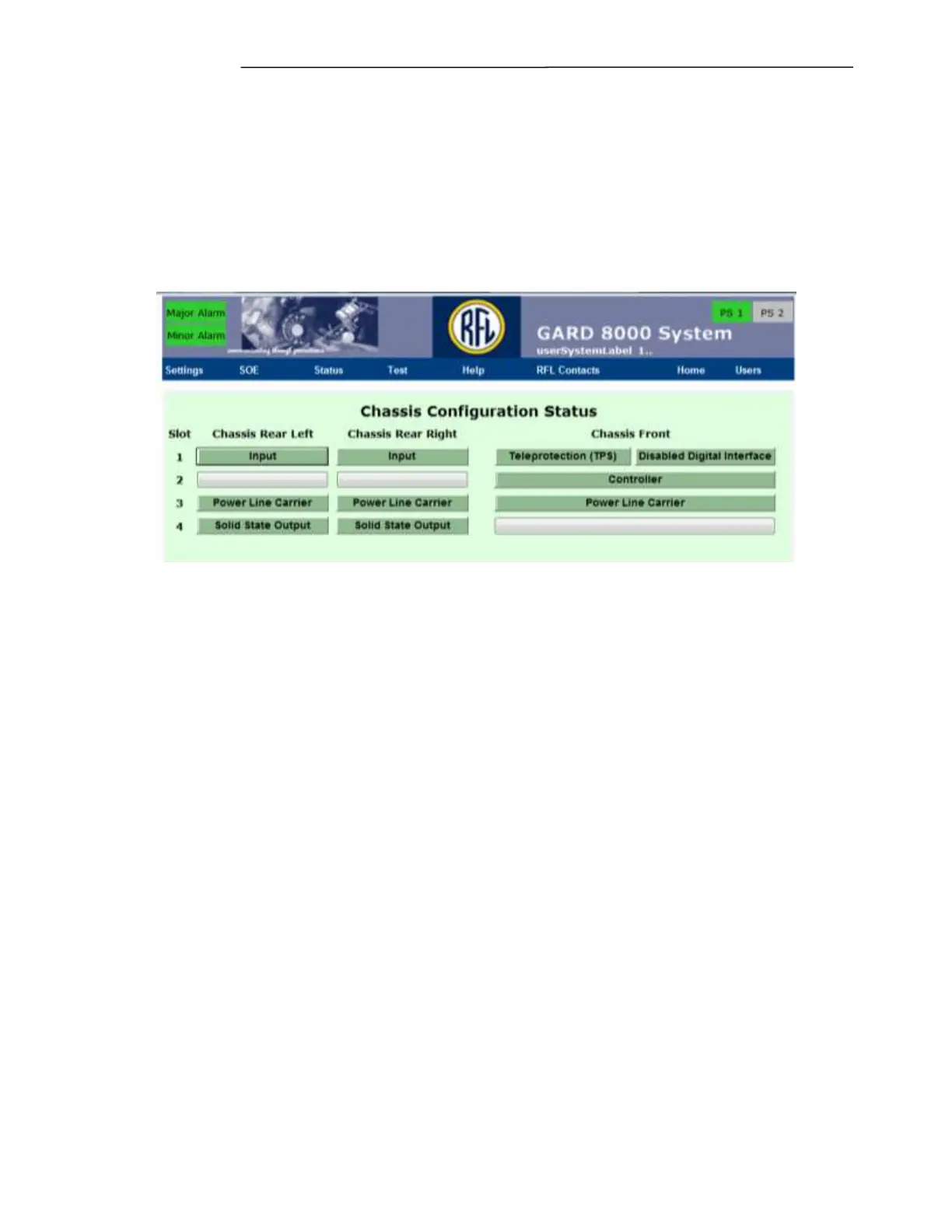
The Chassis Configuration Status page for the 3U chassis is shown below. This page is a pictorial
representation of the front and rear of the 3U chassis. The two left columns represent the rear of the 3U
chassis, and the right column represents the front of the 3U chassis.
Figure 5-10. Typical Chassis Configuration Status page for the 3U chassis
The boxes represent module locations. Boxes that have text in them indicate that a module is plugged
into that slot. Boxes without text indicate a blank slot.
6U Chassis:
The Chassis Configuration Status page for the 6U chassis is shown on the following page. This page is
a pictorial representation of the front and rear of the 6U chassis. The two left columns represent the
rear of the 6U chassis rotated 90 degrees to the left, and the right column represents the front of the 6U
chassis rotated 90 degrees to the left. To get a true representation of the rear of the 6U chassis you
must rotate the two left columns 90 degrees to the right. To get a true representation of the front of the
6U chassis you must rotate the right column 90 degrees to the right. This was done to simplify the
creation of this web page.



 To Next Page