Chassis Configuration Settings
GARD 8000 SYS RFL Electronics
April 1, 2012 7-42 973.334.3100
7.2.10.1 TIME SLOT SETTINGS FOR ASYNC COMMS MODULE
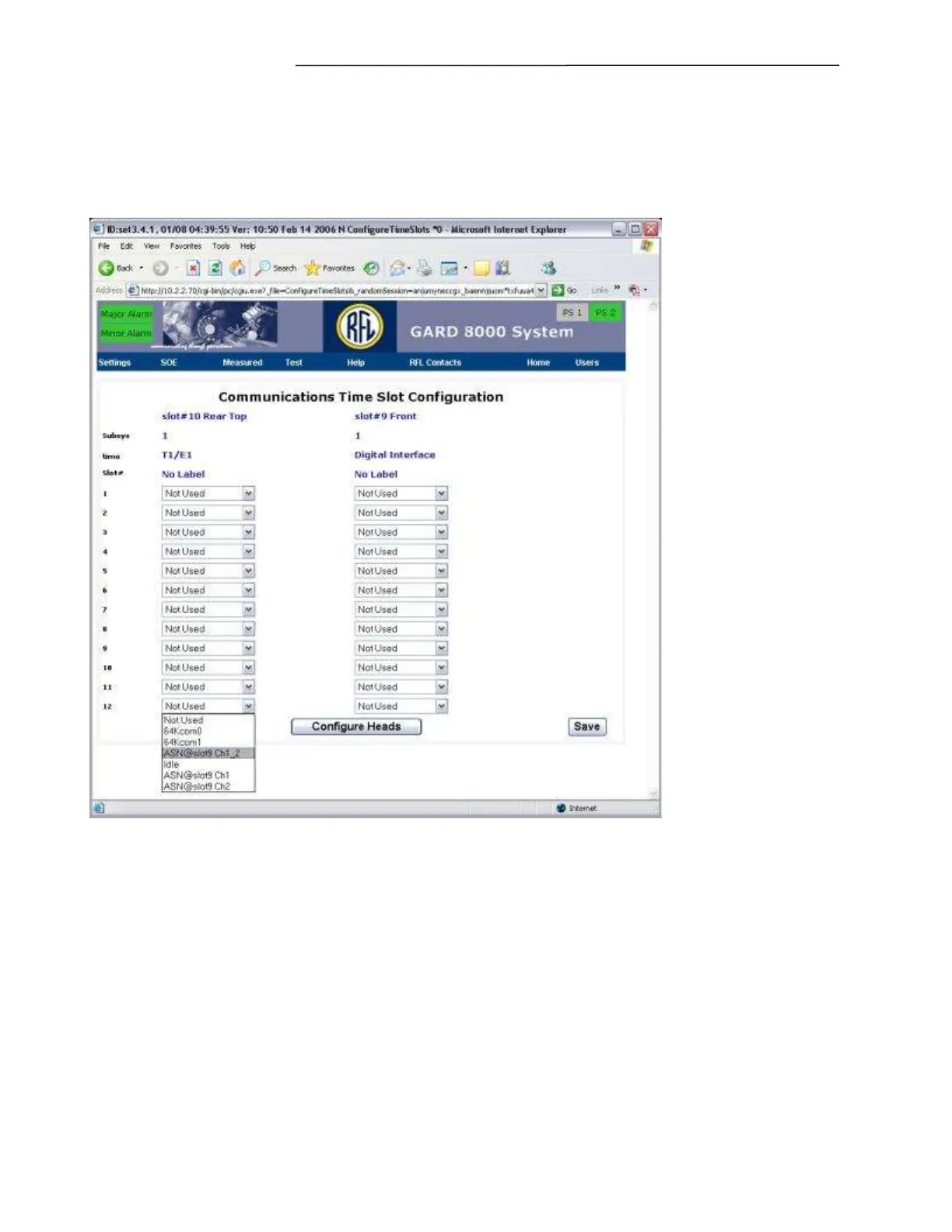
From the Configuration web page select the Communications Interface that is controlling the Async
Comms Module; for example the T1/E1 Electrical Interface. A web page similar to the one shown
below will appear.
Figure 7-26. Communications Time Slot Configuration web page for Async Comms Module
Using the pull down menus assign the Async Comms two channels to the desired interface’s timeslot.
Note the example below has the Async Comms Module physically located in slot 9.
The settings are as follows:
ASN@slot9 Ch1 Use for channel 1
ASN@slot9 Ch2 Use for channel 2
ASN@slot9 Ch1_2Use for channel 1 and 2 on the same timeslot
Note: To switch the same timeslot from using Ch1, to using Ch2, you may have to select “Not Used”
or “idle” first.


 To Next Page