Home
Autodesk
Software
ALIAS 2010
Page 529 (Creating the Neck Surface)
Autodesk ALIAS 2010 - Creating the Neck Surface
746 pages
Manual
Save Page as PDF
To Next Page
To Next Page
To Previous Page
To Previous Page
Loading...
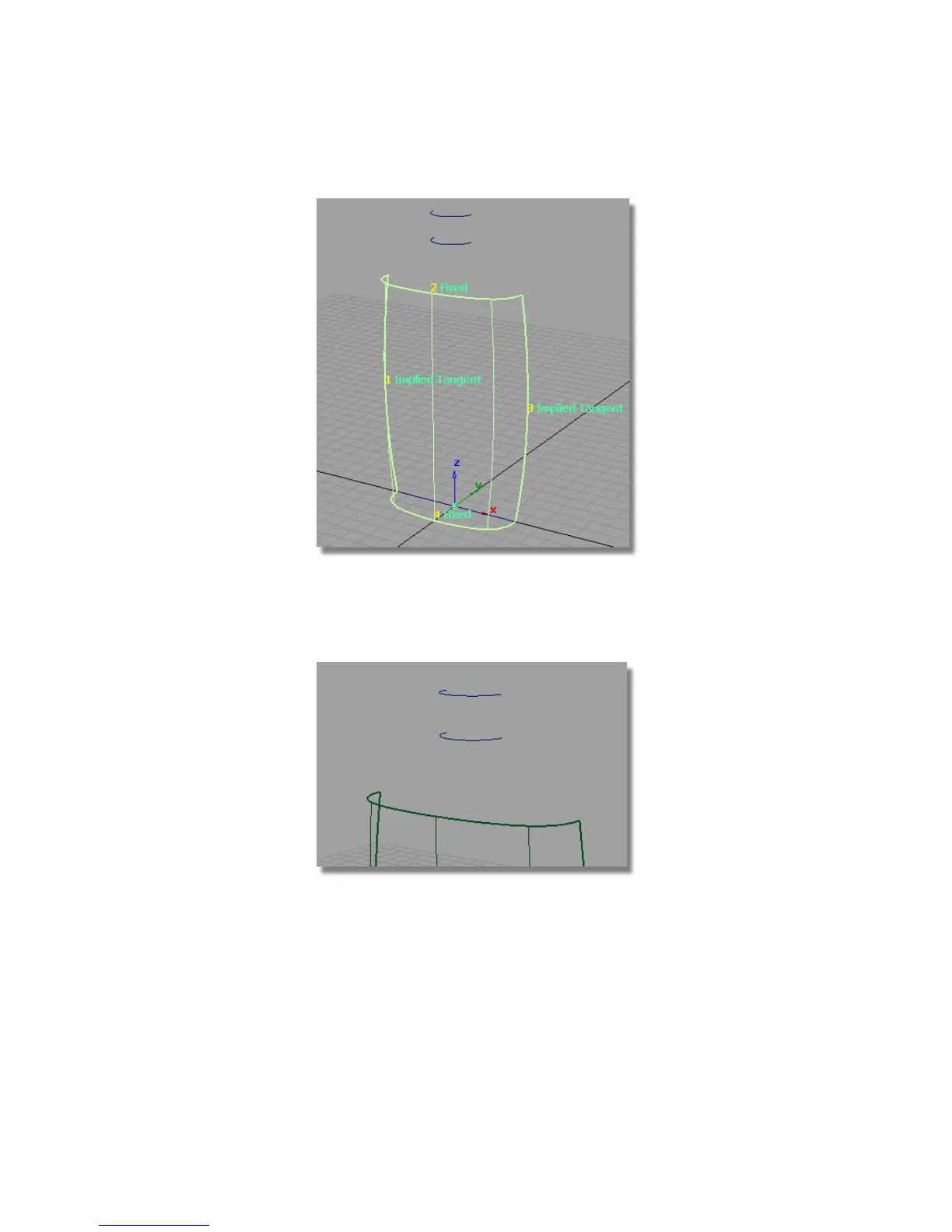
Creating the Neck Surface
1
Adjust the view to see the curves for the neck of the bottle.
2
Choose Surfaces > Skin and, when prompted, select the two neck curves
to create the neck surface.
Part 1: Creating Primary Surfaces |
523
528
530
Table of Contents
Main Page
Default Chapter
3
Table of Contents
3
Learning Alias
7
Q U I
8
About the Learning Alias Tutorials
9
Chapter 1 How to Use this Book
9
Graphic Conventions
10
For more Information
10
Terms
11
Q U I
11
Chapter 2 Getting Help on Alias
13
Finding Help on Alias Features
13
Q U I
13
Q U I
14
Finding Alias Training Resources
15
Q U I
15
Finding Support for Alias
16
Working with Alias
17
Chapter 3 Interface Basics
19
Interface Basics
19
Installing the Tutorial Courseware Files
19
Introduction
19
Learning Objectives
19
Logging in
20
Starting Alias
20
To Install the Courseware for Use with Alias
20
To Start Alias on Windows
21
Overview of the Alias Interface
23
Arranging Windows
24
Performing Menu Commands
24
Using Help
24
Window Controls
26
Closing Windows
27
Resizing Windows
27
Moving Windows
29
To Move and Arrange the Remaining Windows
29
Saving an Arrangement of Windows
32
To Orient Yourself in the Palette Window
32
Tool Basics
32
Using Tools
32
To Create a Primitive Sphere in the Scene
34
To Use Grid Snapping to Place a Primitive Cube
34
Using a Snap Mode
34
To Use the Palette Menu to Choose the Cone Tool
36
To Use Tool Options to Add a Half-Cylinder
37
Picking and Unpicking Objects
39
To Pick All and Pick Nothing
39
To Pick and Unpick Individual Objects
40
To Pick by Name
45
Shortcuts to Tools
46
Creating Custom Shelves
47
To Save the Initial Shelf Set
47
To Show and Hide the Shelf Window
47
To Clear the Existing Shelf Set and Create a New One
48
To Rename the Tools
51
To Change to the Small Icon Size
53
To Remove a Tool from the Shelf
53
Using and Customizing Marking Menus
54
To Choose Common Tools with Marking Menus
55
To Customize a Marking Menu with Common Tools
57
To Use Hotkeys
60
Using Hotkeys
60
Changing Your View of the Model
62
Tracking, Dollying, and Tumbling the Camera S View
62
To Use Look at to Center on an Object
67
Changing the Point of Interest
69
To Use the Point of Interest Manipulator
69
Using the Viewing Panel
73
To Use the Viewing Panel to Move between Different Views
73
To Set and Show Bookmarks
78
Understanding the Object Lister
82
Types of Nodes
82
Node States
83
The Object Lister Window
84
To View and Pick Using the Object Lister Window
84
Conclusion
86
Beginning a Model
87
Chapter 4 Introduction to 3D
87
Desk Lamp Modeling Strategy
87
Learning Objectives
87
Opening the Tutorial File
88
Part 1: Creating 3D Objects
93
Creating a Primitive Object
94
Placing Primitives in Views
94
What Are Primitives?
94
Creating the Lamp Stand
95
Scaling the Lamp Base
98
Saving Your Work
102
Saving Your Work in a Windows Environment
102
Saving Your Work in a Mac os X Environment
106
Aligning the Base to the Grid
108
Part 2: Building the Lampstand
108
Pivot Points
108
Duplicating the Cylinder
111
Create the Hinge Cylinder
118
Part 3: Organizing the Model
120
Using the Object Lister to Control Visibility
121
Grouping the Base Objects
122
Creating Geometry at the Origin
128
Making the Base and Arm Invisible
128
Part 4: Building the Lampshade
128
Creating the Light Bulb
130
Creating the Lampshade
132
Grouping the Lampshade
139
Part 5: Assembling the Desk Lamp
143
Positioning the Lampshade
143
Grouping the Lampshade and Arm
145
Part 6: Posing the Lamp Model
149
Using Diagnostic Shading
152
Conclusion
154
Quiz
154
On Your Own
156
Answers to the Desk Lamp Tutorial Quiz
159
Quiz Answers
159
Chapter 5 Modeling a Joystick
161
Introduction
161
New Tools Used in this Tutorial
162
New Menu Items Used in this Tutorial
163
New Control Panel Tools You will Use in this Tutorial
163
Part 1: Creating the Joystick Handle
163
Revolving the Handle Profile Curve
172
Modifying the Handle Curve and Surface
174
Part 2: Creating the Joystick Base
179
Creating the Base Outline Curve
180
Creating the Upper Curve for the Base
189
Creating the Top Curve for the Base
194
Creating the Base Surfaces
197
Opening the Tutorial File (Optional)
205
Part 3: Creating the Flexible Sleeve
205
Creating the Zig-Zag Curve
206
Part 4: Creating the Connecting Cable
217
Create the Cable Path Curve
218
Create the Cable Profile Curve
221
Create the Cable Surface
227
Part 5: Assigning Objects to Layers
229
Assigning Curves to a Layer
230
Assigning the Surfaces to Layers
234
Part 6: Directly Modifying Surfaces
238
Deleting Construction History
241
Sculpting the Base
243
Sculpting the Top of the Handle
251
Sculpting the Handle Angle
259
Part 7: Creating the Button
263
Creating a Primitive Sphere
264
Part 8: Visualizing the Model
270
Shading the View
271
Conclusion
278
On Your Own
280
Answers to the Joystick Tutorial Quiz
282
Chapter 6 Modeling a Vacuum Cleaner
285
Modeling Workflow
286
Part 1: Creating Primary Surfaces
287
Creating the Lower Surface
289
Creating the Upper Surface
295
Part 2: Intersecting and Trimming
300
Intersecting the Upper and Lower Surfaces
301
Trimming the Surfaces
306
Creating the Nozzle Surface
310
Part 3: Surface Fillet
314
Creating the Nozzle Fillet
322
Save Your Work
328
Part 4: Creating the Handle
329
Creating the Handle Surface
330
Creating the Handle Fillet
334
Part 5: Air Vents
340
Creating the Groove Surfaces
341
Intersecting and Trimming the Air Vents
346
Part 6: Power Button
353
Creating a Cylinder for the Power Button
354
Creating the Power Button
362
Creating the Power Button Hole
367
Part 7: Dust Bag and Cable Connector
371
Extracting the Body Shape
372
Trimming the Dust Bag Surfaces
376
Part 8: Completing the Model
391
Mirroring the Surfaces
392
Optional: Create the Power Cable
394
Optional: Trimming the Dust Bag and Connector
395
Conclusion
396
On Your Own
398
Quiz Answers
403
Chapter 7 Modeling an MP3 Player
405
Absolute and Relative Coordinates
407
Introduction
407
Modeling to Dimensions
407
X,Y,Z Coordinates
407
Keypoint Curves
408
The Information Window
408
Part 1: Creating the Casing Curves
409
Creating a New File
410
Setting up Modeling Units
411
Part 2: Creating the Side Surfaces
420
Creating the Split-Line
427
Part 3: Completing the Casing
431
Creating the Front Surface
432
Filleting the Plane Surface
437
Using Round for the Remaining Edges
440
Completing the Front Casing
442
Layer Symmetry
443
Creating the Rear Casing
446
Part 4: Creating the Screen Recess
448
Creating Offset Curves
450
Projecting the Screen Curves
457
Creating the Screen Surfaces
462
Part 5: Center Navigation Key
468
Navigation Key Curves
470
Revolving the Surfaces
473
Part 6: Control Button
476
Control Button Revolved Surface
478
Creating the Control Button Draft Surfaces
485
Trimming Curves
488
Creating the Draft Surfaces
492
Rounding Multiple Edges
496
Part 7: Completing the Model
499
Positioning the Buttons
504
Conclusion
511
On Your Own
512
Answers to the MP3 Player Tutorial Quiz
516
Chapter 8 Modeling a Sports Shower Gel Bottle
519
New Concepts
520
Continuity
520
Construction Tolerances
521
Part 1: Creating Primary Surfaces
522
Setting the Construction Tolerances
523
Creating the Main Bottle Surface
526
Creating the Neck Surface
529
Creating the Shoulder Surface
530
Aligning the Shoulder Surface
532
Part 2: Creating the Finger Grip
539
Making Space for the Grip Detail
540
Creating the Birail Surface
544
Creating the Base Surface
548
Part 3: Label Surface
550
Trimming the Label Area
551
Creating the Label Surface
556
Creating the Blend Surface
561
Part 4: Adding Blend Details
561
Creating the Generation Curves
562
Building a Birail Surface with Continuity
567
Part 5: Embossed Logo Details
575
Trimming the Body Surfaces
577
Creating the Offset Surfaces
581
Trimming the Offset Surfaces
586
Creating the Freeform Blend Surfaces
590
Part 6: Completing the Model
595
Volume Measurement
599
Preparing the Model for Volume Calculation
599
Calculating the Volume
601
Interpreting the Calculated Volume
602
Revolving a Cap
603
Conclusion
605
On Your Own
608
Quiz Answers
611
Chapter 9 An Introduction to Rendering
613
Overview
614
The Rendering Pipeline
614
Hidden-Line
615
Raycast
615
Rendering Types
615
Raytrace
616
Render Globals
616
Image File Output
617
Resolution - some Theory
618
To Open the Tutorial File
620
Visualizing a PDA
620
Shaded Mode
622
To Enable Shaded Mode
622
Shaders
624
Shaders and Textures
624
The Multi-Lister
630
To Open Shaders in the Multi-Lister
630
Conclusion
634
On Your Own
636
Quiz Answers
636
Chapter 10 Shaders and Lights
637
Introduction
638
Part 1: Creating Shaders
639
Viewing a Shaded Scene
640
Choosing a Shading Model
642
Using the Visualize Control Panel
643
Creating a Bottle Shader
645
Part 2: Adding a Label
653
Mapping the Color Channel
656
An Overview of Lights Used in Alias
663
Part 3: Lighting the Scene
663
Default Lights
664
Lights in the Multi-Lister
664
Lights in the Modeling Windows
665
Shadows
665
Lighting Your Scene
666
Shadows on a Ground Plane
667
Changing the Light Direction
669
Creating a New Light
672
Part 4: Creating an Image
675
Setting the Image Quality
676
Adding Ground Plane Reflections
679
Conclusion
682
On Your Own
684
Quiz Answers
688
Chapter 11 More Rendering
689
Part 1: Editing the Render Globals Parameters
690
Rendering the Scene
692
Rendering the Image Again
697
Creating a Cloudy Sky Background Environment
698
Part 2: Creating a Background Environment
698
Part 3: Creating a 3D Solid Texture
708
Creating a Granite Texture
709
Creating a Shader for the Grip Surface
716
Part 4: Creating a 2D Bump Texture
716
Creating a Bump Map for the Grip Shader
720
Part 5: Raytracing
725
Deleting the Chrome Texture
726
Raytracing the Scene
727
Conclusion
733
Q U I
734
On Your Own
735
Quiz Answers
735
Index
737
Related product manuals
Autodesk AUTOCAD 2010
4 pages
235B1-05A761-1301 - AutoCAD MEP 2010
878 pages
256B1-05A761-1301 - AutoCAD Revit Structure Suite 2010
1638 pages
507B1-90A211-1301 - NavisWorks Manage 2010
472 pages
Autodesk AUTOCAD MEP
6 pages
Autodesk AUTOSKETCH 8
400 pages
Autodesk AUTOCAD 2006
1490 pages
Autodesk AUTOCAD ELECTRICAL
16 pages
Autodesk AUTOCAD ARCHITECTURE
4 pages
ROBOT STRUCTURAL ANALYSIS PROFESSIONAL
6 pages
003A1-121111-1001 - AutoSketch v.9.0
130 pages
22505-051400-9000 - AutoCAD Electrical 2008
1304 pages



 To Next Page