214733 94 Revision A
Resetting to Factory Defaults
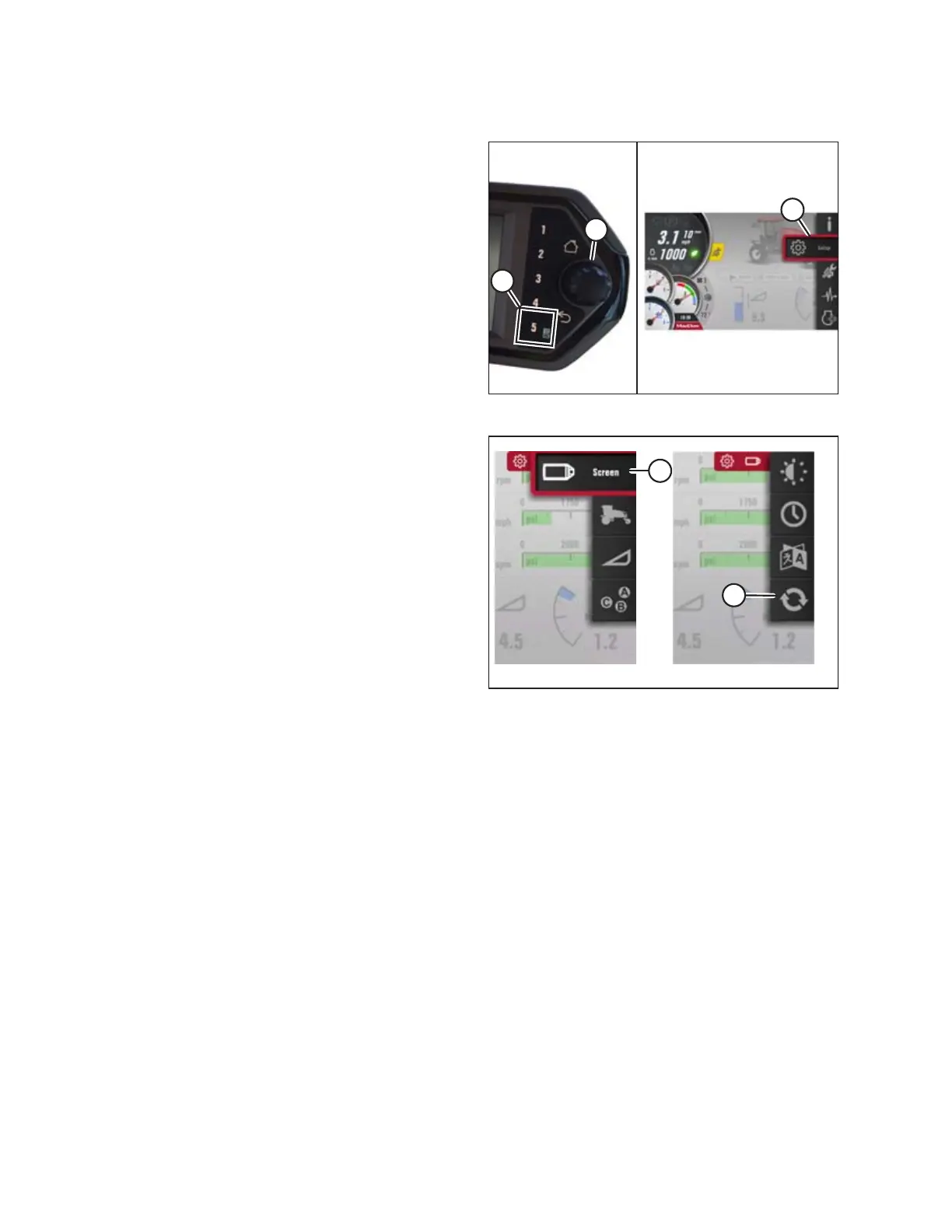
Figure 3.104: Opening the Main Menu
1. Press soft key 5 (A), and use the Harvest Performance
Tracker (HPT) scroll knob (B) or the ground speed
lever (GSL) scroll wheel (not shown) to place the red cursor
over the SETTINGS icon (C).
2. Press the HPT scroll knob (B) or the GSL SELECT button (not
shown) to activate the main menu (C) options.
Figure 3.105: Opening the Reset to Defaults Page
3. Scroll to the DISPLAY SETTING icon (A) and press SELECT.
4. Scroll to the RESET TO DEFAULTS icon (B), and press SELECT
to open the adjustment window.
5. Scroll through the available options, and press SELECT to reset to default. Refer to the following list for factory default
options:
• Select all
• Display brightness
• Keypad brightness by day
• Display volume
• Language (English)
• Units (USA)
• Eco engine control speed (4 and 6 cylinders have different speeds)
• Max cab-forward speed 14 mph
• Max engine-forward speed 27 mph
• Header speed settings
• Header alarm pressures
• Knife alarm speed
• Manual (not auto) knife speed mode
OPERATOR’S STATION



 To Next Page