214733 60 Revision A
3.10.3 Climate Controls
NOTE:
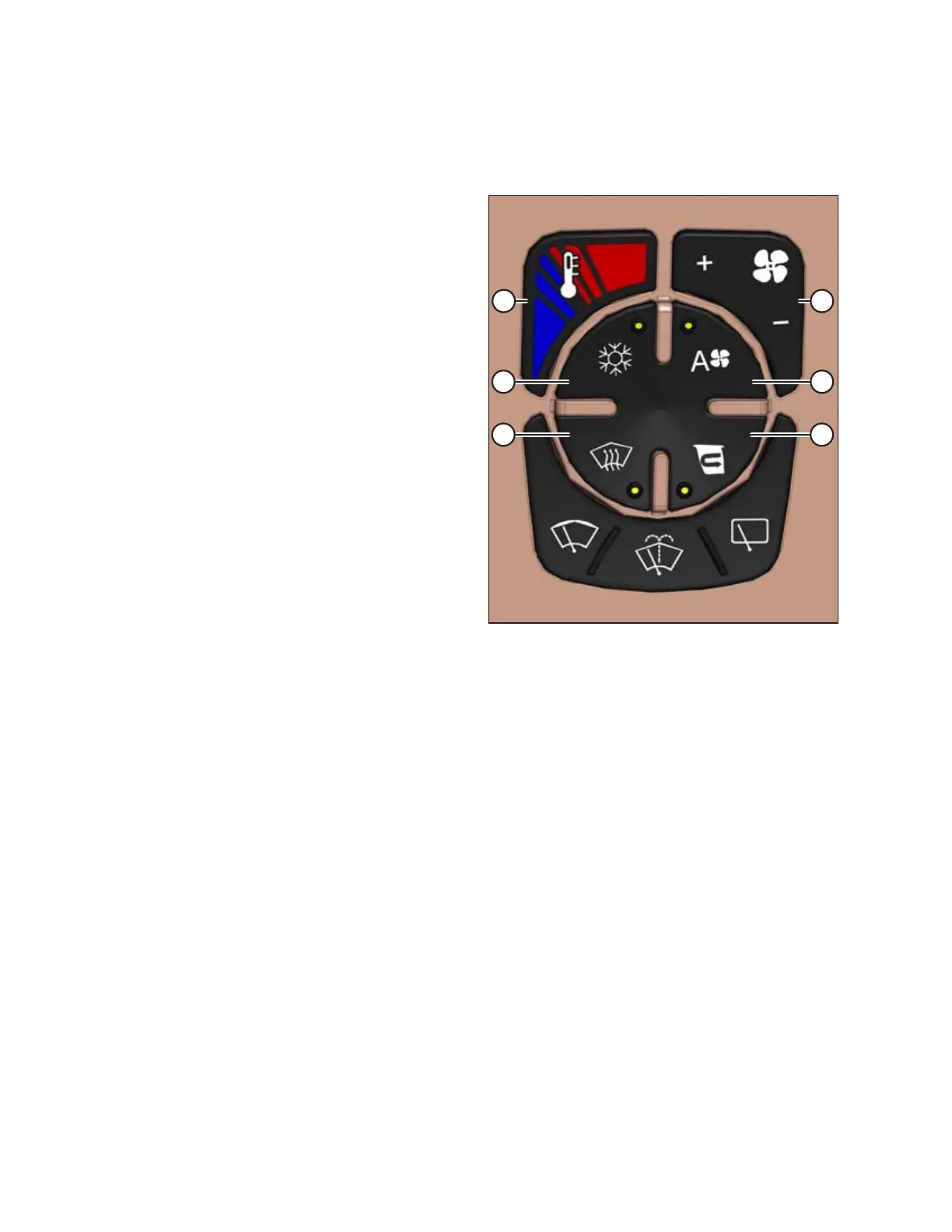
When switches (A), (C), (D), and (E) are activated the LED light on the switch will turn amber.
Figure 3.38: Climate Controls
Auto fan speed switch (A)
Sets the climate control system to auto mode, which
automatically adjusts the fan speed to maintain the set-point
temperature.
Blower control toggle switch (B)
Controls the blower speed. Overrides auto fan control.
• Press + for more air flow
• Press – for less air flow
Recirculating air switch (C)
Controls the air source; stops booster fan so cab air is
recirculated.
Windshield defog/defrost switch (D)
The windshield defog/defrost operates with the A/C
switch (E) ON.
Air conditioning (A/C) switch (E)
Controls the A/C system.
The A/C operates with the blower switch ON and blower speed
is set above 0.
Temperature control toggle switch (F)
Controls cab temperature.
• Press red (top) area to increase cab temperature.
• Press blue (bottom) area to decrease cab temperature.
IMPORTANT:
When starting the windrower after more than one week of storage, it may be necessary to distribute the refrigerant oil
throughout the A/C system. Refer to Air Conditioning Compressor Coolant Cycling, page 111.
OPERATOR’S STATION



 To Next Page