214733 199 Revision A
4.6.9 Adjusting Header Raise and Lower Rates
To adjust header raise and lower rates, follow these steps:
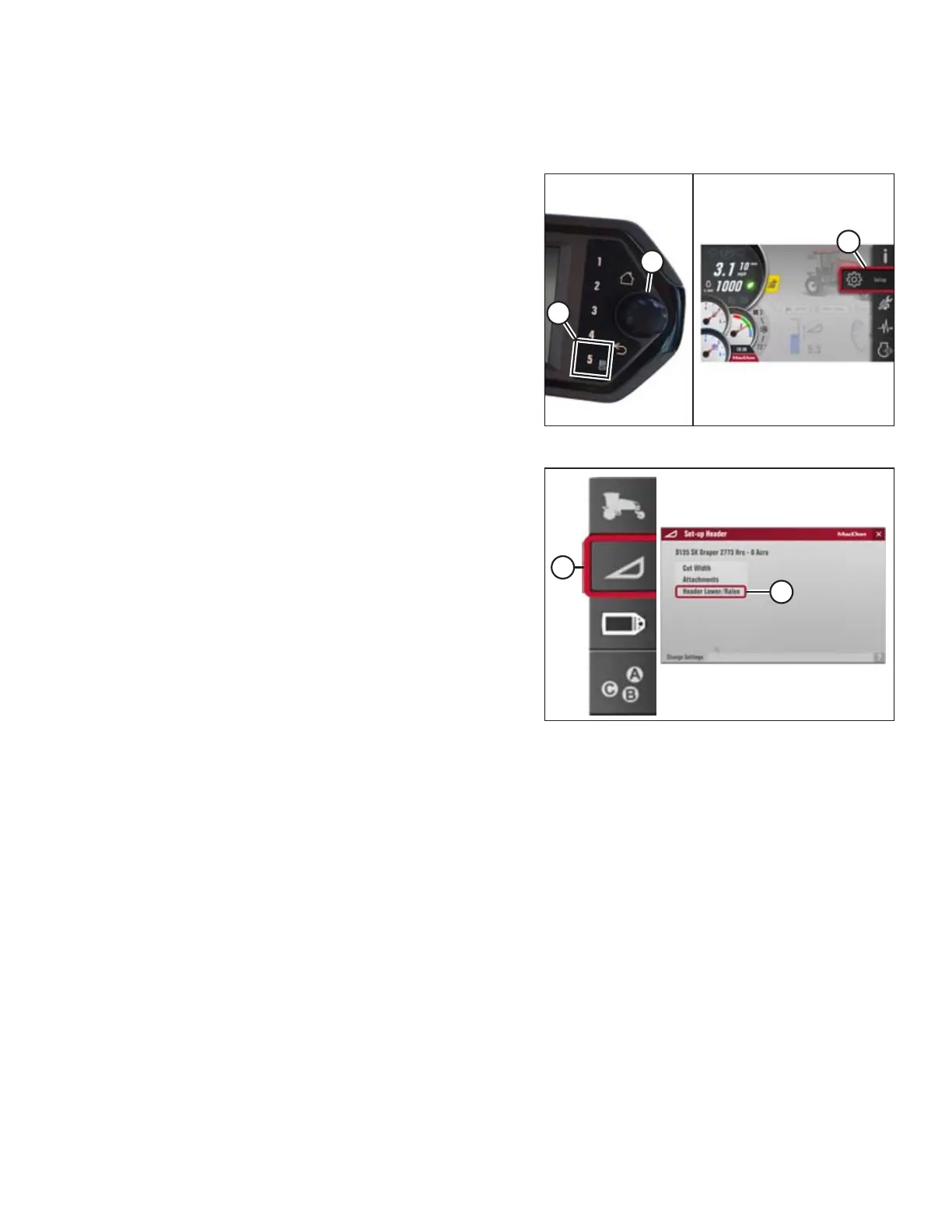
Figure 4.192: Opening the Main Menu
1. On the Harvest Performance Tracker (HPT) press soft key
5 (A) to display the Header Lower/Raise menu.
2. Use the HPT scroll knob (B) or the ground speed lever (GSL)
scroll wheel (not shown) to place the red cursor over the
SETTINGS icon (C).
3. Press the HPT scroll knob (B) or the GSL SELECT button (not
shown) to select the SETTINGS icon (C).
Figure 4.193: Header Settings Icon and Set-Up Header
Menu List
4. Use the HPT scroll knob or the GSL scroll wheel to move the
red cursor to the HEADER SETTINGS icon (A).
5. Press the HPT scroll knob or GSL SELECT button to display
the SET-UP HEADER menu list.
NOTE:
The F4 shortcut button on the operator’s console also will
display the SET-UP HEADER menu list.
6. Scroll to the HEADER LOWER/RAISE menu item (B), and
press SELECT. A menu for adjusting header lower/raise
rates opens with the last header setting as the default
starting point.
OPERATION



 To Next Page