214733 363 Revision A
Replacing Air Conditioner (A/C) Compressor Belts
WARNING
To avoid bodily injury or death from unexpected startup of the machine, always stop the engine and remove the key
from the ignition before leaving the operator’s seat for any reason.
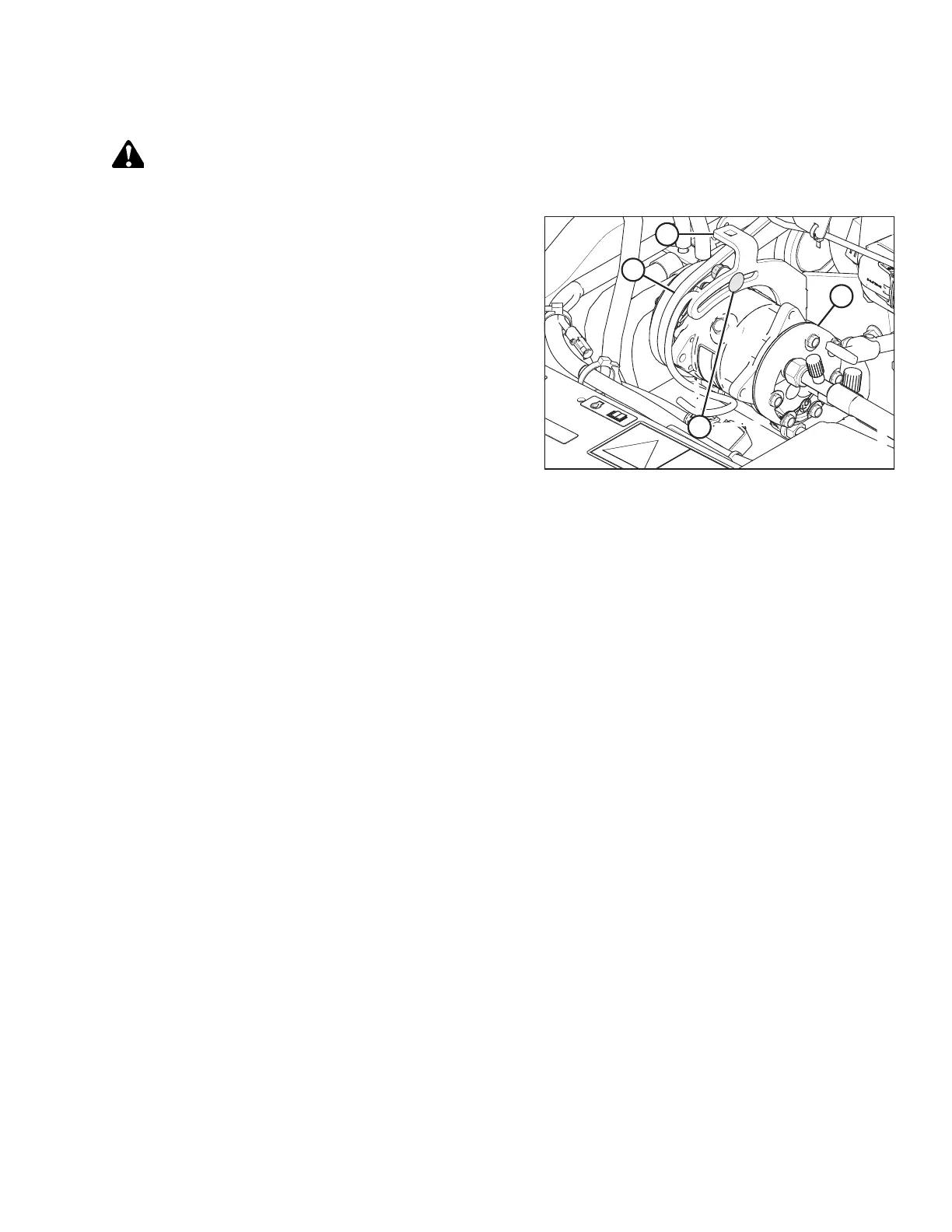
Figure 5.164: Air Conditioning (A/C) Compressor
1. Stop the engine and remove the key.
2. Open the hood. Refer to 5.3.1 Opening Hood, page 256.
3. Loosen compressor mounting hardware (A) and rotate the
compressor (B) towards the engine to release tension
on belts.
4. Remove belts (C) from compressor (B).
5. Install compressor belts (C).
6. Pry compressor (B) away from engine so that a force of
45 N (10 lbf) deflects the belts (C) 5 mm (3/16 in.) at
mid-span.
NOTE:
The tab (D) on bracket can be used as support for prying.
7. Tighten compressor mounting hardware (A).
8. Recheck tension and readjust as required.
9. Close the hood. Refer to .
5.15.5 Engine Speed
The maximum and idle engine speeds are factory set.
Refer to 2.2 Specifications, page 32 for detailed information. If specified speeds cannot be maintained, see your
MacDon Dealer.
IMPORTANT:
To avoid voiding engine warranty, contact Cummins before removing components or starting repairs.
MAINTENANCE AND SERVICING



 To Next Page