214733 255 Revision A
Maintenance
Record
Action:
2000 Hours or Every Two Years
13
p
Engine coolant
ü
General inspection
2000 Hours or Every Three Years
13
p
Hydraulic oil
4500 Hours or Every Three Years
13
p
DEF supply module filter
5000 Hours or Every Two Years
13
ü
Engine valve tappet
clearance
5.2.3 Electronic Maintenance Tool
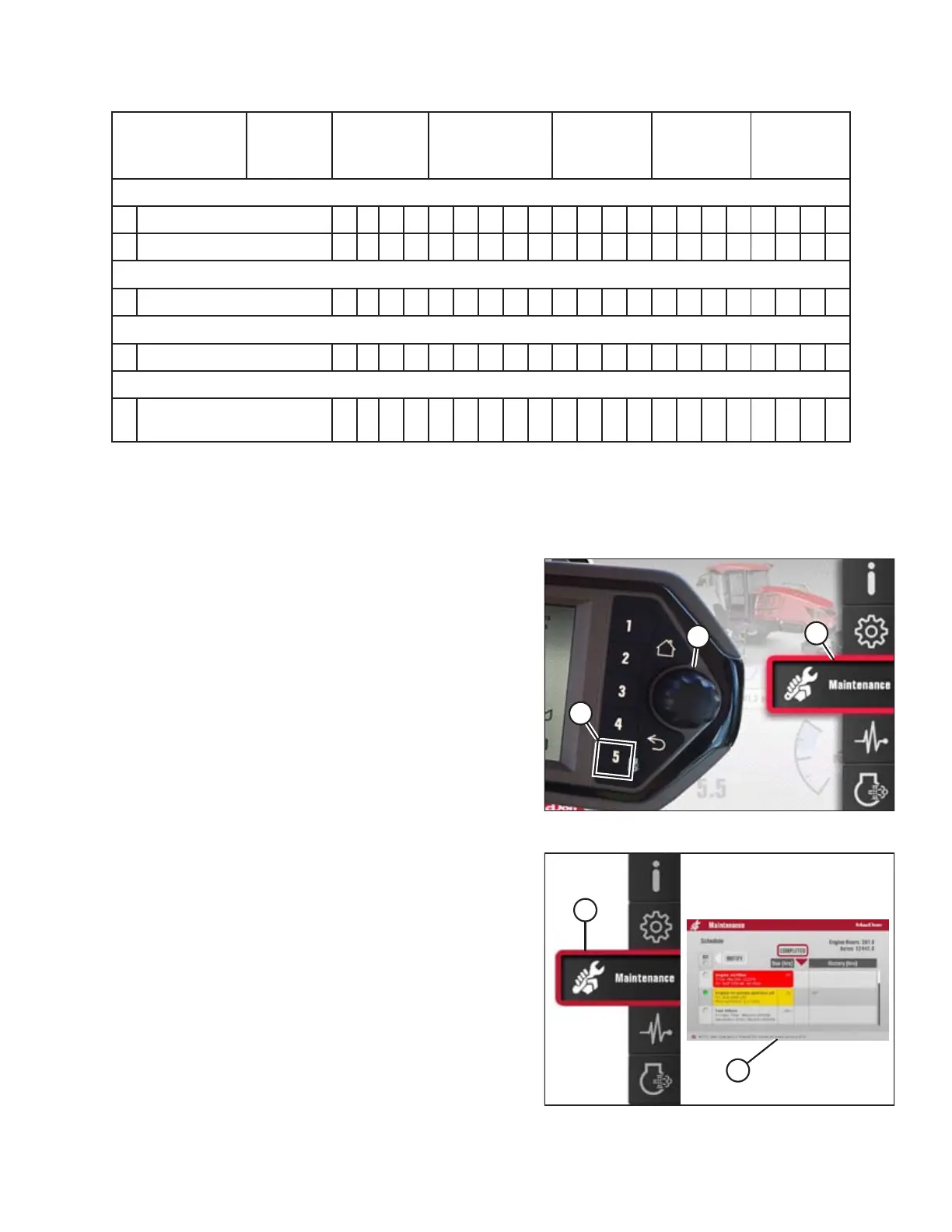
The Electronic Maintenance Tool contains a list of items requiring service after 250 hours or more of windrower operation.
To access the maintenance tool, use the following procedure:
Figure 5.1: Opening the Main Menu
1. Press soft key 5 (A) to display the main menu.
2. To select the MAINTENANCE icon (C), use the Harvest
Performance Tracker (HPT) scroll knob (B) or the ground
speed lever (GSL) scroll wheel (not shown).
3. Press the HPT scroll knob (B) or the GSL SELECT button (not
shown) to select the icon.
Figure 5.2: Maintenance Icon and Menu
4. Select the MAINTENANCE icon (A) to open the maintenance
menu (B). The following information can be added to the
screen:
• Completed maintenance
• Selected maintenance notifications
• Maintenance log
MAINTENANCE AND SERVICING
üü - Check
SS - Lubricate pp - Change ®® - Clean ÉÉ - Add



 To Next Page