214733 103 Revision A
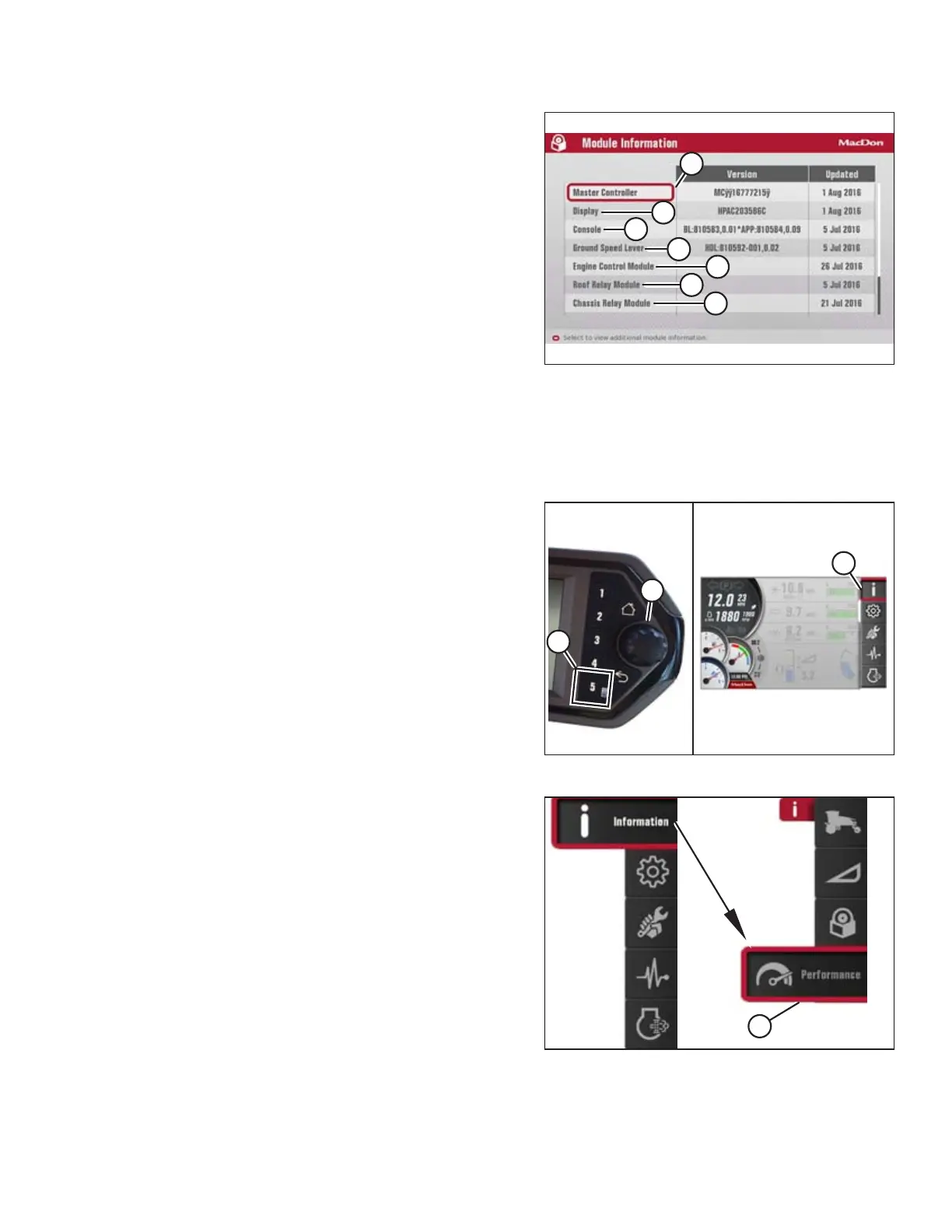
Figure 3.127: Software Information Menu
The HPT display reports the component make, software ID, and
software installation date in the software information menu. In
addition, the software versions and make, model, and serial
numbers of the following modules are also displayed on the
screen:
• Master controller (A)
• Display (B)
• Console (C)
• Ground speed lever (D)
• Engine control module (E)
• Roof relay module (F)
• Chassis relay module (G)
• HVAC module (not shown)
• Firewall extension module (not shown)
Accessing Performance Information
Figure 3.128: Opening the Main Menu
1. Press soft key 5 (A) to open the main menu.
2. To scroll to the INFORMATION icon (C), use the Harvest
Performance Tracker (HPT) scroll knob (B) or the ground
speed lever (GSL) scroll wheel (not shown).
3. Press the HPT scroll knob (B) or the GSL SELECT button (not
shown) to select the highlighted INFORMATION icon.
Figure 3.129: Performance Information Submenu Icon
4. Scroll to the WINDROWER PERFORMANCE submenu
icon (A), and press SELECT to display the performance
information menu.
OPERATOR’S STATION



 To Next Page