214733 170 Revision A
4.4.3 R1 Series Disc Header
Attaching R1 Series Disc Header
The windrower hydraulic center-link may be equipped with a self-aligning option that allows the Operator to control the
vertical position of the center-link from the cab.
WARNING
To avoid bodily injury or death from unexpected startup of the machine, always stop the engine and remove the key
from the ignition before leaving the operator’s seat for any reason.
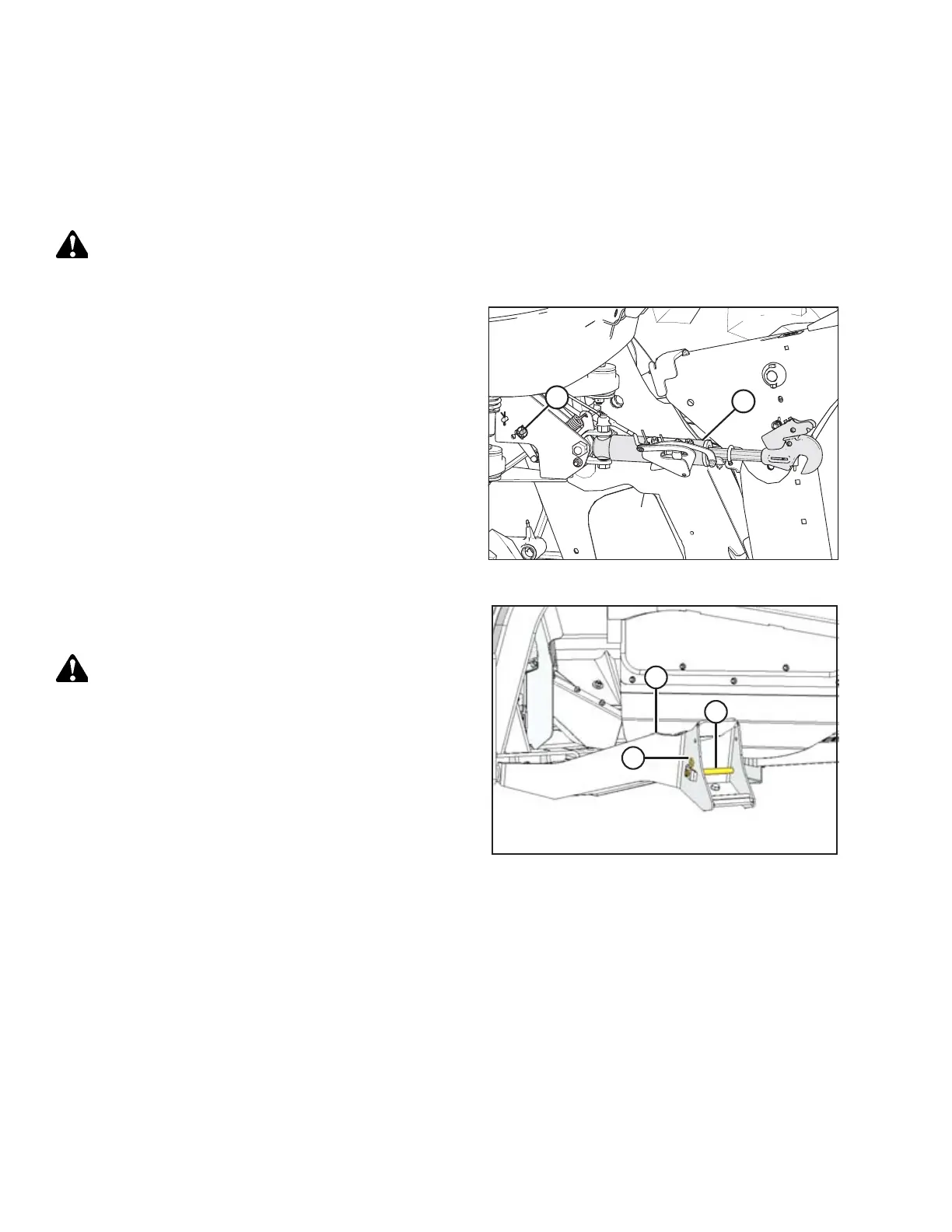
Figure 4.128: Hydraulic Center-Link
1. Hydraulic Center-Link without Self-Alignment: Remove
pin (A) and raise center-link (B) until hook is above the
attachment pin on header. Replace pin (A) to hold center-
link in place.
IMPORTANT:
If the center-link is too low, it may contact the header as
the windrower approaches the header for hookup.
Figure 4.129: Header Support
2. Remove hairpin (A) from clevis pin (B), and remove pin
from header support (C) on both sides of header.
CAUTION
Check to be sure all bystanders have cleared the area.
3. Start windrower engine.
OPERATION



 To Next Page