214733 73 Revision A
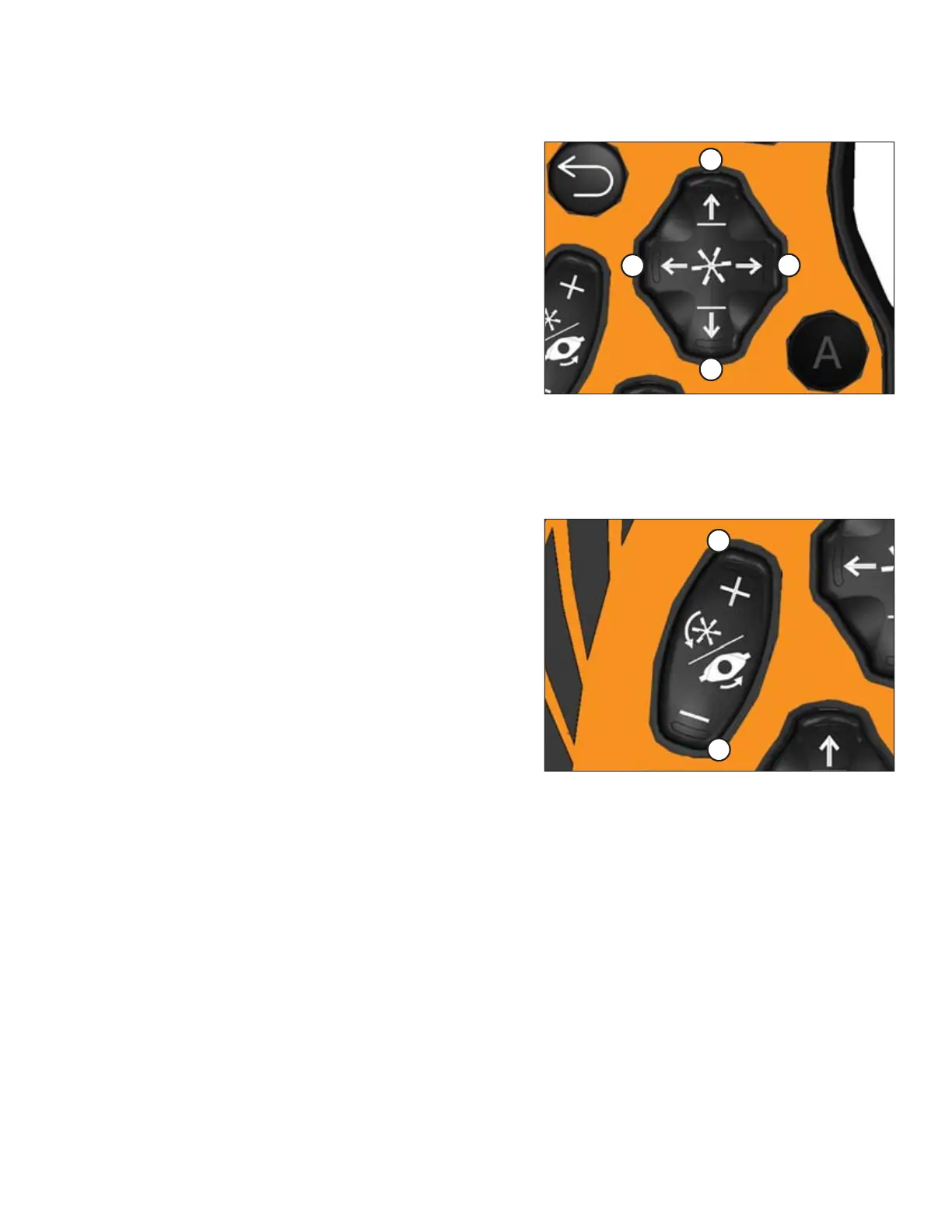
Reel Position Four-Way Switch
Figure 3.60: Ground Speed Lever
A - Reel Down B - Reel Forward
C - Reel Up D - Reel Aft
The reel position button performs different functions depending
on the attached options. For specific operating instructions,
refer to the following sections:
• Reel fore-aft position and height on draper headers:
• 4.7.2 Adjusting Reel Fore-Aft Position, page 201
• 4.7.3 Adjusting Reel Height, page 201
• Center-link assist cylinder:
• 4.4.2 D1X or D1XL Series Draper Header, page 157
• 4.4.1 A40DX Auger Header, page 144
• Double windrow attachment (DWA) position:
• 4.6.6 Double Windrowing, page 194
Reel and Disc Speed Switch
Figure 3.61: GSL Reel and Disc Speed Switch
• Press and hold the + button (A) to increase the reel or
disc speed.
• Press and hold the – button (B) to decrease the reel or
disc speed.
• Release the button at the desired speed.
Refer to the applicable header topic for detailed use of these
switches.
NOTE:
The REEL and DISC SPEED switch can operate the turn signals
when the header is not in use. For example, when driving in the
engine-forward position, or when operating in cab-forward
position with the header disengaged.
OPERATOR’S STATION



 To Next Page